


Participant
November 28, 2022
質問

Colour Profile Error - Indesign

  • November 28, 2022
  • 返信数 1.
  • 283 ビュー

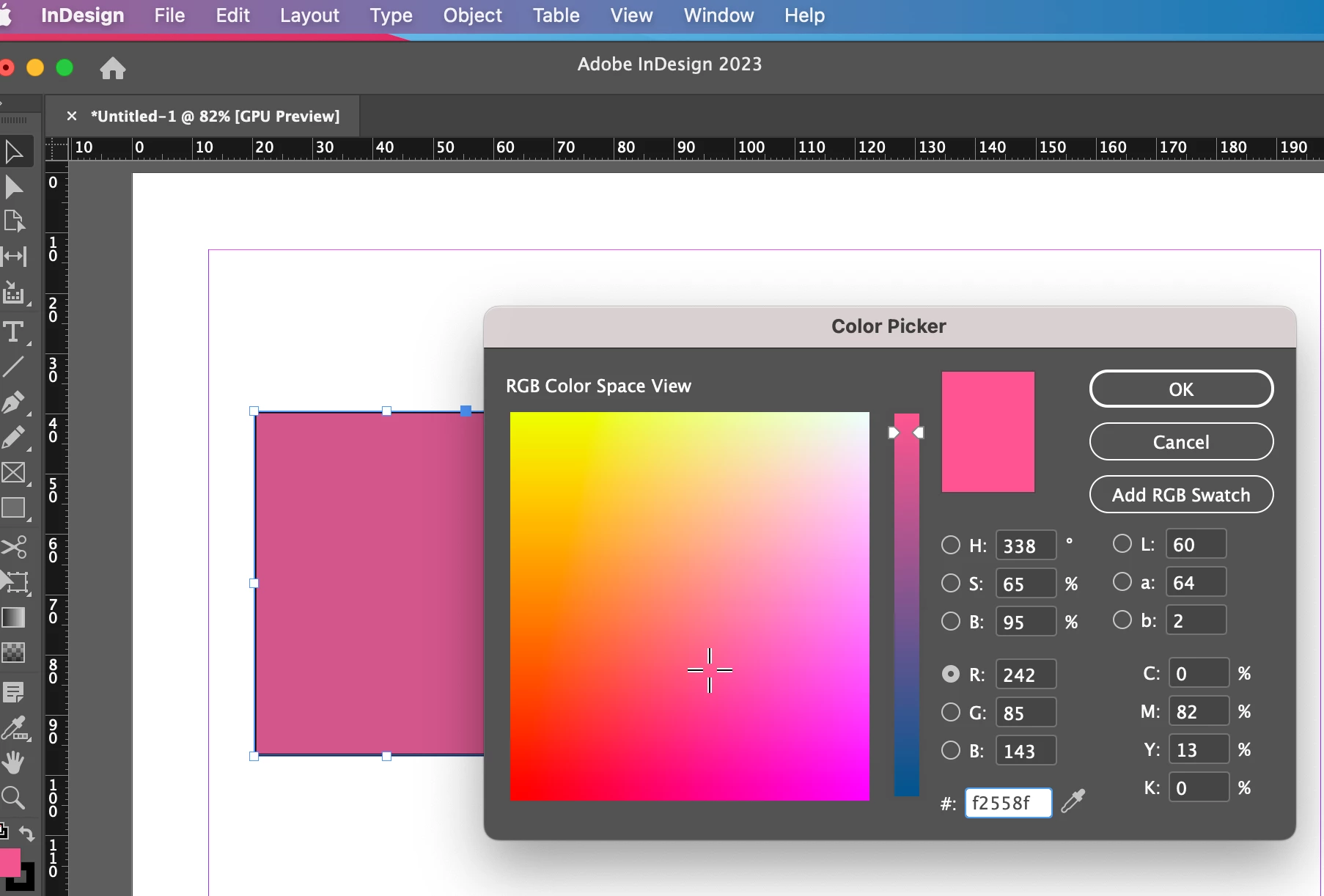
As you can see in the screenshot below, my colours are not displaying correctly on InDesign. All colours look muddy / muted / dull in the file - but display correctly in the colour picker. 


I have tried the following with no success:

- Changing my transparency Blend Space

- Synchronising my colour settings to North America General Purpose 2 | Working space sRGB IEC61966-2.1

- Creating Colour swatches in photoshop and saving them to my library.

- Uninstalling and reinstalling InDesign


Even dragging in an image created in the same working space shows up dull 


I am running macOS Ventura 13.0.1 and the latest version of InDesign 2023.


No other adobe apps are affected - just InDesign.

Please help! 
 

このトピックへの返信は締め切られました。

返信数 1

rob day
Community Expert
Community Expert
November 29, 2022

Hi @Sarah27327065ebuk , I don’t think this is a new issue, the InDesign Color Picker is displayed in your Monitor RGB profile, not the document’s assigned RGB space (sRGB in your case). So when you pick an RGB color and use it as a fill there is a change in appearance from the picker’s Monitor RGB to Document RGB.


I checked earlier versions and it has always worked that way. InDesign is unique in that it allows you to mix colors in HSB/RGB, Lab, or CMYK spaces within the same document—it doesn’t restrict you to a single color space the way Photoshop and Illustrator do.


The Swatches and Color panels (where you are picking a single color mode) do display in the document’s assigned profiles. Here my document is assigned sRGB, and you can see my fill matches the Color and Swatch patches, but not the Color Picker:


If I set my document’s assigned profile to Monitor RGB, the Color Picker matches:


It’s even more obvious if I assign an extra large gamut profile like ProPhoto: