Exit
  • Global community
    • Language:
      • Deutsch
      • English
      • Español
      • Français
      • Português
  • 日本語コミュニティ
  • 한국 커뮤니티
0

create inline anchored text frame

Explorer ,
Dec 04, 2015 Dec 04, 2015

Hello!

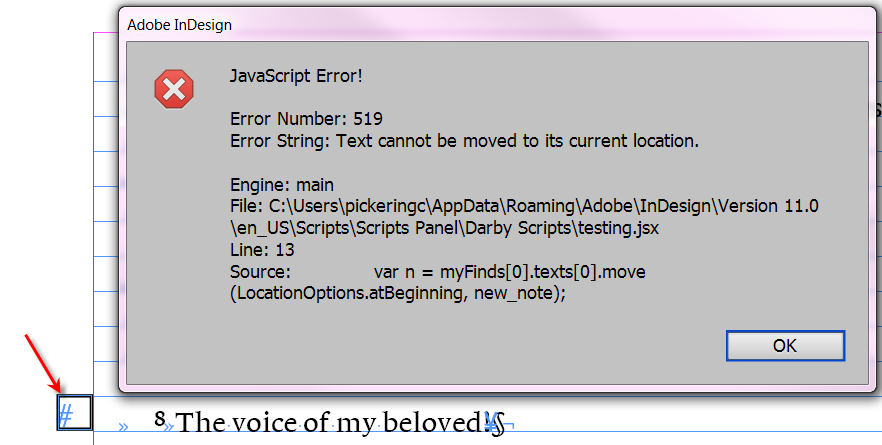
I am trying to create an anchored text frame from the results of a search. If I create the anchored frame from a selection it works no problem, but when I do it from the results of a grep I get the "Text cannot be moved to its current location" error....Do you have any ideas how to resolve that?

As a side question... when I create an object style through script the text frame always has a border.. why is that? (I created the style with another script)

doc = app.activeDocument;

app.findGrepPreferences = app.changeGrepPreferences = null; 

app.findGrepPreferences.findWhat = "~6"; 

var myFinds = doc.findGrep(); 

for (i = myFinds.length; i > 0; i--){

var os = doc.objectStyles.item ("Section");

var new_note = myFinds[0].insertionPoints[0].textFrames.add ({appliedObjectStyle: os, label: 'Section'});

var n = myFinds[0].texts[0].move (LocationOptions.atBeginning, new_note.insertionPoints[0]);

n.applyParagraphStyle (os.appliedParagraphStyle, false)

new_note.fit (FitOptions.frameToContent);

}

Thank you!
Christopher
test.png

TOPICS
Scripting
846
Translate
Report
Community guidelines
Be kind and respectful, give credit to the original source of content, and search for duplicates before posting. Learn more
community guidelines

correct answers 1 Correct answer

Advisor , Dec 05, 2015 Dec 05, 2015

Once you insert the anchored object the pointers to the text shift. So you will need to compensate for that. Sort of like this:

var ip0=myFinds[0].texts[0].insertionPoints[0].index+1,

ip1=myFinds[0].texts[0].insertionPoints[-1].index+1;

...

...

var n = myFinds[0].parentStory.insertionPoints.itemByRange(ip0,ip1).texts[0].move (LocationOptions.atBeginning, new_note.insertionPoints[0]);

//Disclamer, code sinppet written without coffee, will most likely need tweaking.

Second question,

make sure the object s

...
Translate
Advisor ,
Dec 05, 2015 Dec 05, 2015

Once you insert the anchored object the pointers to the text shift. So you will need to compensate for that. Sort of like this:

var ip0=myFinds[0].texts[0].insertionPoints[0].index+1,

ip1=myFinds[0].texts[0].insertionPoints[-1].index+1;

...

...

var n = myFinds[0].parentStory.insertionPoints.itemByRange(ip0,ip1).texts[0].move (LocationOptions.atBeginning, new_note.insertionPoints[0]);

//Disclamer, code sinppet written without coffee, will most likely need tweaking.

Second question,

make sure the object style has enableStroke set to true and strokeWeight set to 0

Translate
Report
Community guidelines
Be kind and respectful, give credit to the original source of content, and search for duplicates before posting. Learn more
community guidelines
Explorer ,
Dec 05, 2015 Dec 05, 2015
LATEST

Thank you, you work well with no coffee

Translate
Report
Community guidelines
Be kind and respectful, give credit to the original source of content, and search for duplicates before posting. Learn more
community guidelines