


Exit
  • Global community
    • Language:
      • Deutsch
      • English
      • Español
      • Français
      • Português
  • 日本語コミュニティ
  • 한국 커뮤니티
1

Data Merge Issue

Community Beginner ,
Jan 03, 2024 Jan 03, 2024

I am getting an error message for photos not importing. The same file path is used in other fields in the same document. The image will transfer for some of the fields but not all of them. This is the error message:
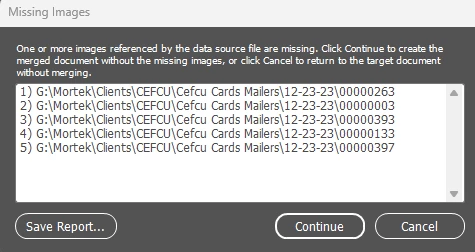
Screenshot 2024-01-03 111711.png

All the image paths are the same, why is it only choosing certain photos to not import? I have attached the .csv file.

Thanks for your help in advance

TOPICS
How to , Import and export
646
Translate
Report
Community guidelines
Be kind and respectful, give credit to the original source of content, and search for duplicates before posting. Learn more
community guidelines

correct answers 1 Correct answer

Community Expert , Jan 03, 2024 Jan 03, 2024

The sample data you shared have commas, and you are using csv. This most likely is causing the issue.

It was a pleasure speaking with you today, you were so....


Try using a tab-deliminated (.txt) source file.

Translate
Community Expert ,
Jan 03, 2024 Jan 03, 2024

Are you absolutely certain the data reference of image in the csv is the same as actually image, ie same number of leading zeros, letter O instead of zero, etc.?

One thing to know when using images in a datamerge, if the data source file is in the same directory as the images, then the path does not need included in the data source column (@photo).

Translate
Report
Community guidelines
Be kind and respectful, give credit to the original source of content, and search for duplicates before posting. Learn more
community guidelines
Community Beginner ,
Jan 03, 2024 Jan 03, 2024

Yes, I have saved it in and out of the images folder to try that option. It still gives me the same error message. I took away the G:\Mortek.... and replaced it with just the image name. I still recived the same error message.

Thanks


Translate
Report
Community guidelines
Be kind and respectful, give credit to the original source of content, and search for duplicates before posting. Learn more
community guidelines
Community Expert ,
Jan 03, 2024 Jan 03, 2024

The sample data you shared have commas, and you are using csv. This most likely is causing the issue.

It was a pleasure speaking with you today, you were so....


Try using a tab-deliminated (.txt) source file.

Translate
Report
Community guidelines
Be kind and respectful, give credit to the original source of content, and search for duplicates before posting. Learn more
community guidelines
Community Beginner ,
Jan 03, 2024 Jan 03, 2024
LATEST

Thank you for your help. I will try the tab delimainated file.

Translate
Report
Community guidelines
Be kind and respectful, give credit to the original source of content, and search for duplicates before posting. Learn more
community guidelines