

Exit
  • Global community
    • Language:
      • Deutsch
      • English
      • Español
      • Français
      • Português
  • 日本語コミュニティ
  • 한국 커뮤니티
3

Export pictures

New Here ,
Mar 13, 2023 Mar 13, 2023

Can I move all pictures I have used in a document to one folder in a easy way so I can move the document from one computer to another without a lot of broken links?


TOPICS
Sync and storage
974
Translate
Report
Community guidelines
Be kind and respectful, give credit to the original source of content, and search for duplicates before posting. Learn more
community guidelines

correct answers 1 Correct answer

LEGEND , Mar 13, 2023 Mar 13, 2023

It's called Package - in the File menu. 


Translate
LEGEND ,
Mar 13, 2023 Mar 13, 2023

It's called Package - in the File menu. 


Translate
Report
Community guidelines
Be kind and respectful, give credit to the original source of content, and search for duplicates before posting. Learn more
community guidelines
New Here ,
Mar 13, 2023 Mar 13, 2023

Thanks!

Translate
Report
Community guidelines
Be kind and respectful, give credit to the original source of content, and search for duplicates before posting. Learn more
community guidelines
Community Expert ,
Mar 13, 2023 Mar 13, 2023

1. Open the Links panel (Window > Links);

2. In the Links panel select all the links you want to copy to the separate folder.

3. Right-click and select Copy Link(s) to

4. Select the destination folder and click OK.


Translate
Report
Community guidelines
Be kind and respectful, give credit to the original source of content, and search for duplicates before posting. Learn more
community guidelines
Community Expert ,
Mar 13, 2023 Mar 13, 2023

Or indeed package!

Translate
Report
Community guidelines
Be kind and respectful, give credit to the original source of content, and search for duplicates before posting. Learn more
community guidelines
Community Expert ,
Mar 13, 2023 Mar 13, 2023

so I can move the document from one computer to another without a lot of broken links?


Hi @Golvprofil i 28846005yerw , Another way to do it is move the InDesign document and its Links into your User>Creative Cloud Files folder. Files placed in that folder will automatically sync to your Adobe cloud account, and if you log in to a different computer using your account, the files will sync to that computer’s Creative Cloud Files folder and you won’t have to move any files.

Translate
Report
Community guidelines
Be kind and respectful, give credit to the original source of content, and search for duplicates before posting. Learn more
community guidelines
Community Expert ,
Mar 13, 2023 Mar 13, 2023

Or...any other cloud service such as Dropbox or OneDrive.


I don't understand the reluctance of people to do this. It's a safety net against lost files and provides automatic versioning (I don't use CC storage, but with Dropbox and Onedrive every time you save, a new version is created. With one click you can restore that even after deleting it.)

Translate
Report
Community guidelines
Be kind and respectful, give credit to the original source of content, and search for duplicates before posting. Learn more
community guidelines
Community Expert ,
Mar 13, 2023 Mar 13, 2023

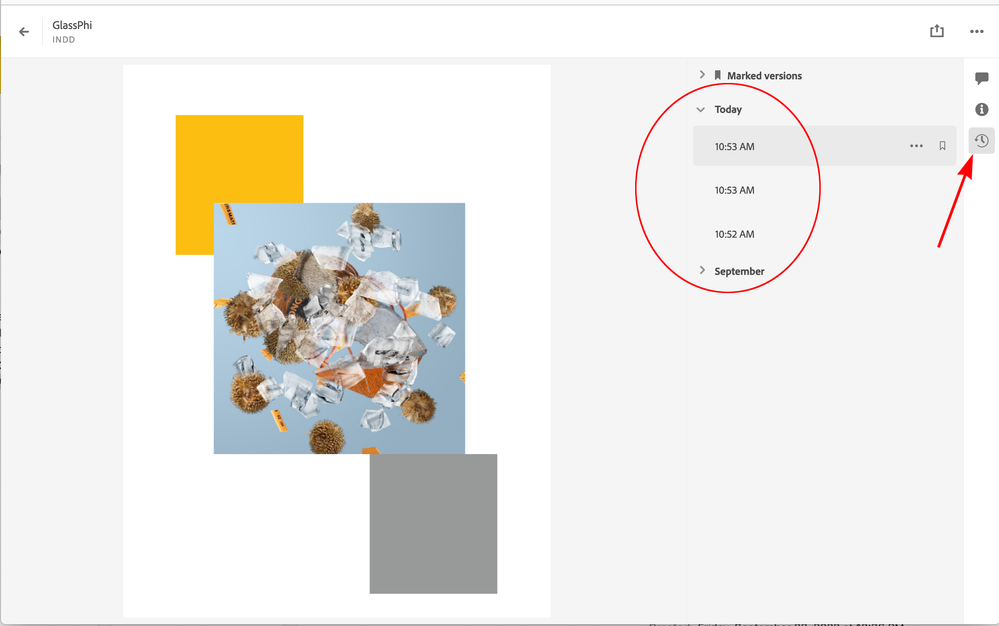
with Dropbox and Onedrive every time you save, a new version is created


The Adobe cloud storage also lets your retrieve files from a save history—right-click a file and choose View on Website to view the saved versions:
 

Screen Shot 6.png

Translate
Report
Community guidelines
Be kind and respectful, give credit to the original source of content, and search for duplicates before posting. Learn more
community guidelines
Community Expert ,
Mar 13, 2023 Mar 13, 2023

Thanks for that. I don't use it but figured it was available in there somewhere. Do you know how long that record of revisions is kept available? For Dropbox it's 30 days unless you pay for an upgraded plan.

Translate
Report
Community guidelines
Be kind and respectful, give credit to the original source of content, and search for duplicates before posting. Learn more
community guidelines
Community Expert ,
Mar 13, 2023 Mar 13, 2023

Looks like it’s also 30 days.

Translate
Report
Community guidelines
Be kind and respectful, give credit to the original source of content, and search for duplicates before posting. Learn more
community guidelines
New Here ,
Jun 24, 2023 Jun 24, 2023
LATEST

سلام


Translate
Report
Community guidelines
Be kind and respectful, give credit to the original source of content, and search for duplicates before posting. Learn more
community guidelines

