


- Home
- InDesign
- Discussions
- Export print ready PDF from InDesign, pictures loo...
- Export print ready PDF from InDesign, pictures loo...

Copy link to clipboard
Copied
I'm trying to send a print ready PDF to a printer for a children's picture book.
When I export the book from InDesign as a PDF and send it to the guys printing my book, the pictures that they print out have a slight yellow tinge to them. BUT when I send a PDF copy of the book directly from PHOTOSHOP to (say, officeworks), the pictures print out normal.


 1 Correct answer


--- colour space is RGB (I know that I it should probably be CMYK, but I didn't know that until I was finished the book -- my bad)
Your PDF export settings converted the images to US Web Coated CMYK when you exported. Making the conversion to US SWOP Coated in Photoshop before you place the images wouldn't make a difference—the conversion would be the same.
The yellow color cast could be coming from the press—the printer isn't printing exactly to the US SWOP Coated profile.
It could also be your mo
...
 7
Replies
7
7
Replies
7


Copy link to clipboard
Copied
What is the images’ Color Space and do they have their profiles embedded?
What are the pdf-export settings (in particular »Output«)?
BUT when I send a PDF copy of the book directly from PHOTOSHOP to (say, officeworks),
What are you trying to describe here exactly? Have you converted the pdf in Photoshop?
Copy link to clipboard
Copied
What is the images’ Color Space and do they have their profiles embedded?
--- colour space is RGB (I know that I it should probably be CMYK, but I didn't know that until I was finished the book -- my bad)
What are the pdf-export settings (in particular »Output«)?
--- color conversion -- 'convert to destinateion (preserve numbers)
--- destination -- 'document CMYK - US Web Coated
--- profile inc. policy -- 'Don't include profiles'
(((I sent these to the designer at the printer before export and he said they were right))
What are you trying to describe here exactly? Have you converted the pdf in Photoshop?
--- yes, I've had business cards, bookmarks, stickers and banners printed at 'Vistaprint', 'Officeworks', and another online sticker company, using the same images as I sent to the printer. And those images were not yellow. The only difference in the process is that I exported straight from Photoshop for the stickers etc. Whereas for the printer I've exported from Indesign.
NOTE --- since writing my original post, I sent the same exported file from Indesign (that printed with a yellow tinge by the book printer) to a cheap local copy centre and the glossy print out from them was fine.
Copy link to clipboard
Copied
What is the images’ Color Space and do they have their profiles embedded?
--- colour space is RGB (I know that I it should probably be CMYK, but I didn't know that until I was finished the book -- my bad)
RGB is a Color Mode, I meant the Color Space (for RGB that could for example be sRGB, Adobe RGB, eciRGB v2, …).
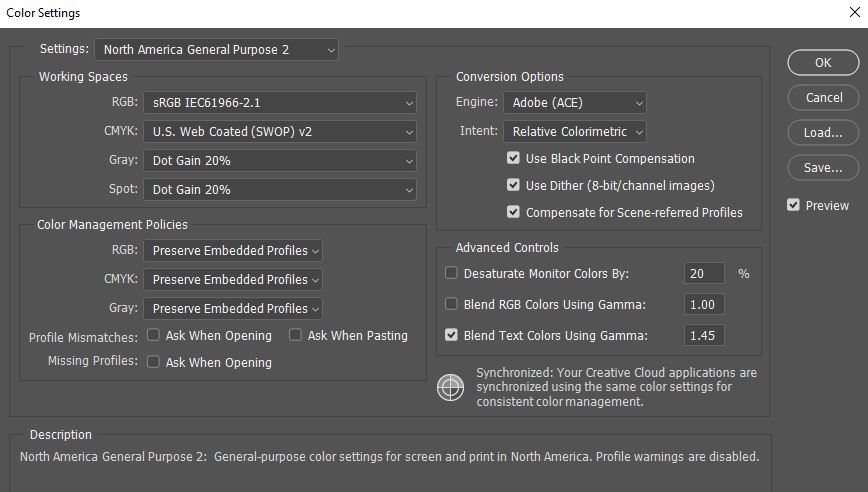
Are Indesign and Photoshop’s Edit > Colour Settings identical?
Copy link to clipboard
Copied
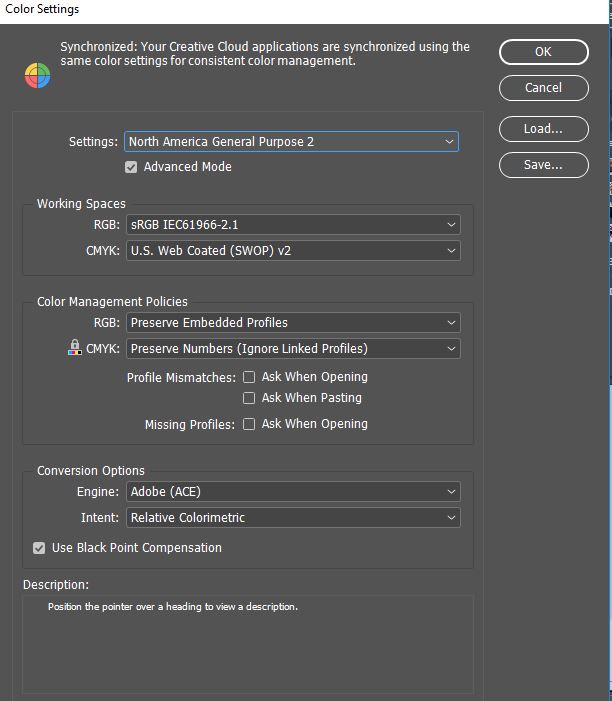
Above is Indesign
Below is Photoshop
Copy link to clipboard
Copied
Just a note on Color Settings. They are the application settings for future documents.
For existing documents the assigned profiles and policies could be different than your current Color Settings. You can check an existing document's profile assignments via Edit>Assign Profiles... And you can check a selected placed image's profile via the Links panel.
Copy link to clipboard
Copied
--- colour space is RGB (I know that I it should probably be CMYK, but I didn't know that until I was finished the book -- my bad)
Your PDF export settings converted the images to US Web Coated CMYK when you exported. Making the conversion to US SWOP Coated in Photoshop before you place the images wouldn't make a difference—the conversion would be the same.
The yellow color cast could be coming from the press—the printer isn't printing exactly to the US SWOP Coated profile.
It could also be your monitor calibration. The accuracy of the CMYK soft proof preview also depends on the accuracy of your system's monitor profile which is created when you calibrate your display.
Copy link to clipboard
Copied
And what is the CMYK Color Space the printer requires?


Get ready! An upgraded Adobe Community experience is coming in January.
Learn more
 AdChoices