
Copy link to clipboard
Copied
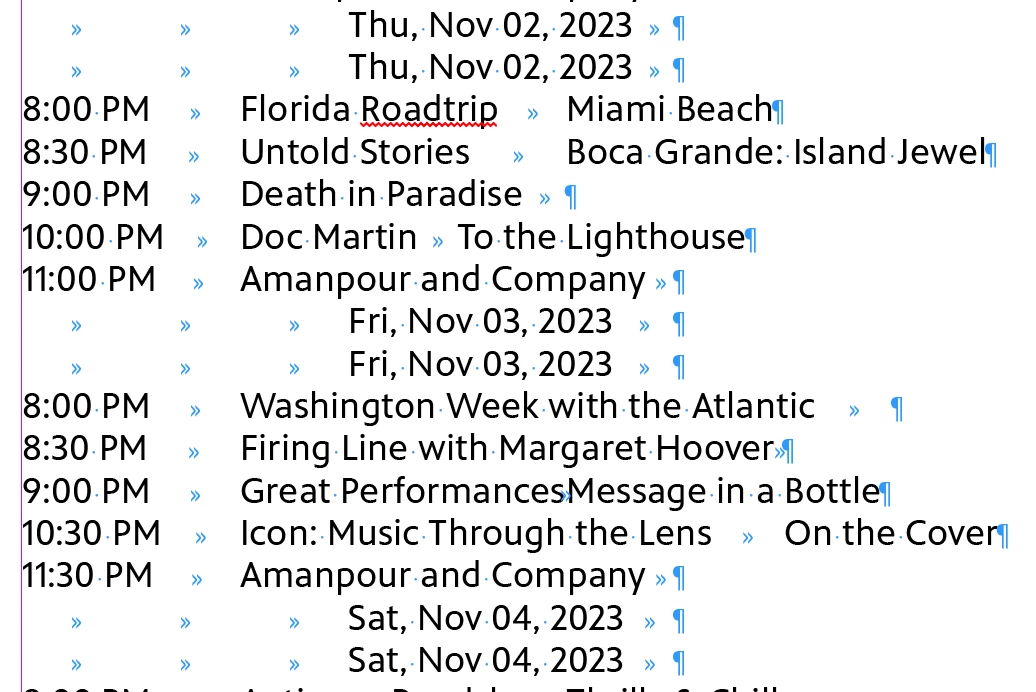
I am modifying the "FindChangeByList" reference file to clean up a TV schedule. I've gotten everything to work so far except to remove the duplicate date lines.
I have the line highlighted in blue in my script, but it doesn't seem to do anything. When I enter those settings directly in the find/change GREP box it works fine. Just not when it's in the scrip. What am I missing?
For reference: I'm a total n00b at GREP and scripting so it's been a lot of google/copy/paste/trial/error. I'm attaching my unaltered schedule file and the "FindChangeList.txt" for reference.
Works for me if I move the ^(.+\r)\\1+ search to first in the list and escape \1, so maybe the previous searches are affecting your ^(.+\r)\\1+ search. I’ve attached the text file.
Copy link to clipboard
Copied
Per the documentation for the script, you need to double escape bacsklashes: \\r and \\1
Copy link to clipboard
Copied
Unfortunately that didn't work. Funnily enough, I've used the single \ in other instances without issue. But changing everything to \\ doesn't make a difference.
Copy link to clipboard
Copied
Copy link to clipboard
Copied
No luck there either.
Copy link to clipboard
Copied
Copy link to clipboard
Copied
That did it! Thank you!!
Copy link to clipboard
Copied
Nice call, Rob. But how bizarre.
Copy link to clipboard
Copied
Hi Peter, If I run only the first 3 items before the remove duplicate lines in @_jessmoe_ ’s F&C list, there is a return left between the duplicate dates. Running the ^(.+\r)\1+ Grep code from the UI returns no match:
Copy link to clipboard
Copied
That's caused by the second grep entry:
{changeTo:"~b$0"}
introduces a paragraph break (~b)
Get ready! An upgraded Adobe Community experience is coming in January.
Learn more
