


- Home
- InDesign
- Discussions
- find tables and apply table-style to all
- find tables and apply table-style to all
find tables and apply table-style to all

Copy link to clipboard
Copied
Dear all! Is there a possibility to find all tables (all table-text has a special paragraph-style "TableText") and apply tablestyle to all in 1 go? thank you thank you thank you 🙂


 9
Replies
9
9
Replies
9




Copy link to clipboard
Copied
It'll have to be a script:
style = app.documents[0].tableStyles.item('TableText');
tables = app.documents[0].stories.everyItem().tables.everyItem().getElements();
for (i = 0; i < tables.length; i++) {
  tables[i].appliedTableStyle = style;
}
P
Copy link to clipboard
Copied
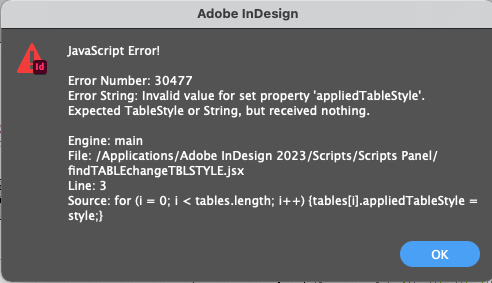
Dear Peter, that looks promiing but unfortunately I get an error:

Copy link to clipboard
Copied
Sorry, Caroline, I should have read your post more carefully. The tables you're after are in a paragraph style TableText, and you want to apply a table style. You didn't say what the name of the table style is, in the updated script, below, I assumed TableText (same name as the paragraph style). If you use a different name, replace TableText in the script's first line with the name you use.
style = app.documents[0].tableStyles.item('TableText');
tables = app.documents[0].stories.everyItem().tables.everyItem().getElements();
for (i = 0; i < tables.length; i++) {
  if (tables[i].storyOffset.appliedParagraphStyle.name == 'TableText') {
    tables[i].appliedTableStyle = style;
  }
}
Copy link to clipboard
Copied
Oh dear, it seems I make a mistake again. My Table-style is named My_Table, my paragraph-style TableText. But still i get an error.Complicated matter these scripts... Thanks for your time and patience!
Copy link to clipboard
Copied
The name of the table style should be changed in the script;
style = app.documents[0].tableStyles.item('My_Table');
tables = app.documents[0].stories.everyItem().tables.everyItem().getElements();
for (i = 0; i < tables.length; i++) {
  if (tables[i].storyOffset.appliedParagraphStyle.name == 'TableText') {
    tables[i].appliedTableStyle = style;
  }
}Copy link to clipboard
Copied
Yes, I did that but still got the error...
Copy link to clipboard
Copied
Could you send your document to pkahrel@gmail.com?
Copy link to clipboard
Copied
Dear Peter, that is so very kind of you!
And guess what?!
While making the e-mail to you I discoverd what went wrong! I corrected the script in Indesign version 2022 instead of Indesign 2023.... AAAGGHHH.... so very very stupid.
The good news: IT WORKS!!!
While working on this, I'm thinking:
I made this query now in 2 steps. First I searced for tables and changed the paragraph style in every table
app.activeDocument.stories.everyItem().tables.everyItem().changeText();
(thanks to brianp311) and then I used your script to change said paragraphe-style to table-style.
Can that be done in 1 script instead of 2?
Copy link to clipboard
Copied
Sure. Since you want to appy the table style to all tables, my script can be reduced to a single line, which comes after Brian's line:
app.activeDocument.stories.everyItem().tables.everyItem().changeText();

app.activeDocument.stories.everyItem()
  .tables.everyItem()
  .appliedTableStyle = app.activeDocument.tableStyles.item('My_Table');


Get ready! An upgraded Adobe Community experience is coming in January.
Learn more
 AdChoices