Copy link to clipboard
Copied
I have a ton of pages and im wondering if i can use the frame fitting options on more than one page at a time.
Copy link to clipboard
Copied
Which version of InDesign and OS.
Can you explain more clearly what you want to do.
Copy link to clipboard
Copied
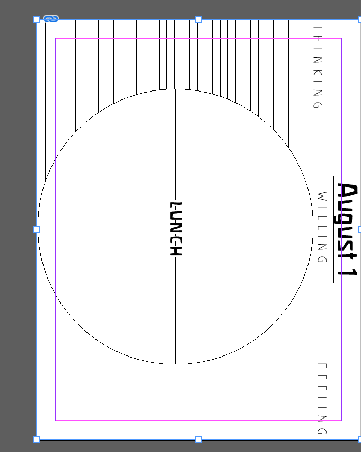
cc, and i want to resize all of the pages into the the frame (the blue box) So all of them fit inside, this is so when i print it it doesnt get cut off.
Copy link to clipboard
Copied

I would like to move this image into the bounds of the blue rectangle in the middle, and is their a way to do this with all the pages
Edit: not blue sorry im color blind.
Copy link to clipboard
Copied
>I would like to move this image into the bounds of the blue rectangle in the middle, and is their a way to do this with all the pages
Can't you just put the image on a common master page?
Copy link to clipboard
Copied
A
rylesm19958447 wrote
so when i print it it doesnt get cut off.
re you talking about printing it on your own printer -- if so, just use Fit to Page in the print dialog box.
Copy link to clipboard
Copied
Hi,
If you are wanting to change the frame fitting option of the frames that contain images(graphics) then you can try modifying the [Basic Graphic frame] or create a new object style and set it as the default graphic frame.
To do this:
1. open Windows menu and styles->Object styles
2. Create a new style and set it as the default graphic frame
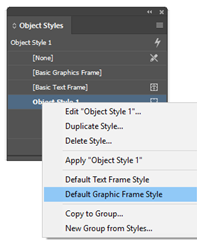
3. Edit this style and enable the frame fitting options you want
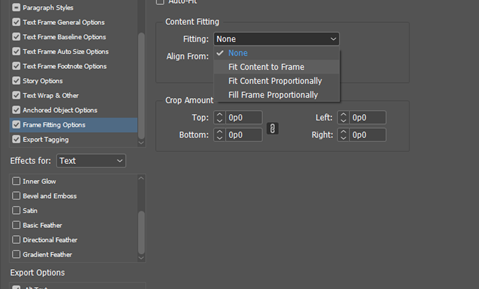
-Aman

Get ready! An upgraded Adobe Community experience is coming in January.
Learn more