


- Home
- InDesign
- Discussions
- Re: Foonotes: two different styles in same documen...
- Re: Foonotes: two different styles in same documen...
Foonotes: two different styles in same document

Copy link to clipboard
Copied
Is there anyway, in InDesign, to change the color of the line on top of the footnotes? I would like to make white the line that is on the purple background, but keep the black for the rest of the document.


 22
Replies
22
22
Replies
22


Copy link to clipboard
Copied
footnotes settings are valid for the whole document, therefore the separator line it will always be the same in the document.
however you could uncheck the rules on in the footnotes option panel and:
- create one paragraph style with paragraph rule above for the first footnotes and choose white colour
- create second paragraph style with paragraph rule above for the first footnotes and choose black colour
Copy link to clipboard
Copied
Thanks but when I create one paragraph style with paragraph rule above for the first footnotes and choose white colour, I get a line on top of each footnote, instead of one line at the top. See below. After a chat with adobe late last thinght, they said "it is no possible". So, I will change my design, or create an a box with the same background color, and add a white line on top, and put it to cover the black line.

Copy link to clipboard
Copied
I have written to create the paragraph style with the rule above only for the first footnotes.
All other footnotes will naturally have one other paragraph style without rule above

Copy link to clipboard
Copied
Can you show an entire page with what you wanted?
(^/)
Copy link to clipboard
Copied
is this, more or less, what you would to get?

Copy link to clipboard
Copied
yes, how did you make the line ONLY on the top of the first footnote?
Copy link to clipboard
Copied
ok, so I need two different paragaph styles (one with the line, one with no lines)


Copy link to clipboard
Copied
Hi Rosana,
I don't like to discourage you from trying out what Obi-wan suggested.
It's a really good solution!
Some details you are missing perhaps:
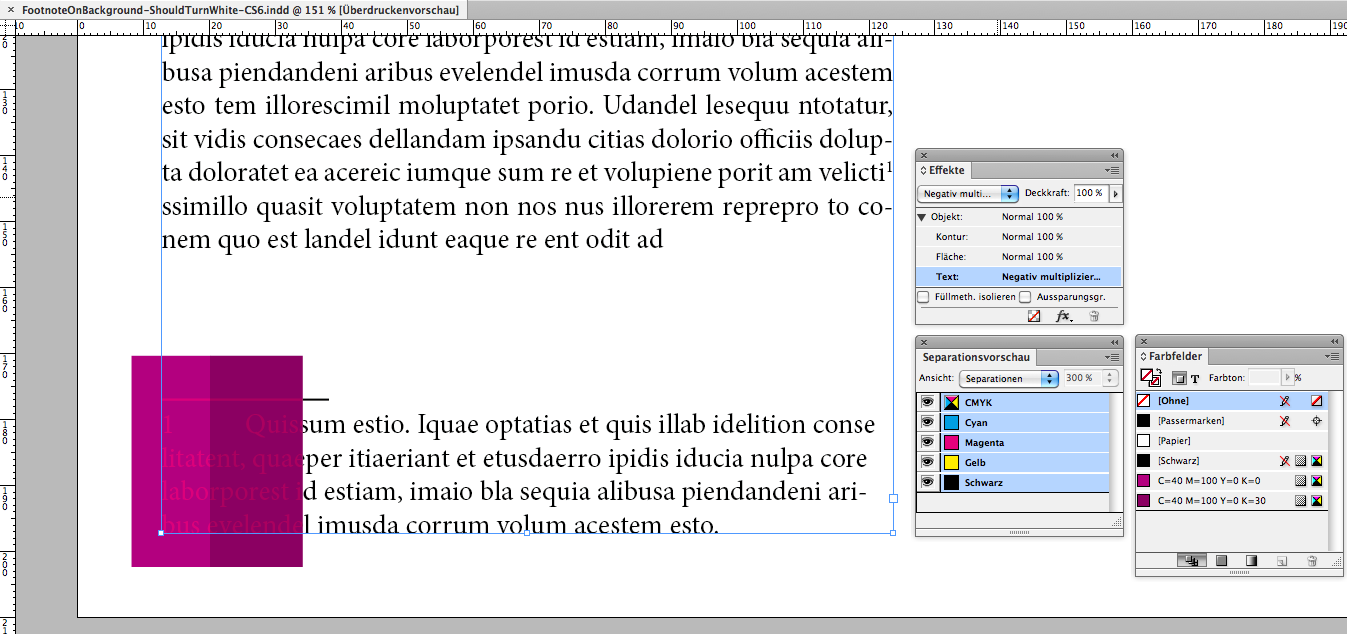
Blending mode is "Screen" (from my German UI this is "Negativ Multiplizieren").
You would apply it to the "Text" when selecting the text frame.
And do not forget to check "Isolate Blending" (German: Füllmeth. isolieren")
Example where "Isolate Blending" is off:
"Isolate Blending" on:
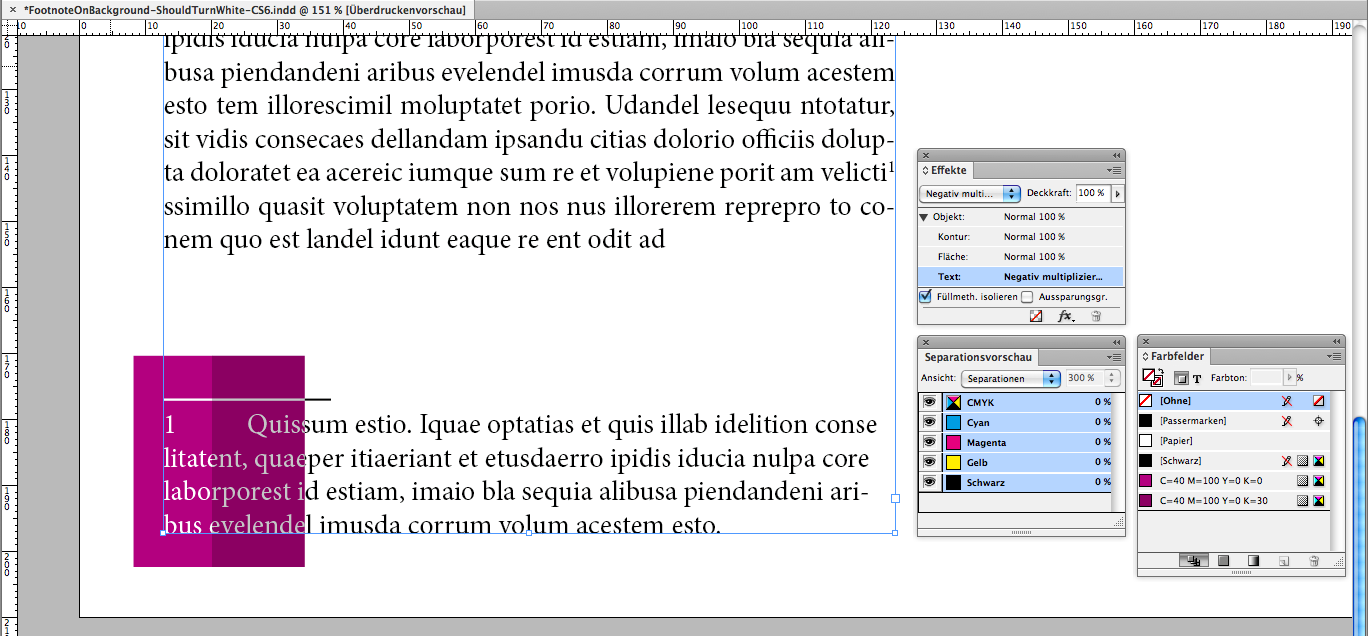
As you might see something's wrong with the text stacked on the dark purple background.
The reason:
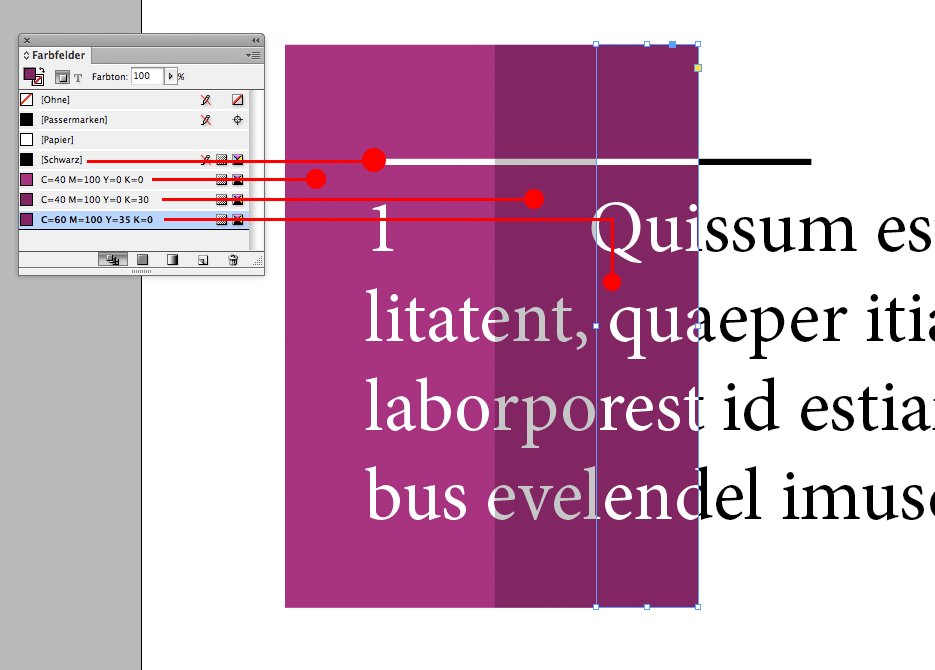
The dark purple swatch has 30% K in the mix of CMYK where the overlaying text is "[Black]".
Details here:

What to do, if my dark purple consists of percentages of "[Black]"?
Try a new mix of CMY to substitute the percentages of "[Black]". And set the [Black] to 0%:
Regards,
Uwe
Copy link to clipboard
Copied
Uwe is totally right!
The deal is to play with primary colors combinations except black! 
----------------------------------------------------------------------------------------------------------------------------------------------------------
For anyone who reads this topic, the more important is not my answer but the reason it could be a bad way about answering Rosana's question! … So, great thanks to Uwe for his totally relevant explanations!
----------------------------------------------------------------------------------------------------------------------------------------------------------
(^/)
Copy link to clipboard
Copied
Thanks to Uwe and Laubender!!!
Copy link to clipboard
Copied
Can the same thing be done with RGB mode?
My report will be going to be printed (CMYK) version, and also I need to make and RGB version for PDF (that will need to be tagged to make it accessible) On the RGB version, when I export it as interactive PDF the white text will disappear. See below two screen shots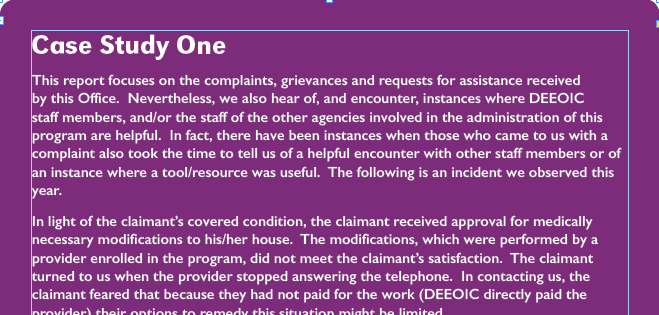

Copy link to clipboard
Copied
Hi,
Screenshots please!
(^/)
Copy link to clipboard
Copied

Copy link to clipboard
Copied
Something I don't see is a complete double page!
Question : when have you a purple background?
(^/)
Copy link to clipboard
Copied
Humm!
If you want some notes on a purple background, just do it without nothing else!
Sorry, but I really don't understand what you mean!! 

(^/)
Copy link to clipboard
Copied
the sample you sent is what I was talking about. Is there another way to get it done without having to create 2 different paragaph Styles premio_oscar describes above? Thanks to all!
Copy link to clipboard
Copied
I"ve only one para style for the footnotes!
The trick is that its "black" color automatically becomes "white" if there's a "purple" background!
Nothing else! … or maybe a coffee! 
(^/)
Copy link to clipboard
Copied
perfect! That is what I was looking for. How did you do that?
Copy link to clipboard
Copied
Just select the text frames on the master pages and apply an effect to the text! [in French here!]
If "white" background, no effect. If "black", it doesn't work. If other colors, The Force acts!!

(^/)
Copy link to clipboard
Copied
Hi Rosana,
what PDF Export setting will you use for producing PDFs that go to the printers?
I hope, its PDF/X4 and not PDF/X-1 or PDF/X-3.
Note: Obi-wan's solution implies effects.
That perhaps is meaning flattening of "transparency" during the export.
At least when using PDF/X-1 and PDF/X-3 presets. And flattening could mean that perhaps some degradation could happen to the shapes of every individual glyph on the page where flattening occurs. Depending on the printing process it would be visible if flattend and non-flattened pages are visible next to each other. Especially with text point sizes in the lower range.
Hi Obi-wan,
another important note:
Only test this with Separation Preview or Overprint Preview set to: On.
Depending on both colors used, the one for the text, the other one for the background, you could run into some problems: The background color should not contain any black, if the text color does!
Regards,
Uwe
Copy link to clipboard
Copied
you could create two paragraph style for white and two paragraph style for black (it is always better create all paragraph style)
...or set up the colour of rule "text colour"


Copy link to clipboard
Copied
If you work in a book file indb in separate documents indd you can make a different design.


Get ready! An upgraded Adobe Community experience is coming in January.
Learn more
 AdChoices