



Copy link to clipboard
Copied
This question arises because of rotated text frames.
If a text frame is rotated, the baseline property of an insertion point is simply the y-coordinate of the insertion point, and the horizontalOffset property of the insertionPoint is the x-coordinate.
Thus, for a rotated frame, just moving along a single line of text changes the baseline value. Quite weird, but there you are.
I am needing to find the distance (leading) between two insertionPoints on different lines of a rotated text frame. If the frame is not rotated, I can subtract the baseline of one character from the baseline of the other to get the correct answer.
But this does not work for rotated frames for the reason stated.
(I can't just check the leading value of the lower character, because the top character might be inside a table, or the bottom one inside a footnote, or one or both could have baseline shift applied, or the "apply leading to entire paragraph" might be switched on, etc. etc.)
Clearly a bit of geometry would help here. Maybe even some trigonometry? Transformation matrices?
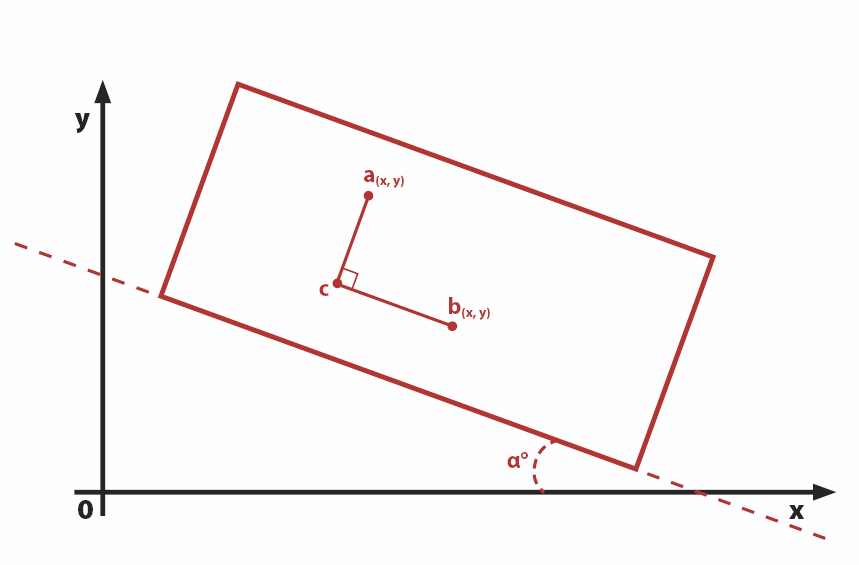
In the diagram, points a and b represent two insertion points inside a text frame.
The text frame is rotated by angle α relative to the x-axis.
Line segment cb is parallel to the long side of the rectangle (the text frame) in the diagram.
Line segment ac is perpendicular to cb.
What is the length of line segment cb?
More specifically, how can it be expressed in terms of ax, ay, bx, by, and α?
Many thanks,
Ariel


 1 Correct answer
Something like this seems to work, given a selected text frame with at least 2 lines (based on https://academo.org/demos/rotation-about-point/ and c++ - Rotating a point about another point (2D) - Stack Overflow 😞
...const RADIAN = Math.PI /180;
myTextFrame = app.selection[0];
myAngle = myTextFrame.rotationAngle;
ip1 = myTextFrame.lines[0].insertionPoints[10];
ip2 = myTextFrame.lines[1].insertionPoints[1];
result = getLength({x: ip1.horizontalOffset, y: ip1.baseline}, {x: ip2.horizontalOffset, y: ip2.ba

 7
Replies
7
7
Replies
7

Copy link to clipboard
Copied
Thinking some more about this away from the computer (is it only me, or is it difficult to really think in front of a screen?), it seems that if we move the triangle such that point B now is located at (0,0), and then rotate the triangle around point B by -α degrees, the length of BC is then given simply by Ax.
So it does begin to look like a transformation matrix...


Copy link to clipboard
Copied
Hi Ariel,
I think we can solve this by adding a helper graphic line to the spread, one with two path points.
Below an example where the text frame is rotated to 8.25° .
I want to know the distance of the baseline of the red text to the footnote text's last baseline of footnote 1.
That's the length of the red arrow:

I selected the red text with the footnote and ran the code below:

I first thought we had to calculate the angle of the baseline, but the value for the angle can be derived anytime from parentTextFrames[0] of the selected text.
// Text is selected with a footnote:
var sel = app.selection[0];
var angle = sel.parentTextFrames[0].rotationAngle;
// Here in the selected text a footnote is inserted:
var insPoint1 = sel.texts[0].insertionPoints[0];
// Access to the last insertion point of that foot note:
var insPoint2 = sel.texts[0].footnotes[0].texts[0].lines[0].insertionPoints[-1];
// We add a helper graphic line, that consists of two path points derived from the values of horizontalOffset and baseline of the two insertion points:
var graphicLine = app.documents[0].layoutWindows[0].activeSpread.graphicLines.add
(
{
fillColor : "None" ,
strokeWidth : 0 ,
strokeColor : "None"
}
);
// The entirePath uses horizontalOffset and baseline of the two insertion points:
graphicLine.paths[0].entirePath =
[
[ insPoint1.horizontalOffset , insPoint1.baseline] ,
[ insPoint2.horizontalOffset , insPoint2.baseline]
];
// Now we rotate back the graphic line:
graphicLine.rotationAngle = -angle ;
// Suddenly calculating the distance is easy:
var distance = graphicLine.paths[0].pathPoints[1].anchor[1] - graphicLine.paths[0].pathPoints[0].anchor[1] ;
// Throw away the graphic line:
graphicLine.remove();
$.writeln("distance: " + distance );
Of course there is also a solution without using the helper graphic line.
FWIW: What is not working in every case is to rotate back the parent text frame to zero and do the easy calculations with the two values of baseline.
Below a sample where I tried this with selected text in a rotated inline anchored text frame and got wrong results. Wanted to calculate the distance of the two selected lines of text:


Regards,
Uwe
Copy link to clipboard
Copied
Thanks Uwe. Nice idea with the line, but it's going to be too slow to do this. This is a calculation that might need to be made hundreds of times per doc. Only a mathematical solution will do.
Ariel
Correct answer by
TᴀW
AUTHOR
Copy link to clipboard
Copied
Something like this seems to work, given a selected text frame with at least 2 lines (based on https://academo.org/demos/rotation-about-point/ and c++ - Rotating a point about another point (2D) - Stack Overflow 😞
const RADIAN = Math.PI /180;
myTextFrame = app.selection[0];
myAngle = myTextFrame.rotationAngle;
ip1 = myTextFrame.lines[0].insertionPoints[10];
ip2 = myTextFrame.lines[1].insertionPoints[1];
result = getLength({x: ip1.horizontalOffset, y: ip1.baseline}, {x: ip2.horizontalOffset, y: ip2.baseline}, myAngle * RADIAN);
alert(result);
function getLength(p1, p2, angle){
return Math.abs((p1.x - p2.x) * Math.sin(angle) + (p1.y - p2.y) * Math.cos(angle));
}
Copy link to clipboard
Copied
Hi Ariel,
thank's for sharing the code.
Just adapted your sample to the samples ( screenshots ) I posted in reply 2.
It's working very well.
Thanks,
Uwe
Copy link to clipboard
Copied
The description for the function should be:
// Returns the vertical displacement between 2 points p1 and p2 in a cartesian plane rotated by the angle provided.

Copy link to clipboard
Copied
Hi Ariel
I marked your answer as correct, unmark it if you see otherwise.
Trevor


Get ready! An upgraded Adobe Community experience is coming in January.
Learn more
 AdChoices