Exit
  • Global community
    • Language:
      • Deutsch
      • English
      • Español
      • Français
      • Português
  • 日本語コミュニティ
  • 한국 커뮤니티
0

GREP question

Mentor ,
Jun 12, 2018 Jun 12, 2018

Hey guys,

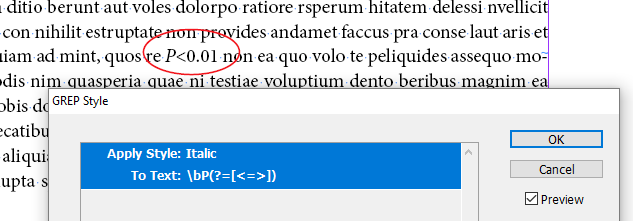
question. i have a really big layout that has lots of "P" values. see screenshots below. How do i tell indesign to apply italics to all of the "P" it find before a "<" or ">" or "="?

Thanks

Jonathan

Screen Shot 2018-06-12 at 3.15.31 PM.pngScreen Shot 2018-06-12 at 3.15.26 PM.png

1.1K
Translate
Report
Community guidelines
Be kind and respectful, give credit to the original source of content, and search for duplicates before posting. Learn more
community guidelines

correct answers 1 Correct answer

Mentor , Jun 13, 2018 Jun 13, 2018

Ah, for initial code to work your P must be uppercase - true, not with All Caps applied...

That's must be the case.

So, try to add case-insensitive ON/OFF:

(?i)\bP(?=[<>=])(?-i)

Translate
Mentor ,
Jun 12, 2018 Jun 12, 2018

Well, you could start with this, and see how it works for you. Tested as a paragraph style option.

\bP(?=[<>=])

Translate
Report
Community guidelines
Be kind and respectful, give credit to the original source of content, and search for duplicates before posting. Learn more
community guidelines
Advocate ,
Jun 13, 2018 Jun 13, 2018

P(<|>|=)(\d+\.\d+|\d+)

This one only finds

P=1.234

P<1.234
P>1.234

P=1

P<1

P>1

Bildschirmfoto 2018-06-13 um 13.37.42.png

Bildschirmfoto 2018-06-13 um 13.37.57.png

Translate
Report
Community guidelines
Be kind and respectful, give credit to the original source of content, and search for duplicates before posting. Learn more
community guidelines
Mentor ,
Jun 13, 2018 Jun 13, 2018

this apply italic to the entire thing. i just want to apply italic to the "P"

Translate
Report
Community guidelines
Be kind and respectful, give credit to the original source of content, and search for duplicates before posting. Learn more
community guidelines
Mentor ,
Jun 13, 2018 Jun 13, 2018

did not worked

Screen Shot 2018-06-13 at 9.31.22 AM.png

Translate
Report
Community guidelines
Be kind and respectful, give credit to the original source of content, and search for duplicates before posting. Learn more
community guidelines
Community Expert ,
Jun 13, 2018 Jun 13, 2018

It does for me. Are you sure there is nothing unexpected between that P and the next character? And that you actually have applied this style to that paragraph?

Translate
Report
Community guidelines
Be kind and respectful, give credit to the original source of content, and search for duplicates before posting. Learn more
community guidelines
Mentor ,
Jun 13, 2018 Jun 13, 2018

i don't know what i am doing wrong.

Translate
Report
Community guidelines
Be kind and respectful, give credit to the original source of content, and search for duplicates before posting. Learn more
community guidelines
Community Expert ,
Jun 13, 2018 Jun 13, 2018

Create a new text frame. Fill it with placeholder text. Type "P<0.01" somewhere inside. Then add this GREP style using the Paragraph panel menu to its containing paragraph only. That should work, right?

There could be an invisibly-thin or other code character in your original text. Typing it a-fresh will make sure the GREP Style works as intended.

Translate
Report
Community guidelines
Be kind and respectful, give credit to the original source of content, and search for duplicates before posting. Learn more
community guidelines
Mentor ,
Jun 13, 2018 Jun 13, 2018

Thank You, Jongware!

@Jonathan:

and if your test will pass it possibly indeed means the 'unexpected characters' in your text.

Then you can try to catch and eliminate them using this grep:

Find:

\bP.([<>=])

Change to:

P$1

Or just include that character in the initial code...

Translate
Report
Community guidelines
Be kind and respectful, give credit to the original source of content, and search for duplicates before posting. Learn more
community guidelines
Mentor ,
Jun 13, 2018 Jun 13, 2018

did a an empty text frame, applied the style. nothing. see below.

Screen Shot 2018-06-13 at 11.07.43 AM.png

Translate
Report
Community guidelines
Be kind and respectful, give credit to the original source of content, and search for duplicates before posting. Learn more
community guidelines
Mentor ,
Jun 13, 2018 Jun 13, 2018

Ah, for initial code to work your P must be uppercase - true, not with All Caps applied...

That's must be the case.

So, try to add case-insensitive ON/OFF:

(?i)\bP(?=[<>=])(?-i)

Translate
Report
Community guidelines
Be kind and respectful, give credit to the original source of content, and search for duplicates before posting. Learn more
community guidelines
Mentor ,
Jun 13, 2018 Jun 13, 2018

still does not work:

Screen Shot 2018-06-13 at 11.35.27 AM.png

Translate
Report
Community guidelines
Be kind and respectful, give credit to the original source of content, and search for duplicates before posting. Learn more
community guidelines
Mentor ,
Jun 13, 2018 Jun 13, 2018
LATEST

this one worked!!

Translate
Report
Community guidelines
Be kind and respectful, give credit to the original source of content, and search for duplicates before posting. Learn more
community guidelines
Mentor ,
Jun 13, 2018 Jun 13, 2018

would it help to share the file? i might be making a mistake with setting up the styles? if it works for you guys than it must be something i am doing wrong in the styles.

Translate
Report
Community guidelines
Be kind and respectful, give credit to the original source of content, and search for duplicates before posting. Learn more
community guidelines