


- Home
- InDesign
- Discussions
- Re: GREP Search “Selection” or “Story” ExtendScrip...
- Re: GREP Search “Selection” or “Story” ExtendScrip...

Copy link to clipboard
Copied
When looking for Searching via “Selection” or “Story” through GREP using a script — it expands into this convoluted rabbit hole, when you would imagine it would be much simpler .
The short and sweet script, below, works but affects the entire document. I attempted placing “selection” in various places, and tried creating variables to point to various iterations of app.pageItem.selection , app.selection , etc . To no avail.
I commented out the last line I attempted.
As always any help is very much appreciated.
Thank you.
//reset GREP preferences
app.findGrepPreferences=app.changeGrepPreferences=null;
//app.findChangeGrepOptions = app.pageItem.selection
app.findGrepPreferences.findWhat="\r";
app.changeGrepPreferences.changeTo=",\s";
app.activeDocument.changeGrep();
app.findGrepPreferences=app.changeGrepPreferences=null;
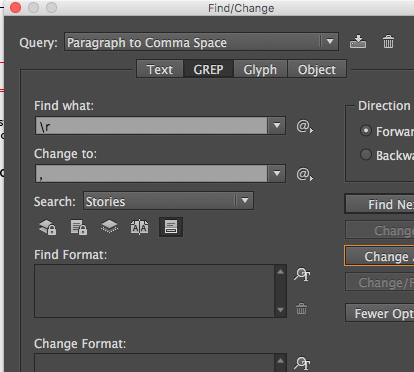
Looking for the javascript syntax that affects Find/Change > GREP > Search > Stories (and/or selection)


 1 Correct answer

Just try to use app.selection[0].changeGrep();
Em Qui, 12 de abr de 2018 16:48, neal derekl34934377 <
forums_noreply@adobe.com> escreveu:
Adobe Community <https://forums.adobe.com/?et=watches.email.thread>
GREP Search “Selection” or “Story” ExtendScript ?
criado por neal derekl34934377
<https://forums.adobe.com/people/neal+derekl34934377?et=watches.email.thread>
em InDesign Scripting - Visualize a discussão completa
<https://forums.adobe.com/message/10312967?et=watches.email.thread#10312967>

 12
Replies
12
12
Replies
12

Copy link to clipboard
Copied
Just try to use app.selection[0].changeGrep();
Em Qui, 12 de abr de 2018 16:48, neal derekl34934377 <
forums_noreply@adobe.com> escreveu:
Adobe Community <https://forums.adobe.com/?et=watches.email.thread>
GREP Search “Selection” or “Story” ExtendScript ?
criado por neal derekl34934377
<https://forums.adobe.com/people/neal+derekl34934377?et=watches.email.thread>
em InDesign Scripting - Visualize a discussão completa
<https://forums.adobe.com/message/10312967?et=watches.email.thread#10312967>

Copy link to clipboard
Copied
"\r" instead "\\r" "\s" instead "\\s"

Copy link to clipboard
Copied
… About catching an "active story", e.g. placing the cursor inside it, "app.selection[0].parentStory"
Best,
Miche!, from FRIdNGE
Copy link to clipboard
Copied
But inverse. In JavaScript, use two
to escape.
\r will find nothing with javascript.
And, using app.activeDocument he's pointing the changeGrep to perform the
changes in entire document.
>
Copy link to clipboard
Copied


Copy link to clipboard
Copied
https://forums.adobe.com/people/Michel+%5BFRIdNGE%5D wrote
lf.corullon wrote: "… \r will find nothing with javascript."
Not for me! …
Absolutely right, Michel. But it will only work for a very select subset of meta-characters that actually mean the same thing in GREP as in JavaScript strings!
Always remember that the JavaScript string translation comes first. What's left after that will be fed into GREP. (A third layer, added by Adobe, translates InDesign's special character codes and functions, all starting with a tilde ~.)
It works because '\r' translates inside the string itself into a literal paragraph return and '\t' to a tab – and you actually can "insert" these characters literally into the GREP dialog as well. (It takes a script...)
BUT! Not all backslash escaped meta-characters behave like that. The codes \d, \s, \w and a long list of others do not translate into a single character or code, and so the backslash is stripped and just the plain letter gets inserted. \b is another one: it inserts a backspace code ("0x08") but within InDesign, that code searches for a Shift-Tab, so it will still do something entirely else than expected.
Bottom line: unless you know from heart all "regular" escaped codes (and what they search for) and all special ones (meta-codes), do yourself a favour and always use double backslashes.
(One of the more addicting features of Python: raw strings. In there no character is parsed, and so it's perfect for constructing regexes out of ordinary strings.)
Copy link to clipboard
Copied
I definitely stop to try to help. I already stopped in Facebook groups.
Now, I'll stop here too. I must be very stupid. It'll be better for me just
watch, read and learn.
You guys are definitely clever than me. Almost all polite and didactics,
other........
>

Copy link to clipboard
Copied
> You guys are definitely clever than me
Not at all, Luis Felipe. Just more experienced. Don't give up!
P.
Copy link to clipboard
Copied
Hi Theunis,
I obviously systematically use the "double backslahes".
I was simply expressing reservations about a peremptory statement!
See you soon and thanks for the explanations [always appreciated!]!
Best,
Michel
Copy link to clipboard
Copied
You know what at one point I did try just that — instead I just realized I used parenthesis instead of brackets *face palm* .
app.selection(0).changeGrep(); <--- WRONG
Egg on my face — still super noobish with all this.
Thanks — really appreciate it.
Final code below, with a loop that I took from another code I had — which I should have tried to begin with.
//reset GREP preferences
app.findGrepPreferences=app.changeGrepPreferences=null;
app.findGrepPreferences.findWhat="\r";
app.changeGrepPreferences.changeTo=",";
var sel = app.selection;
for(var n=0;n<sel.length;n++)
{
sel
.changeGrep(); };
//reset GREP preferences
app.findGrepPreferences=app.changeGrepPreferences=null;
Copy link to clipboard
Copied
What do you mean by: "app.selection"?

Copy link to clipboard
Copied
Hello fellow scripters,
Adding to an old thread... You can also target the grep find change to a single story, e.g.
var doc = app.documents[0];
doc.stories[0].changeGrep();
// or
doc.textFrames[0].parentStory.changeGrep();
// or
doc.textFrames.itemByName("frame_name").parentStory.changeGrep();
Cheers!
Funtom


Get ready! An upgraded Adobe Community experience is coming in January.
Learn more
 AdChoices