Exit
  • Global community
    • Language:
      • Deutsch
      • English
      • Español
      • Français
      • Português
  • 日本語コミュニティ
  • 한국 커뮤니티
0

how to add text wrap to paragraph style

Participant ,
Nov 07, 2017 Nov 07, 2017

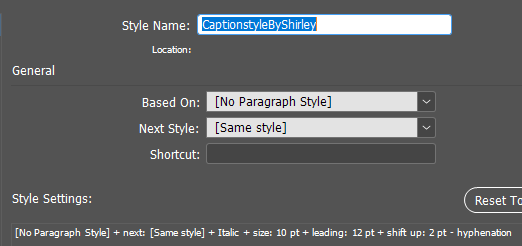
I am trying to add text wrap to a paragraph style for my very simple captions which go beneath variously sized photos. I do not see an option to do this. Here is what my style looks like so far.

In addition to adding text wrap I would like to make sure that there is a standard space between the bottom of the photo and the caption.

2.9K
Translate
Report
Community guidelines
Be kind and respectful, give credit to the original source of content, and search for duplicates before posting. Learn more
community guidelines
Adobe Employee ,
Nov 07, 2017 Nov 07, 2017

Hi,

Apply the text wrap to the frame and not the style.

Use an object style to define the text wrap settings and apply the same object style to all the captions.

-Aman

Translate
Report
Community guidelines
Be kind and respectful, give credit to the original source of content, and search for duplicates before posting. Learn more
community guidelines
Participant ,
Nov 09, 2017 Nov 09, 2017

Oh, I just reread this. I actually already have an object style called TextWrap. Are you saying that I need to do separate actions on my captions?  1) textwrap object, then 2) my caption character style, and then 3) my caption paragraph style? I was hoping to consolidate!

Translate
Report
Community guidelines
Be kind and respectful, give credit to the original source of content, and search for duplicates before posting. Learn more
community guidelines
LEGEND ,
Nov 09, 2017 Nov 09, 2017

Your object style can contain your paragraph style.

Further, if there is an internal logic to where you need the character styles added on top of the paragraph style, you can use nested styles or GREP styles within the paragraph style to selectively apply Character styles.

Translate
Report
Community guidelines
Be kind and respectful, give credit to the original source of content, and search for duplicates before posting. Learn more
community guidelines
LEGEND ,
Nov 09, 2017 Nov 09, 2017

Here with one click, I have applied all of the formatting for the object and the text.

start here - apply object style to smaller text box, and get text wrap, autosizing, paragraph style and a couple of character styles:

Screenshot 2017-11-09 16.18.19.pngScreenshot 2017-11-09 16.20.47.png

Translate
Report
Community guidelines
Be kind and respectful, give credit to the original source of content, and search for duplicates before posting. Learn more
community guidelines
LEGEND ,
Nov 09, 2017 Nov 09, 2017
LATEST

sarai53562771  wrote

Oh, I just reread this. I actually already have an object style called TextWrap. Are you saying that I need to do separate actions on my captions?  1) textwrap object, then 2) my caption character style, and then 3) my caption paragraph style? I was hoping to consolidate!

If you are taking about captions with the format shown in your other post, you can add a nested style to change the formatting of the text in parenthesis. It will automatically apply alone with your paragraph style when you apply your object style to your caption box.Screenshot 2017-11-09 16.54.19.png

Translate
Report
Community guidelines
Be kind and respectful, give credit to the original source of content, and search for duplicates before posting. Learn more
community guidelines