Exit
  • Global community
    • Language:
      • Deutsch
      • English
      • Español
      • Français
      • Português
  • 日本語コミュニティ
  • 한국 커뮤니티
0

How to change default tab stops?

Participant ,
Feb 13, 2019 Feb 13, 2019

By default, it looks like my InDesign sets tabs at .5" each time the tab button is pressed.  How would I increase this a little more?

Also, Im not referring to the Tabs toolbar where I have to manually set each tab stop.  I just want them each to be maybe .75" apart to matter how many tabs I insert

1.3K
Translate
Report
Community guidelines
Be kind and respectful, give credit to the original source of content, and search for duplicates before posting. Learn more
community guidelines

correct answers 1 Correct answer

Community Expert , Feb 13, 2019 Feb 13, 2019

Hi VicoDrive:

  1. Click in the paragraph that needs the tab stops
  2. Choose Type > Tabs
  3. Add the first tab manually: I put a left-align tab at 9 picas (1.5 inches).
    Screen Shot 2019-02-13 at 3.09.38 PM.png
  4. Then click on Repeat Tab to add additional tabs with the same spacing.Screen Shot 2019-02-13 at 3.09.45 PM.png
  5. Hover over your paragraph style and Right Click > Redefine Style in the Paragraph Styles panel.

~Barb

Translate
Community Expert ,
Feb 13, 2019 Feb 13, 2019

Hope so, you work correct with InDesign and always use formats.

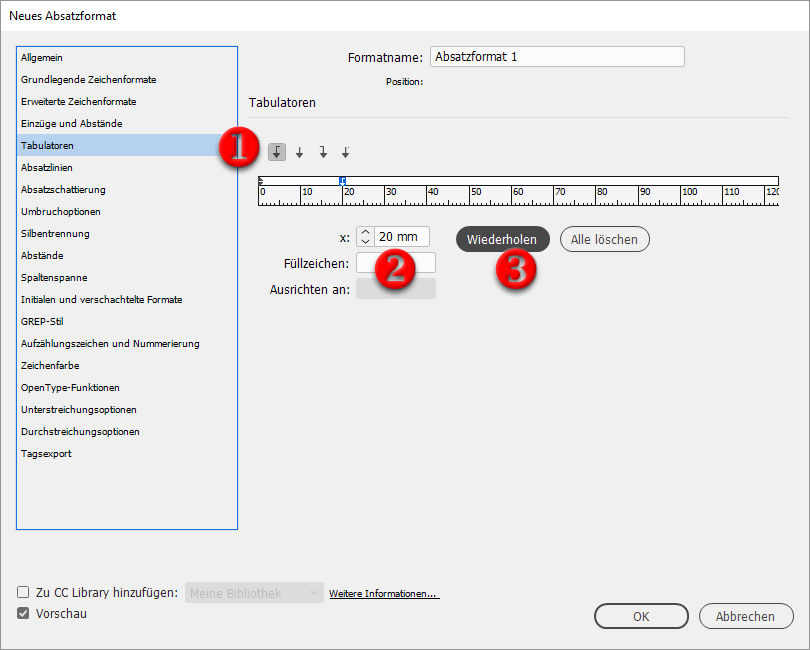
Its easy to change the tab position in the paragraph style: tabulator

tabulator.png

Have fun

Translate
Report
Community guidelines
Be kind and respectful, give credit to the original source of content, and search for duplicates before posting. Learn more
community guidelines
Participant ,
Feb 13, 2019 Feb 13, 2019

What is this window called?  Are you able to translate at all?  I assume this is the Preferences window but it doesnt compare to the Preferences window on the current versions of CC 2019

Translate
Report
Community guidelines
Be kind and respectful, give credit to the original source of content, and search for duplicates before posting. Learn more
community guidelines
Community Expert ,
Feb 13, 2019 Feb 13, 2019

Double click an existing paragraph style  or

create a new one.

Then this window appears.

Translate
Report
Community guidelines
Be kind and respectful, give credit to the original source of content, and search for duplicates before posting. Learn more
community guidelines
Community Expert ,
Feb 13, 2019 Feb 13, 2019
LATEST

Hi VicoDrive:

  1. Click in the paragraph that needs the tab stops
  2. Choose Type > Tabs
  3. Add the first tab manually: I put a left-align tab at 9 picas (1.5 inches).
    Screen Shot 2019-02-13 at 3.09.38 PM.png
  4. Then click on Repeat Tab to add additional tabs with the same spacing.Screen Shot 2019-02-13 at 3.09.45 PM.png
  5. Hover over your paragraph style and Right Click > Redefine Style in the Paragraph Styles panel.

~Barb

Translate
Report
Community guidelines
Be kind and respectful, give credit to the original source of content, and search for duplicates before posting. Learn more
community guidelines