
Exit
  • Global community
    • Language:
      • Deutsch
      • English
      • Español
      • Français
      • Português
  • 日本語コミュニティ
  • 한국 커뮤니티
0

How to color manage a file that is going to an "RGB printer"

Explorer ,
Nov 09, 2018 Nov 09, 2018

I'm setting up a file in InDesign that is going to be printed on a 12 ink inkjet printer. I've been given a profile for the printer. I used the Mac ColorSync Utility to have a look inside it; it is in RGB space. This has me confused; I think of printers as being CMYK, because they are always substractive devices, no matter how large their gamut.

Could someone explain to me the color management settings I should use and how to generate a PDF that should print correctly?
707
Translate
Report
Community guidelines
Be kind and respectful, give credit to the original source of content, and search for duplicates before posting. Learn more
community guidelines

correct answers 1 Correct answer

Community Expert , Nov 09, 2018 Nov 09, 2018

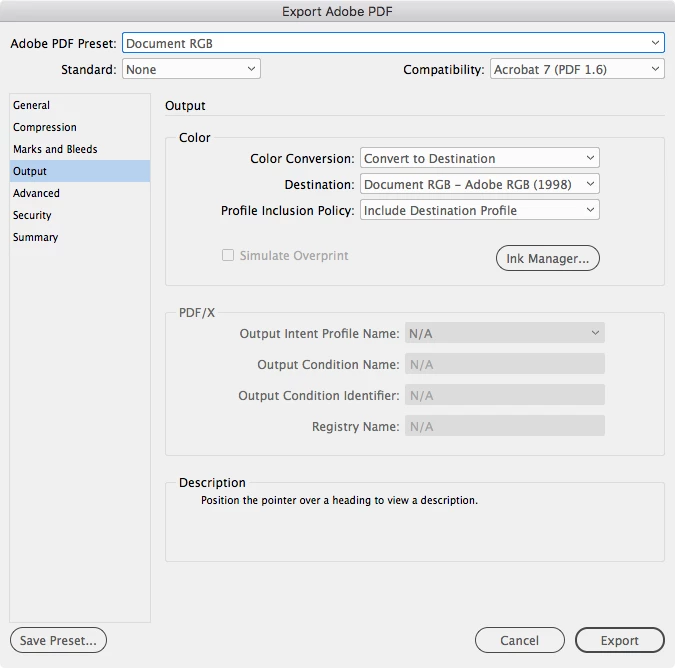
The drivers for most inkjet printers expect RGB color and the conversion into the final CMYK space is handled by the printer software. You can send CMYK values, but the driver will not print those document CMYK values—there will be additional conversions.

If the inkjet printer is the final destination, setting the Output Color Destination to Document RGB and including the Destination Profile will export all color to your document's assigned RGB profile. Including the profile is important when the

...
Translate
Community Expert ,
Nov 09, 2018 Nov 09, 2018

The drivers for most inkjet printers expect RGB color and the conversion into the final CMYK space is handled by the printer software. You can send CMYK values, but the driver will not print those document CMYK values—there will be additional conversions.

If the inkjet printer is the final destination, setting the Output Color Destination to Document RGB and including the Destination Profile will export all color to your document's assigned RGB profile. Including the profile is important when the destination is RGB, because if the printing is handled correctly, the source RGB profile will be needed by the driver to make the correct conversion into the printer's profile. If you are using transparency set the doc's Transparency Blend Space to RGB.

Screen Shot 19.png

Translate
Report
Community guidelines
Be kind and respectful, give credit to the original source of content, and search for duplicates before posting. Learn more
community guidelines
Explorer ,
Nov 09, 2018 Nov 09, 2018

Very helpful, thank you. What should I use for "Color Settings" when creating the document itself?

Translate
Report
Community guidelines
Be kind and respectful, give credit to the original source of content, and search for duplicates before posting. Learn more
community guidelines
Community Expert ,
Nov 09, 2018 Nov 09, 2018
LATEST

The conventional color management strategy is to settle on a large RGB editing space as your Working RGB space, and then the conversion to the print profile happens at output. AdobeRGB should be OK. Don't use sRGB because it is considerably smaller than most print color spaces, and it wont let you get at some of the inkjet printer's color gamut. Make sure any placed images are also edited in the same RGB space.

The RGB Color management Policy should be Preserve Embedded, so that all RGB color objects have a source profile. The CMYK Working Space and profile assignment only comes into play if you work with CMYK swatches or colors—it affects CMYK's color appearance.

Translate
Report
Community guidelines
Be kind and respectful, give credit to the original source of content, and search for duplicates before posting. Learn more
community guidelines