Exit
  • Global community
    • Language:
      • Deutsch
      • English
      • Español
      • Français
      • Português
  • 日本語コミュニティ
  • 한국 커뮤니티
0

How to Find/Replace fonts for Fonts in Graphics

New Here ,
Jul 06, 2021 Jul 06, 2021

Capture_ID.PNG

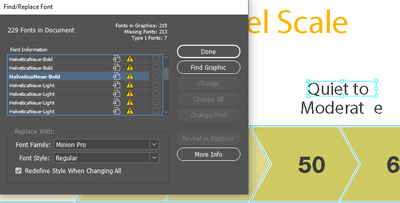
Hi everyone, I'm trying to edit a template and link all the missing fonts but I can't seem to change the font or do the find/replace font for this graphic font. I can only really move the text around. I don't know if it's outlined? I do have the fonts and when I try to change them the 'Change' and 'Change All' are greyed out. Does anyone know any fix about this?

TOPICS
How to , Print , Type
2.5K
Translate
Report
Community guidelines
Be kind and respectful, give credit to the original source of content, and search for duplicates before posting. Learn more
community guidelines

correct answers 1 Correct answer

Community Expert , Jul 07, 2021 Jul 07, 2021

You cannot Find/Replace fonts in placed graphics; only InDesign-created objects.

What kind of files are these graphics?? Can you open them? (This seems like an odd way to create a document if each word is a separate graphic.)


This is normally what one would see if you place something like:

a) PDFs/EPSs that do not have the fonts embedded;

b) Live type copied and pasted from Illustrator


If you have the fonts as you say and have loaded them AND they are the same FORMAT as used in the graphic, everyth

...
Translate
LEGEND ,
Jul 07, 2021 Jul 07, 2021

You fix each graphic, and relink it. You need to use the original app, because only it knows about your constraints on the text (such as margins, scaling, flow, hyphenation...)  

Translate
Report
Community guidelines
Be kind and respectful, give credit to the original source of content, and search for duplicates before posting. Learn more
community guidelines
Community Expert ,
Jul 07, 2021 Jul 07, 2021

What kind of graphics do we talk about?

What is the creator application?


Regards,
Uwe Laubender

( ACP )

Translate
Report
Community guidelines
Be kind and respectful, give credit to the original source of content, and search for duplicates before posting. Learn more
community guidelines
Community Expert ,
Jul 07, 2021 Jul 07, 2021
LATEST

You cannot Find/Replace fonts in placed graphics; only InDesign-created objects.

What kind of files are these graphics?? Can you open them? (This seems like an odd way to create a document if each word is a separate graphic.)


This is normally what one would see if you place something like:

a) PDFs/EPSs that do not have the fonts embedded;

b) Live type copied and pasted from Illustrator


If you have the fonts as you say and have loaded them AND they are the same FORMAT as used in the graphic, everything should resolve. If not, it probably won't match. in which case your only recourse is to resolve the issues by editing the graphics. e.g. If it's a PDF and you DO have the fonts that haven't embedded, there are ways to fix that with a Preflight Fixup in Acrobat to embed them.



Translate
Report
Community guidelines
Be kind and respectful, give credit to the original source of content, and search for duplicates before posting. Learn more
community guidelines