Copy link to clipboard
Copied
Hi,
we want to write a script to get default Dictionary for active InDesign document.
we are getting it by manual way that:
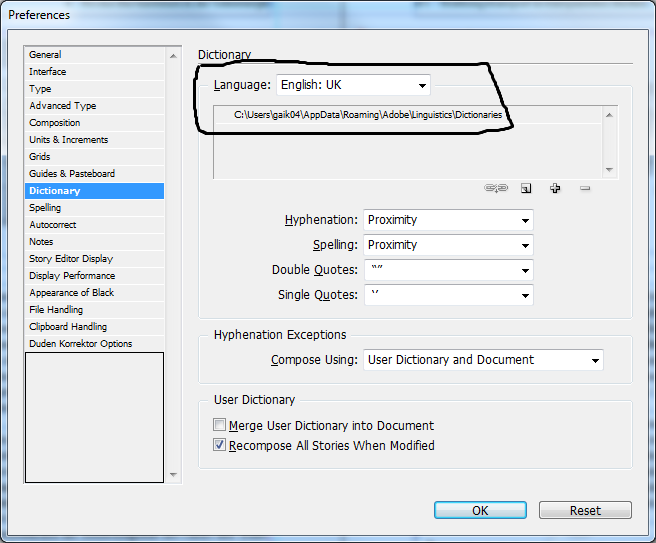
Edit => Preferences => Dictionary => Language drop down
but how can we do this task by using Java script.
We tried by using Document.DictionaryPreferences but not getting the value.
so please help me out to get the Default Dictionary language from active document

Copy link to clipboard
Copied
Hi,
I am geeting all languages list but can't able to assign the value. Maybe its readonly property.
var len = app.languagesWithVendors.length;
var arr = []
for(var i=0;i<len;i++)
{
arr.push(app.languagesWithVendors.item(i).name)
}
arr = arr.toString().replace(/,/g,"\n");
alert(arr)
Copy link to clipboard
Copied
Hi,
myLanguages = app.languagesWithVendors // every app languages
myLanguage = myLanguages[10] // language with index = 10; use any you want
myDoc.textDefault.appliedLanguage = myLanguage; //this set default language for a new text in myDoc
maybe not exactly what you wanted...
Copy link to clipboard
Copied
The OP is misunderstanding the purpose of this Preference field.
RajGaikwad wrote:
we want to write a script to get default Dictionary for active InDesign document.
we are getting it by manual way that:
Edit => Preferences => Dictionary => Language drop down
This is not true. This preference dialog is to set a preference for a language. The 'selected item' here has no relation at all with the "active InDesign document" (other than that the selected language may be used in the active document).
So you don't get "the" default dictionary, you get "a" default dictionary -- for the very first language in the list. If your intention is to get "the" default dictionary per language in your document, you have to
1st: gather a list of all used languages in your document, and
2nd: find out the dictionary for each of them.
(neither of which I have a good one-liner for).
Jump_Over wrote:
maybe not exactly what you wanted...
Without further clarification from the OP, we might never know.

Get ready! An upgraded Adobe Community experience is coming in January.
Learn more