Inspiring
October 16, 2017
Answered

I want to put the period before my superscript footnote numbers. How? GREP?

  • October 16, 2017
  • 1 reply
  • 2710 views

In my document all superscript footnote numbers at the end of a sentence have the period follow the footnote number instead of preceding it.

The footnote numbers all have a character style.

How can I change the position of the period to BEFORE the superscript numbers?

THANKS!

example:


This topic has been closed for replies.
Correct answer winterm

Well, I still believe, it’s possible using GREP... with some assuming, and in three steps. Unfortunately, GREP has some limitation/feature/bug we need to 'hack’. Also it’s a good idea to create special Character style for your numbs (if you haven’t the one already).

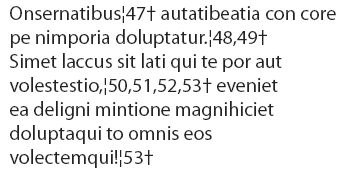
So, here’s our initial text:

We’ll need two additional glyphs that are NOT used anywhere in the text. I’ll use:

broken bar: ¦

dagger: †

Find what:

[,\d]+

Change to:

¦$0†

Find format: color: Orange

Change format:

color: [Black] + position: normal

Here goes the main trick:

Find what:

(¦[,\d]+†)([[:punct:]])

Change to:

$2$1

Don’t forget to trash Find and Change formats before running this!

And finalizing:

Find what:

(¦)([,\d]+)(†)

Change to:

$2

Change format:

Character Style: my orange numbs

1 reply

winterm
Legend
October 16, 2017

A bit more complicated since you have 'double' footnotes, and, possibly, not always?

Maybe in two steps?

First - remove unwanted period after footnote:

Find what:

~F,?~F?\K\.

Change to:

[leave blank]

Then insert period before footnote (or just before first one in a pair):

Find what:

\w\K~F

Change to:

.$0

UPDATE. Just for the record: everywhere above the written 'footnotes' should be read as 'Footnote Reference Markers'.

Sometimes (too) short words may lead to misconception...

Inspiring
November 9, 2017


Hi Winterm!

Thank you so much for trying to help.

Unfortunately they aren't 'Footnote Reference Markers' but just orange superior numbers...

So your trics didn't work and I still haven't found a solution...

Help!

C

Obi-wan Kenobi
Legend
November 10, 2017

Well, I still believe, it’s possible using GREP... with some assuming, and in three steps. Unfortunately, GREP has some limitation/feature/bug we need to 'hack’. Also it’s a good idea to create special Character style for your numbs (if you haven’t the one already).

So, here’s our initial text:

We’ll need two additional glyphs that are NOT used anywhere in the text. I’ll use:

broken bar: ¦

dagger: †

Find what:

[,\d]+

Change to:

¦$0†

Find format: color: Orange

Change format:

color: [Black] + position: normal

Here goes the main trick:

Find what:

(¦[,\d]+†)([[:punct:]])

Change to:

$2$1

Don’t forget to trash Find and Change formats before running this!

And finalizing:

Find what:

(¦)([,\d]+)(†)

Change to:

$2

Change format:

Character Style: my orange numbs


More funny with real footnotes! 

(^/)