


- Home
- InDesign
- Discussions
- icônes du bas disparus dans le panneau nuancier d'...
- icônes du bas disparus dans le panneau nuancier d'...

Copy link to clipboard
Copied
Bonjour,
Dans inDesign, j'ai les icônes du bas de la palette nuancier qui ont disparu (poubelle, ajouter une nuance etc...)
Je ne sais pas comment les remettre... impossible de trouver dans les options, sur internet...
Voir photo ci dessous, merci.



 1 Correct answer


Si aucun message n'apparaît, c'est que tu lâches trop tôt les touches du clavier. D'après ta capture, je pense que tu es sur Mac, je me trompe ? Il faut quitter InDesign et le relancer (par le Dock, clic droit > ouvrir) tout en appuyant sur les touches Maj, Ctrl, Alt et Cmd simultanément.
Cette fenêtre va apparaître
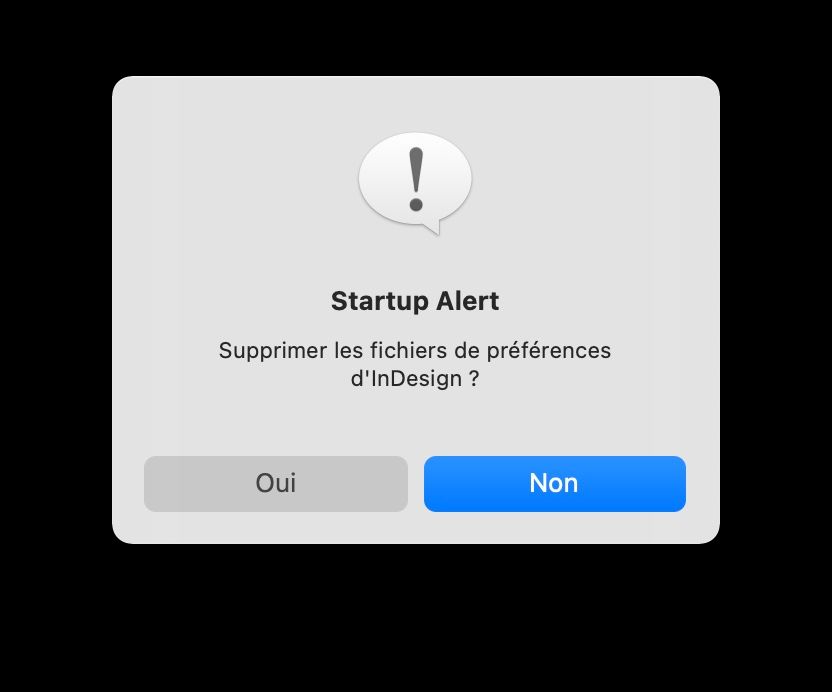
Il faut cliquer sur Oui

 6
Replies
6
6
Replies
6


Copy link to clipboard
Copied
Hi @Julie ChOoLie ,
Sorry to hear about the trouble. Please try the suggestions shared here https://community.adobe.com/t5/indesign-discussions/swatch-panel-buttons-not-showing-cc/m-p/11173713... and let us know if this helps or if you need any further assistance.
Regards
Rishabh
Copy link to clipboard
Copied
Thank you but it's not the same pblm...
Copy link to clipboard
Copied
La première chose à faire est de réinitialiser les préférences. Il faut relancer l'application tout en appuyant simultanément sur Maj, Ctrl, Alt [Windows], Maj, Ctrl, Alt et Cmd [Mac] jusqu'à l'apparition du message demandant confirmation.
Copy link to clipboard
Copied
Merci, je n'ai aucun message qui apparait.
Peu importe quel espace de travail j'utilise, je reste avec un nuancier qui n'a pas la ligne du bas avec nouvelle nuance, supprimer etc...
Copy link to clipboard
Copied
Si aucun message n'apparaît, c'est que tu lâches trop tôt les touches du clavier. D'après ta capture, je pense que tu es sur Mac, je me trompe ? Il faut quitter InDesign et le relancer (par le Dock, clic droit > ouvrir) tout en appuyant sur les touches Maj, Ctrl, Alt et Cmd simultanément.
Cette fenêtre va apparaître
Il faut cliquer sur Oui
Copy link to clipboard
Copied
Je ne le faisais pas assez tôt 😉
C'est apparu, j'ai cliqué, tout est revenu ! Merci bcp pour votre aide !


Get ready! An upgraded Adobe Community experience is coming in January.
Learn more
 AdChoices