


InDesign 17.2.1, tool issue

Copy link to clipboard
Copied
Hello,
I am trying to "Place" a photo into a graphic box. (My program is up-to-date.) The option to place is gray. When I choose a photo to place, it's showing on my cursor not inserting into my box. I have a yearbook to do, and this will make the job very tedious.
To clarify, I have the correct tool chosen to "Place" a graphic. This feature worked until the installation of the update. The word "Place" is black but the function is gray as are all the other short cuts. I have a deadline. I'm melting.


 18
Replies
18
18
Replies
18


Copy link to clipboard
Copied
I have restarted my computer since installation.

Copy link to clipboard
Copied
To clarify, the graphic box that you want to contain the image is an InDesign object made with the rectangle tool?
Copy link to clipboard
Copied

This is the tool used to make the graphics box,
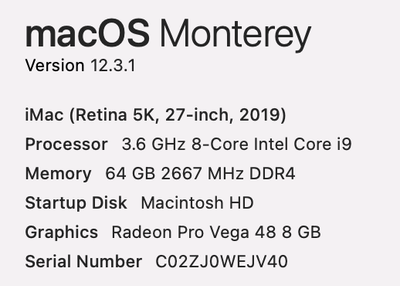
Here is the info on my Mac. I do not have any other apps open.


Copy link to clipboard
Copied
Give us a screen shot of what is happening and an open and extended Layer Panel.
Copy link to clipboard
Copied
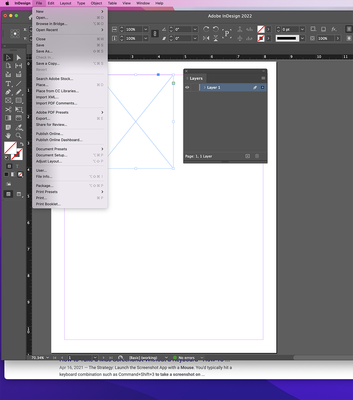

Copy link to clipboard
Copied
Thank you for the screenshot.
Could you expand the "Layer 1" so we can see what's going on there?
Thanks,
Uwe Laubender
( ACP )
Copy link to clipboard
Copied
"When I choose a photo to place, it's showing on my cursor not inserting into my box."
Hi Lisa,
the frame you want to place the image of your loaded cursor in might be locked.
Look that up in the Layers panel.
Or, the frame might be occupied by another image or other contents that was pasted inside.
Maybe you cannot see this because the contents of the target frame is moved outside the frame's area.
The Layers panel should also show this situation.
Note: To replace the contents of a frame with the one in your cursor just hold the Alt key and click if the cursor with loaded image hovers over the area of the target frame.
Hm. And finally this case:
In the stacking order of all the elements on the page there is a text frame that is positioned on top of your rectangle you want to place the image to. Lock that text frame or make it invisible in the Layers panel so you get access to the target frame.
Regards,
Uwe Laubender
( ACP )
Copy link to clipboard
Copied
I've checked all of the above and nothing changed. Nothing is lock, the layer is unlocked, there is not text box only margins, and still no solution. It's just broke. Thank you for trying to help me.
Copy link to clipboard
Copied

Copy link to clipboard
Copied
Thanks!
Did not see your screenshot of the layout before posting.
Hm. Could you share that InDesign document we can see in the screenshot?
For this please use the forum editor's controls.
Thanks,
Uwe Laubender
( ACP )
Copy link to clipboard
Copied
Thanks for this other screenshot. Well, that leaves me a bit speechless. Could be that something's wrong with your InDesign installation, InDesign cache or InDesign preferences…
Trashing cache and preferences would be the next logical step perhaps.
But before doing this make a backup of the same. The position of both Version 17.0 folders that contain caches and preferences can be looked up here:
https://helpx.adobe.com/indesign/kb/indesign-preferences-support-file-locations.html
Regards,
Uwe Laubender
( ACP )
Copy link to clipboard
Copied
I now believe it is the upgrade to Monterey OS.
Copy link to clipboard
Copied
Hm. Lisa, could you revert the OS upgrade?
Don't know how important that OS upgrade is to you and your workflow.
Regards,
Uwe Laubender
( ACP )
Copy link to clipboard
Copied
I would be happy to revert. However, I'm not that tech savvy.

Copy link to clipboard
Copied
Is it not possible that you are in the View / Display Quality / Quick Display position?
Switch to Typical or High Quality display

Copy link to clipboard
Copied
Could you share the file? Or only this page? You can remove all except this frame (for privacy).

Copy link to clipboard
Copied
Hi Lisa,
Is it possible that you need to make new settings in the MacOS control panel regarding to read/write for Indesign on your Mac? In other words: Indesign has no right to look on you harddisk. When i look at your screenshot, cmd-O / "Open File" is greyed out. — You can change the settings in your System Controlpanel —› Security & Privacy
There you can find all application and their read/write or privacy settings. I hope this helps.
Copy link to clipboard
Copied
I forgot to mention to look under Files & Folders to see what rights applications have. 😅 Cheers!


Get ready! An upgraded Adobe Community experience is coming in January.
Learn more
 AdChoices