Exit
  • Global community
    • Language:
      • Deutsch
      • English
      • Español
      • Français
      • Português
  • 日本語コミュニティ
  • 한국 커뮤니티
1

Indesign interface comically large

Engaged ,
Oct 28, 2021 Oct 28, 2021

Hi, evidently there has been an update.


On my ultrawide 5120x1444 the interface is comically large. It looks like a tablet mode or something. In scaling it set to the mid point of normal and before the update performed correctly.

How do I fix this, I am not currently blind!

 

TOPICS
Bug
274
Translate
Report
Community guidelines
Be kind and respectful, give credit to the original source of content, and search for duplicates before posting. Learn more
community guidelines
Community Expert ,
Oct 29, 2021 Oct 29, 2021

Hi,

could you share two screenshots?
One of the overall screen with InDesign, another one of the UI-Scaling preferences?


Thanks,
Uwe Laubender

( ACP )

Translate
Report
Community guidelines
Be kind and respectful, give credit to the original source of content, and search for duplicates before posting. Learn more
community guidelines
Community Expert ,
Oct 29, 2021 Oct 29, 2021

Mac or Windows? There are some issues on the Mac side.

Translate
Report
Community guidelines
Be kind and respectful, give credit to the original source of content, and search for duplicates before posting. Learn more
community guidelines
Adobe Employee ,
Oct 29, 2021 Oct 29, 2021
LATEST

Hi there,


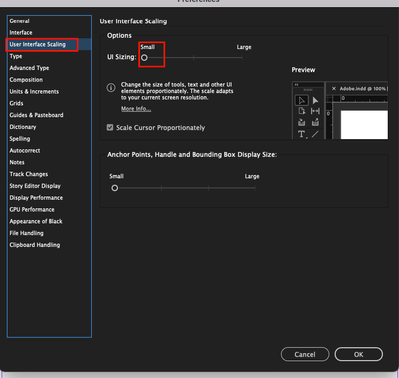
Sorry to hear about your experience. I would request you to share the screenshots asked by @Laubender and the display scaling settings. Also, you may go to InDesign preferences > User Interface Scaling and toggle the slider from small to large, and restart InDesign to see which scaling point suits your workspace. I hope it helps!

Anshul_Saini_0-1635548175577.png


We'll be looking forward to your response.


Regards,

Anshul Saini

Translate
Report
Community guidelines
Be kind and respectful, give credit to the original source of content, and search for duplicates before posting. Learn more
community guidelines