Exit
  • Global community
    • Language:
      • Deutsch
      • English
      • Español
      • Français
      • Português
  • 日本語コミュニティ
  • 한국 커뮤니티
0

Indesign Special Characters

Guest
Nov 15, 2010 Nov 15, 2010

Hello everyone!

Spending time with the XML and the InDesing.

It would be the great thing if somebody here have had eperience with importing special characters inside of XML nodes.

I mean, these characters:
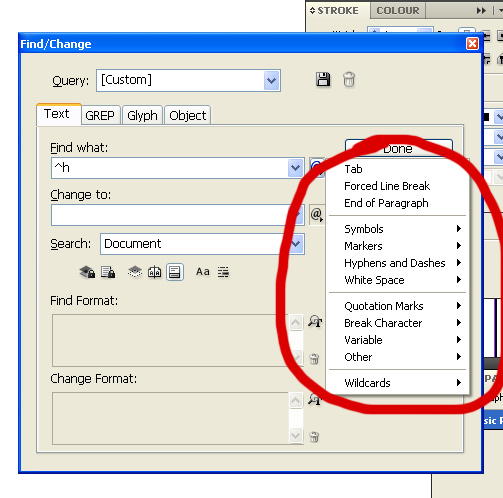
12.jpg

And this XML structure:

<xmlnode>information text here ^h and so on </xmlnode>

where ^h should be the End Nested Style character, for example, to be recognized by ID as its special character, not text.

Any information is welcome.

Thanks in advance, Alex.

TOPICS
Scripting
1.7K
Translate
Report
Community guidelines
Be kind and respectful, give credit to the original source of content, and search for duplicates before posting. Learn more
community guidelines
People's Champ ,
Nov 16, 2010 Nov 16, 2010

Quick way is to drop the special character, tag the text frame, export to XML checking "Remap Break, Whitespace, And Special Characters" and then have a look at the generated html code.

However this technique fails with certains characters like the one you want.I tried to use the unicode value but neither decimal or hexadecimal value for End Nested Style character work. I guess it's really Indesign topic.

You have to cheat by using a specific marker that you can change in Indesign such as **** or whatever.

But the best place may be the Indesign general forum as this one is more scripting oriented

Loic

Translate
Report
Community guidelines
Be kind and respectful, give credit to the original source of content, and search for duplicates before posting. Learn more
community guidelines
Engaged ,
Nov 16, 2010 Nov 16, 2010

Hi,

U just find the character using ^^h and change the character you want.  ^^ sign recognize the text in the find panel.

Translate
Report
Community guidelines
Be kind and respectful, give credit to the original source of content, and search for duplicates before posting. Learn more
community guidelines
Guest
Nov 16, 2010 Nov 16, 2010

thank you Loic! Of course, i use that cheat, but it is wonderful if nothing is have to be done after importing, isn't it? And, i posted this in main topic earlier, no feedback received 🙂

Translate
Report
Community guidelines
Be kind and respectful, give credit to the original source of content, and search for duplicates before posting. Learn more
community guidelines
New Here ,
Oct 25, 2012 Oct 25, 2012
LATEST

Did you ever find a way to do this without more steps after the import? I am very new to scripting, but being able to place break characters in XML docs is what I need to do. At my company, they say there is no way to do it, but I am sure there is. If you have the time to help me, I would greatly appreciate it. Thanks in advance!

Translate
Report
Community guidelines
Be kind and respectful, give credit to the original source of content, and search for duplicates before posting. Learn more
community guidelines

