Exit
  • Global community
    • Language:
      • Deutsch
      • English
      • Español
      • Français
      • Português
  • 日本語コミュニティ
  • 한국 커뮤니티
0

Interface wijzigen Indesign / Altering interface Indesign

New Here ,
Mar 28, 2021 Mar 28, 2021

Weet iemand hoe je de lettergrootte van de deel vensters, de interface dus, kunt vergroten/wijzigen? In Photoshop en Illustrator staat die bij voorkeuren>interface. Indesign houdt het verborgen.... of het kan niet. Ik wil dus dat de vensters niet zo klein staan.


No clue how to alter the interface of Indesign in order to enlarge (text: font size) all the panels. In Illustrator and Photoshop it's no problem. Anybody an idEA?


Thank you all.

TOPICS
Performance
401
Translate
Report
Community guidelines
Be kind and respectful, give credit to the original source of content, and search for duplicates before posting. Learn more
community guidelines
Community Expert ,
Mar 28, 2021 Mar 28, 2021

HI,

To make sure we understand your issue, can you share some screenshots of InDesign and Photoshop so we can see the difference?

Also, can you confirm the version of the software and operating system you are using?

Translate
Report
Community guidelines
Be kind and respectful, give credit to the original source of content, and search for duplicates before posting. Learn more
community guidelines
New Here ,
Mar 28, 2021 Mar 28, 2021

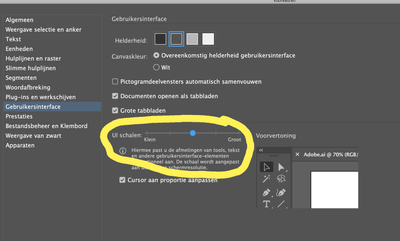
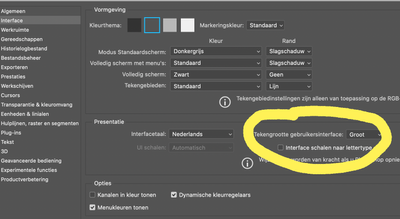
Thank you. I send you a screendump of a Photoshop and an Illustrator preferences > interface. It is in Dutch. The same altering I would like to apply in InDesign.

 Illustrator.png

Photoshop.png


Translate
Report
Community guidelines
Be kind and respectful, give credit to the original source of content, and search for duplicates before posting. Learn more
community guidelines
New Here ,
Mar 28, 2021 Mar 28, 2021
LATEST

System OS Catalina 10,15.7, Adobe 2021 

Translate
Report
Community guidelines
Be kind and respectful, give credit to the original source of content, and search for duplicates before posting. Learn more
community guidelines