


Copy link to clipboard
Copied
Any idea to write a javascript for InDesign that insert inverted page number on any page based on document


 1 Correct answer

Try this code:
var c = 0;
while(c < app.activeDocument.pages.length){
try{
var sec = app.activeDocument.sections.add(app.activeDocument.pages[c]);
sec.continueNumbering = false;
sec.pageNumberStart = app.activeDocument.pages.length-c;
}
catch(e){
var sec = app.activeDocument.pages[c].appliedSection;
sec.continueNumbering = false;
sec.pageNumberStart = app.activeDocument.pages.length-c;
}
c++;
}
Best
Sunil

 12
Replies
12
12
Replies
12


Copy link to clipboard
Copied
What do you mean by inverted page number. How do you do it manually, is it just about entering the page number in a frame and then flipping the frame?
-Manan
Copy link to clipboard
Copied
NO,
The purpose is :the first logic page number of the document become the last number.
Example a 10 pages document :
the first logic page is 10
the last logic page is 1
Olivier

Copy link to clipboard
Copied
Set the binding type to Right-to-Left.
Copy link to clipboard
Copied
Try this code:
var c = 0;
while(c < app.activeDocument.pages.length){
try{
var sec = app.activeDocument.sections.add(app.activeDocument.pages[c]);
sec.continueNumbering = false;
sec.pageNumberStart = app.activeDocument.pages.length-c;
}
catch(e){
var sec = app.activeDocument.pages[c].appliedSection;
sec.continueNumbering = false;
sec.pageNumberStart = app.activeDocument.pages.length-c;
}
c++;
}
Best
Sunil

Copy link to clipboard
Copied
You could reverse the page order via scripting, but if the page numbers are a special character like Current Page Number the page numbers would get updated and changed as you move the pages. Your page numbers would have to be regular numbers.

Copy link to clipboard
Copied
The actual page number is accessible via "page.name". I haven't drunk sufficient coffee to figure out an invert mechanism, but parse the name as an int then doing some kind of calc on the total # of pages would probably work. You would take the new figure and reinsert into page.name.
Copy link to clipboard
Copied
The actual page number is accessible via "page.name".
The page name string could be a letter—if the page was a section start using roman numerals, page one of the section would be named "i". There's also page.documentOffset which reurns the page’s sequential number relative to the document.
If an auto Current Page Number is being used it might be possible to set every page to a section start and reverse the order of the auto page numbering. I can’t do it easily in JS, but this AppleScript (OSX only) seems to work.
tell application "Adobe InDesign CC 2018"
	tell active document
		set allow page shuffle of document preferences to false
		my clearSections()
		set p to every page
		set c to count of p
		repeat with i from 1 to c
			set pn to c - (i - 1)
			set itm to item i of p
			try
				make new section with properties {continue numbering:false, page start:itm, page number start:pn}
			end try
		end repeat
	end tell
end tell

--reset the sections
on clearSections()
	tell application "Adobe InDesign CC 2018"
		tell active document
			set s to every section
			repeat with i from 2 to count of s
				try
					delete item i of s
				end try
			end repeat
		end tell
	end tell
end clearSections
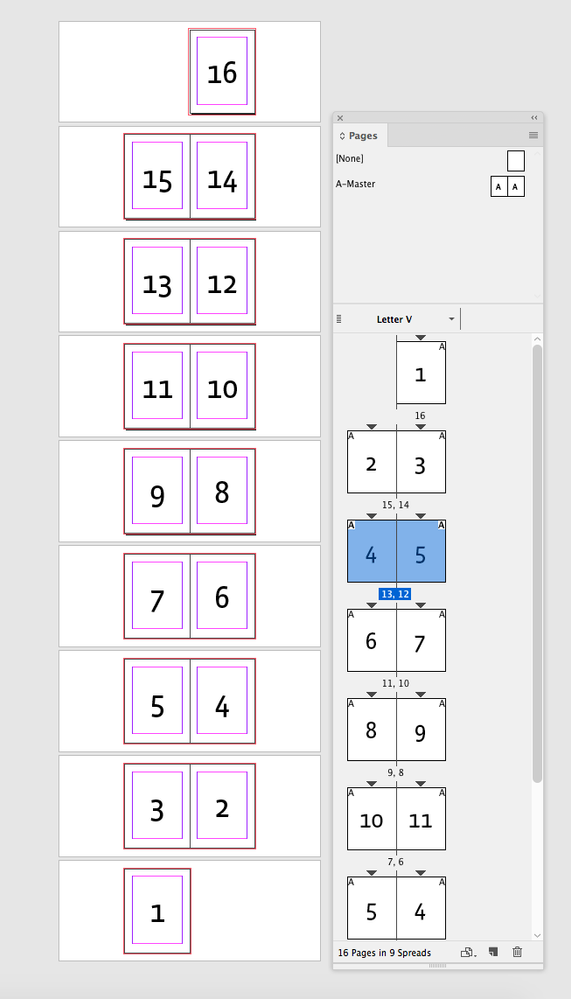
Copy link to clipboard
Copied
Wonderful.
The result is exacly what I was waiting for.
If the document get new pages, re-run the script.
Thank you.

Copy link to clipboard
Copied
مجموعة الأدوات منصة [10] شليلة

Copy link to clipboard
Copied
Wow, Great Job Sunail, Can i ask what if i want to Invert Pages as Well with the Inverted Numbers so Everyting will be Logic? Can this be done ?
Best Regards
Mohammad Hasanin
Mohammad Hasanin
Copy link to clipboard
Copied
I think Brian has answered your query : https://community.adobe.com/t5/indesign/trying-to-reverse-page-orders-with-textframes/m-p/11201629?p...
Best
Sunil
Copy link to clipboard
Copied
yes, thank you very much
Mohammad Hasanin


Get ready! An upgraded Adobe Community experience is coming in January.
Learn more
 AdChoices