Hi Sunil,
there is no DOM feature like table.row.move() or table.row.duplicate().
So I can only think of:
1. Add a new table row at the positon you want to move your row to.
2. Select and cut the row you want to move with app.select( tableRow ) and app.cut().
3. Select the new added row and paste the contents of the clipboard with app.paste().
If your source row has a fixed height you have to apply that fixed height also to the traget row.
Here some code where I suppose that there is only one story with one table in your document.
Based on your screenshot I selected the appropriate index numbers for the table rows:
// Supposed there is only one story with one table in your document:
var table = app.documents[0].stories[0].tables[0];
var tableRowToMove = table.rows[3];
app.select( tableRowToMove );
app.cut();
var newRow = table.rows.add( LocationOptions.AFTER , table.rows[6] );
app.select( newRow );
app.paste();
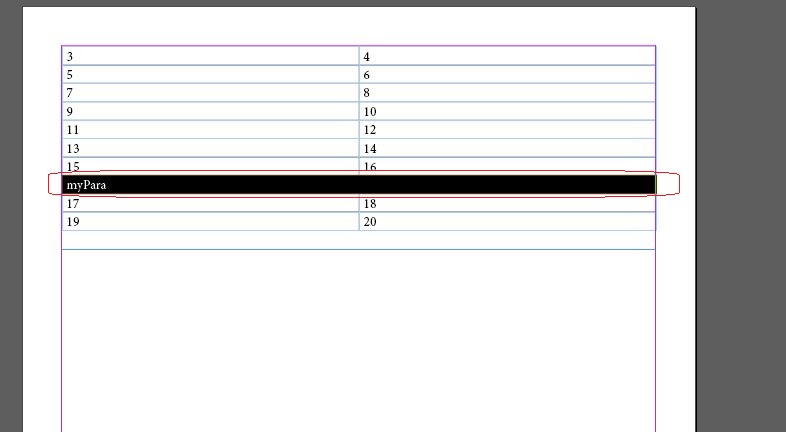
Before script execution:
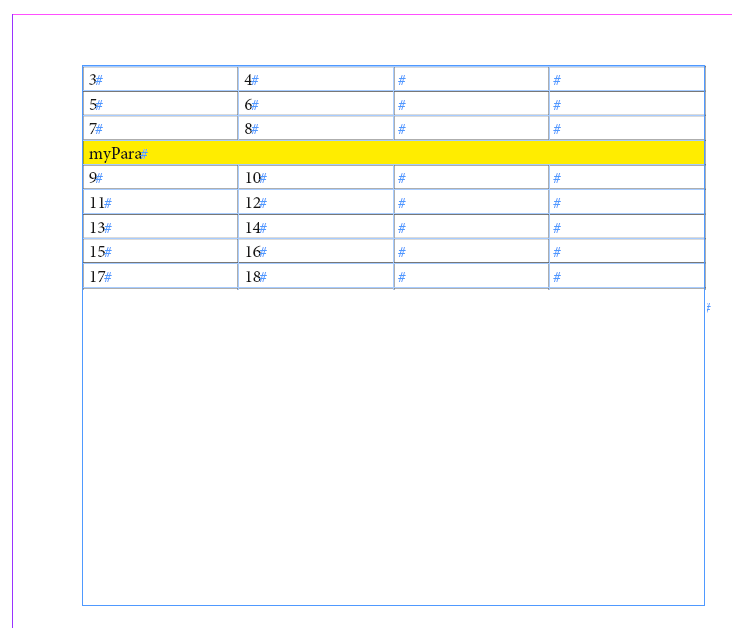
After script execution. Note: Row of cells is selected.

Regards,
Uwe





 2
Replies
2
Replies


 AdChoices