Exit
  • Global community
    • Language:
      • Deutsch
      • English
      • Español
      • Français
      • Português
  • 日本語コミュニティ
  • 한국 커뮤니티
Locked
0

Moving InDesign swatch groups

Community Beginner ,
Nov 25, 2021 Nov 25, 2021

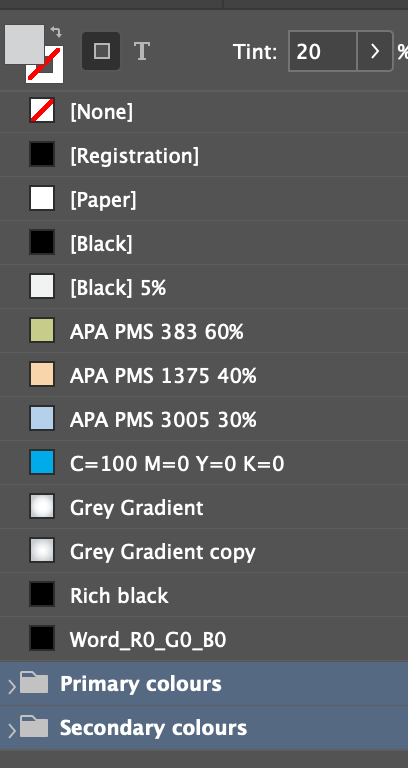
In swatches have create a colour group in InDesign (latest version) which contain regular colours I use. I would like to move this group/folder to the top of the list of swatches. So I would like move my 'Primary colours' and 'Secondary colours' folder above the general swatches listed there in my attahed screen grab. Any ideas why this can't be done if at all? 

677
Translate
Report
Community guidelines
Be kind and respectful, give credit to the original source of content, and search for duplicates before posting. Learn more
community guidelines
Community Expert ,
Nov 25, 2021 Nov 25, 2021

As far as I know the sort order of swatches is swatcehs before folders. You find this sorting of folders first or last in some file systems also. You could make a folder with the other colours (except colours in [] that are fixed)

Translate
Report
Community guidelines
Be kind and respectful, give credit to the original source of content, and search for duplicates before posting. Learn more
community guidelines
Community Beginner ,
Nov 25, 2021 Nov 25, 2021

Thanks, that's shame. Yeah I could make a folder with the other colour, however the other colours grow all the time as I import/copy and paste vector files so it would be too time consuming. I reckon InDesign should alow you to place all material in the swatches palette in the order you want. Oh well, it is what it is. 

Translate
Report
Community guidelines
Be kind and respectful, give credit to the original source of content, and search for duplicates before posting. Learn more
community guidelines
New Here ,
Sep 17, 2025 Sep 17, 2025
LATEST

Replying in 2025 out of solidarity for this frustrating quality of life (and still present) minor ssue. I wonder if it's intentional to discourage people buying more economical screen sizes and catering them to their needs. It sorta mandates workflows use larger screens or rely on external monitors etc. Unfortunately it's the only way to really show the full palette at all times. Otherwise, on a 13/14" macbook, you can see maybe 2 swatches at once without constantly rearranging your workspace. 

Translate
Report
Community guidelines
Be kind and respectful, give credit to the original source of content, and search for duplicates before posting. Learn more
community guidelines