


Package Problems

Copy link to clipboard
Copied
Hi!
Since yesterday, I'm having some problems doing packages on Illustrator and Indesign.
This never happen before, and I already tried to uninstall both apps.
On Indesign this is the error that shows up "Indesign could not package the document "untiteld_1.indd". Cannot copy necessary linked file(s). "
On Illustrator it shows this one, "Could not complete Package".
I don't know what to do, could some on help me please...


 11
Replies
11
11
Replies
11




Copy link to clipboard
Copied
In the InDesign document are all the links linked? Are they on the same computer/ hard drive as the InDesign file?
Copy link to clipboard
Copied
Yes, all the links are linked.
Preflight doesn't shows any problems.
And I have all the links on the same folder, computer/hard drive.

Copy link to clipboard
Copied
Are they truly on your harddrive or are they in a Dropbox, Onedrive, Google Drive folder? If they're in a cloud storage folder be sure that any smart sync type of feature is turned off.

Copy link to clipboard
Copied
It could have something to do with the location(s) of the linked files, and/or permissions. More information about the computing environment would help draw more conclusive theory. Is the computer connected to a network? When was the last time it was rebooted?
Copy link to clipboard
Copied
I rebooted my computar, minutes ago... And still has the same problem.
Copy link to clipboard
Copied
Yes, I agree with John Mensinger. I would try to check the network and reboot the computer to see if this helps.
Copy link to clipboard
Copied
But I already tried that, and still has the same problem...

Copy link to clipboard
Copied
Any linked files that might themselves contain links?

Copy link to clipboard
Copied
@brunomfg1 Just to add to what other people have suggested so far, is the file name of your document as you say in your question "untiteld_1.indd" (you may mean Untitled_1.indd) but what I'm getting at is it sounds as though you haven't saved and renamed this as a unique document to a folder on your computer. This could have nothing to do with what you are experiencing but I bring it up as a possibility since I spotted it in your post. When you create a new InDesign document, the title defaults to "Untitled_1.indd" until you save and change the name of the document. I'm assuming you worked on the document and made changes and saved it but maybe you never changed the file name to reflect the project or whatever. It's possible that you have another default document with that same title in the same folder and there is a confusion. If this is the case, perhaps try to save your file with a new name, to a new folder, then close InDesign, restart and navigate to that directory to open the renamed file to see if you can now package it properly. Worth a try!

Copy link to clipboard
Copied
Do any of the linked images have strange file names that include various symbols. If so, rename and relink those images and try to Package again.

Copy link to clipboard
Copied
Hi Bruno,
as a workaround you could package the document this way:
[1] Package, but leave out any linked graphics and images.
[2] Create a Links folder in the package folder.
[3] Open the Links panel in InDesign and select all graphics and images.
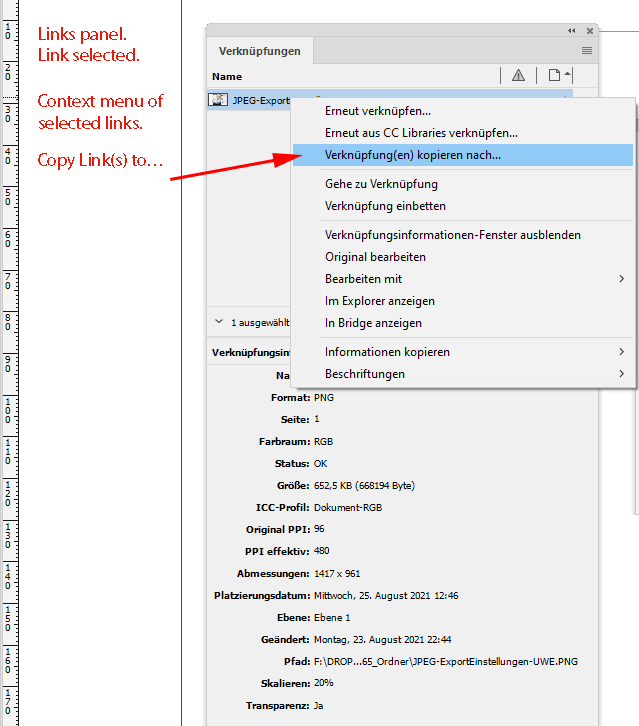
Copy the links over to the Links folder you created in [2]:
Use the context menu with "Copy Link(s) to …". From my German InDesign 2021 on Windows 10:
Regards,
Uwe Laubender
( ACP )


Get ready! An upgraded Adobe Community experience is coming in January.
Learn more
 AdChoices