


- Home
- InDesign
- Discussions
- Problem with hyphen in pdf from indesign
- Problem with hyphen in pdf from indesign
Problem with hyphen in pdf from indesign

Copy link to clipboard
Copied
I have now in several different documents had the same
problem that some words, at the end of a sentence and
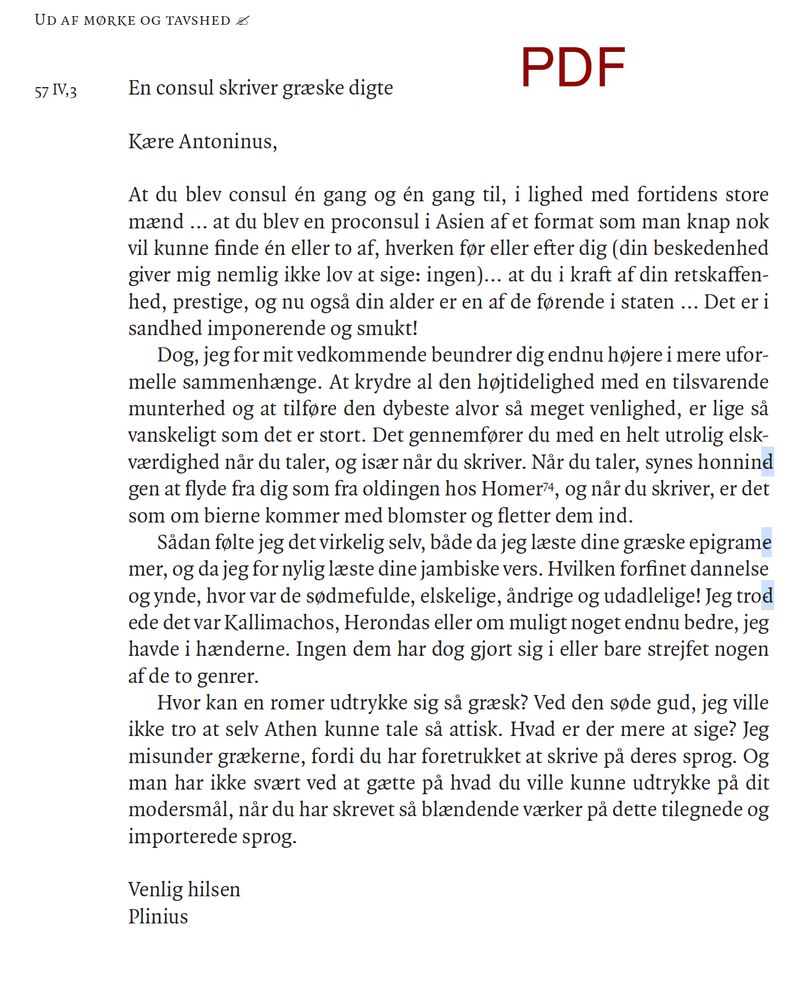
with a hyphen, in the exported pdf, appear with a strange sign.
I don't see this sign in indesign, but in the pdf it's clear. What is this cause?



 6
Replies
6
6
Replies
6


Copy link to clipboard
Copied
What font is it? Does it only happen with this specific font?
It looks like it may not have embedded correctly. Deleting it entirely from your system, and re-installing it might fix this.

Copy link to clipboard
Copied
I have the same problem, did you find a solution yet?
Copy link to clipboard
Copied
No, I never solved the problem, and still have it with many different types of font;(

Copy link to clipboard
Copied
My two cents. I had the similar problem. In my case I found out that I had 2 different languages set inside one paragraph. After changing whole paragraph to one language, everything works fine. As soon as I set one word to be from different language, similar problem with hyphen over character is back.

Copy link to clipboard
Copied
This solved it for me thank you !

Copy link to clipboard
Copied
Hi together,
I think, that's a known bug!
Did you enable the option "PDF Tags" in the export preset for PDF?
Try to disable it and export again.
If this is not possible because you need a tagged PDF we have to go to the source of the issue. And unfortunately this is the usage of the "Adobe World-Ready Composer" plus perhaps some formatting overrides with your paragraphs. Change text composition to the "Adobe Paragraph Composer" or the "Adobe Single-line Composer" to get rid of the issue. However that means, that you have to proofread the whole document again.
Read about all the details here:
Automatic hyphens randomly have letters in them
bracewell4213, 2 hours ago
https://community.adobe.com/t5/indesign/automatic-hyphens-randomly-have-letters-in-them/td-p/1218946...
Support a fix of that bug, I can see it already in InDesign CS6, and vote at InDesign UserVoice:
PDF Hyphenation Bug when line has cross-reference, hyphenated word, and option is to create Tagged PDF
Sonny Rafael, February 13, 2019
Regards,
Uwe Laubender
( ACP )


Get ready! An upgraded Adobe Community experience is coming in January.
Learn more
 AdChoices