Exit
  • Global community
    • Language:
      • Deutsch
      • English
      • Español
      • Français
      • Português
  • 日本語コミュニティ
  • 한국 커뮤니티
0

Script issue: Find/Change is not recognizing the full GREP expression

Contributor ,
Nov 08, 2022 Nov 08, 2022

Hi everyone,


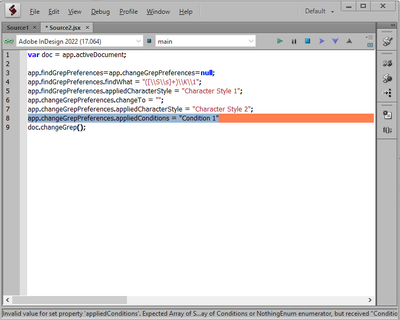
Can anyone help me with a script issue? Somehow, my Find/Change is not recognizing the full GREP expression "([\S\s]+)\K\1" when I run the code on Extendscript Toolkit. As shown in the screenshot below, the backslaches and number "1" are missing. Also, I'm unable to include "Condition 1" on Change Format. It seems this line "app.changeGrepPreferences.appliedConditions = "Condition 1"" is not correct.  Here's the script:

var doc = app.activeDocument;

app.findGrepPreferences=app.changeGrepPreferences=null;
app.findGrepPreferences.findWhat = "([\S\s]+)\K\1";
app.findGrepPreferences.appliedCharacterStyle = "Character Style 1";
app.changeGrepPreferences.changeTo = "";
app.changeGrepPreferences.appliedCharacterStyle = "Character Style 2";
app.changeGrepPreferences.appliedConditions = "Condition 1"
doc.changeGrep();

Capture.PNG
Thanks in advance,
Rogerio

TOPICS
Bug , Scripting
440
Translate
Report
Community guidelines
Be kind and respectful, give credit to the original source of content, and search for duplicates before posting. Learn more
community guidelines

correct answers 2 Correct answers

Community Expert , Nov 08, 2022 Nov 08, 2022

You have to escape the backslashes in the grep pattern string, eg.

app.findGrepPreferences.findWhat = "([\\S\\s]+)\\K\\1";

(I'm not able to test right now, but that is definitely one issue.)

- Mark

Translate
Community Expert , Nov 08, 2022 Nov 08, 2022

The error says it expects an Array so could you try 


app.changeGrepPreferences.appliedConditions = ['Condition 1'];


- Mark 

Translate
Community Expert ,
Nov 08, 2022 Nov 08, 2022

You have to escape the backslashes in the grep pattern string, eg.

app.findGrepPreferences.findWhat = "([\\S\\s]+)\\K\\1";

(I'm not able to test right now, but that is definitely one issue.)

- Mark

Translate
Report
Community guidelines
Be kind and respectful, give credit to the original source of content, and search for duplicates before posting. Learn more
community guidelines
Contributor ,
Nov 08, 2022 Nov 08, 2022

Hi Mark,

It worked like magic! Thanks for that 🙂

Could you also help me to figure out how to fix this?

Rogerio5C09_0-1667925643560.png

Thanks,
Rogerio


Translate
Report
Community guidelines
Be kind and respectful, give credit to the original source of content, and search for duplicates before posting. Learn more
community guidelines
Community Expert ,
Nov 08, 2022 Nov 08, 2022

The error says it expects an Array so could you try 


app.changeGrepPreferences.appliedConditions = ['Condition 1'];


- Mark 

Translate
Report
Community guidelines
Be kind and respectful, give credit to the original source of content, and search for duplicates before posting. Learn more
community guidelines
Contributor ,
Nov 08, 2022 Nov 08, 2022
LATEST

It worked! Thank you so much 🙂

Translate
Report
Community guidelines
Be kind and respectful, give credit to the original source of content, and search for duplicates before posting. Learn more
community guidelines