


- Home
- InDesign
- Discussions
- Re: Script to open 'Insert Cross-Reference' Dialog
- Re: Script to open 'Insert Cross-Reference' Dialog

Copy link to clipboard
Copied
Hello,
I'm trying to get something that I (thought) was fairly simple. When I right-click, I want to add a menu option to the Context Menu to open the 'Insert Cross-Reference...' Dialog. But I can't seem to make any progress in actually opening that dialog.
Here is what I have:
1) I understand how to add the context menu item, based on http://www.hubbers.info/content/customize-indesign-and-incopy-contextmenus
2) I understand in general how to launch menu items, based on http://www.indiscripts.com/post/2010/02/how-to-create-your-own-indesign-menus
However I can't seem to figure out where those keys come from, and what the key for the Cross-Reference dialog/menu is. They reference the findKeyStrings() function, but it doesn't seem to return anything for "Insert Cross-Reference", the menu item name in my locale:
app.findKeyStrings("Hyperlinks & Cross-References")
Result:
app.findKeyStrings("Insert Cross-Reference...")
Result:
I tried modifying another script I found that dumped all menu ID's, to dump the key values. While the "Insert Cross-Reference..." and "Hyperlinks & Cross-References" both appear with a id & area, the KeyString is empty! Am I doing something wrong?
Thanks,
-Colin
Here is my script to list all ID's:
var myActions = app.menuActions;
var myActionsList = Array();
var counter = Number(0);
var menuMask = null;
var keyString;
for(var i = 0; i <myActions.length; i++){
var nameStr = String(myActions.name);
try {
keyString = String(app.findKeyStrings(nameStr))
}
catch(all) {
continue;
}
myActionsList.push(nameStr);
myActionsList.push(String(myActions.area));
myActionsList.push(String(myActions.id));
myActionsList.push(keyString);
}
var myDoc = app.activeDocument;
var myTextFrame = myDoc.pages[0].textFrames.add();
myTextFrame.geometricBounds = app.activeDocument.pages[0].bounds;
var myMenuActionsTbl = myTextFrame.insertionPoints[0].tables.add();
myMenuActionsTbl.columnCount = 4;
myMenuActionsTbl.bodyRowCount = myActions.length;
myMenuActionsTbl.contents = myActionsList;


 1 Correct answer

Ah... yes that makes sense, so there IS reason behind them 😉 But you are right - it sounds like findKeyStrings should ideally ignore these, as you want to pass it the english version, not the "english with all these extra ampersands".
Actually, I'm not sure anymore. I was almost on the urge of writing up a bug report. But I think it's just that the scripting docs are deficient:
...
*EDIT*: So if you are on Windows, you can figure out the string to pass directly. Hit the alt button and use the keyboa

 10
Replies
10
10
Replies
10

Copy link to clipboard
Copied
When I right-click, I want to add a menu option to the Context Menu to open the 'Insert Cross-Reference...' Dialog.
Incidently, there's more than one context menu, by the way. There's the Layout Context Menu and the Text Context Menu, not to mention all the panel context menus ("Tables Style Panel Context Menu" [sic], etc.).
However I can't seem to figure out where those keys come from, and what the key for the Cross-Reference dialog/menu is. They reference the findKeyStrings() function, but it doesn't seem to return anything for "Insert Cross-Reference", the menu item name in my locale:
You don't actually have to use the key, you can just use the actual name, too. But the keys don't include '...', though (confusingly), you have to add it yourself to the result (I believe). In this case, it appears even that's not sufficent. So I guess it is probably concatenating $ID/Insert with $ID/Cross-Reference. So you could do that yourself, or use the locale-specific name. Or, I guess, some would suggest you use the ID, 79377, though I personally don't like that, but it's been alleged that there are bugs in some locales that make that the safest approach.
Copy link to clipboard
Copied
Thanks for the info John.
I tried digging a little deeper into how InDesign works & where those names come from, perhaps this will be useful to other people. The main problem is InDesign seems to put extra & in sometimes in the name... but it doesn't always, so you can try just playing around with where they go. I used another procedure though to find the names (which I'll detail). For reference, the required names for my specific case are:
For the menu entry:
app.findKeyStrings("Insert &Cross-Reference...")
Result: $ID/New XRef...
For the type sub-menu:
app.findKeyStrings("&Hyperlinks && Cross-References")
Result: $ID/XRefSubMenu
Perhaps there is rhyme & reason to how the extra & are added, but I'm not sure of it myself. So here is how you find the names:
The names themselves seemed to be stored in .idrc files, located somewhere in the Adobe InDesign CS5.5\Plug-Ins\Layout\(SOMETHING)/idrc_PMST directory. Rather than poking around let's do a smart search.
Step #1: Download any utility capable of searching binary files, e.g.: http://www.wingrep.com/download.htm
Step #2: Search for a single word in what you want (e.g.: I searched for cross-reference), look at the results list. You can probably guess which file you want - in this case it was one in the 'Hyperlinks Panel Resources', which made sense:
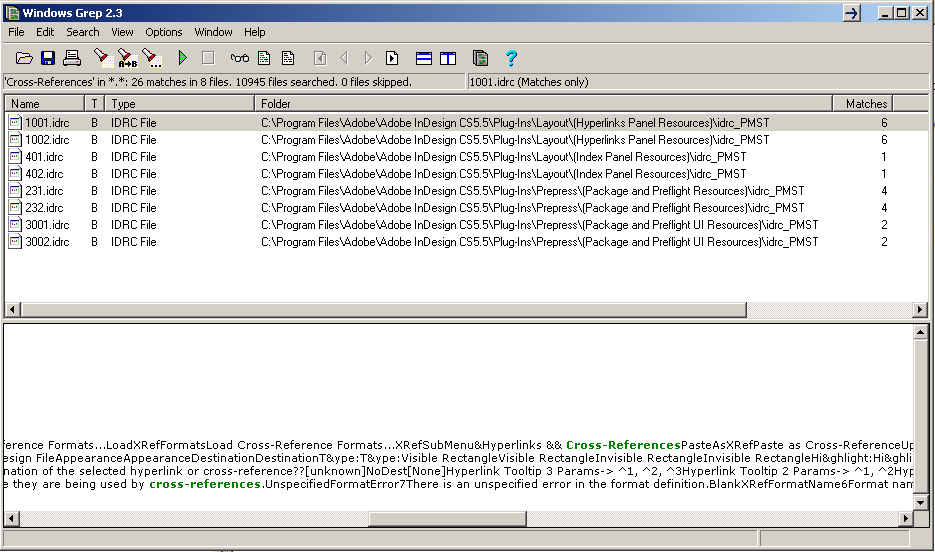
Step #3: Open the file in a text editor. Find the english-like name of what you want, and immediatly preceeding that will be the InDesign keyword. To double-check run the english-like name through the app.findKeyStrings() function:

I wasn't too sure on the .idrc file format, it seems pretty basic. You can open it in a hex editor if you want to see all the binary data, perhaps we could make a script dump everything...
Regards,
-Colin O'Flynn
Copy link to clipboard
Copied
Good for you, Colin! I believe the &'s are specified as:
| Title | string | readonly | The name of the Menu for display in the user interface. The title includes any ampersand characters (&), which are used to tell the Windows OS to underline the following character in the name for use with the Alt key to navigate to a menu item. Double ampersands are used to display an actual ampersand character in the name. The Mac OS ignores and removes the extra ampersand characters. |
I would say, really, this is a bug in app.findKeyStrings(). Do you disagree?
Copy link to clipboard
Copied
Ah... yes that makes sense, so there IS reason behind them 😉 But you are right - it sounds like findKeyStrings should ideally ignore these, as you want to pass it the english version, not the "english with all these extra ampersands".
*EDIT*: So if you are on Windows, you can figure out the string to pass directly. Hit the alt button and use the keyboard to navigate the menu, this will let you see where the ampersands need to be added. For example the following is my part of the menu:

And you also add an extra & if there is already one. Thus:
"Hyperlinks & Cross-References" --> "&Hyperlinks && Cross-References"
"Insert Cross-Reference..." --> "Insert &Cross-Reference..."
"Insert Special Character" --> "Insert &Special Character"
"Insert White Space" --> "Insert &White Space"
Thanks for finding that out John, makes this much easier!
Copy link to clipboard
Copied
Ah... yes that makes sense, so there IS reason behind them 😉 But you are right - it sounds like findKeyStrings should ideally ignore these, as you want to pass it the english version, not the "english with all these extra ampersands".
Actually, I'm not sure anymore. I was almost on the urge of writing up a bug report. But I think it's just that the scripting docs are deficient:
*EDIT*: So if you are on Windows, you can figure out the string to pass directly. Hit the alt button and use the keyboard to navigate the menu, this will let you see where the ampersands need to be added. For example the following is my part of the menu:
There's a much easier way! The ampersands appear in the title property:
app.findKeyStrings(app.menuActions.itemByName("Insert Cross-Reference...").title)
Result: $ID/New XRef...
Copy link to clipboard
Copied
Awesome, that method does seem to work! Some menu items seem to return more than one results, for example:
app.menuActions.itemByName("Insert Footnote").title
Result: Insert Footn&ote,Insert Footn&ote
But you can manually just pass one of those onword to findKeyStrings(). With that I finally got my script running thanks to your other suggestion of using the .add() instead of what I was doing, which was adding an entire menu item with a function call which attempted to open the dialog. Here is what I have, is there any changes/improvements you would suggest?
/* ADD items to CONTEXT MENU
The locale-independent name (aka "key string") for the context menus:
- Layout menu: $ID/RtMouseLayout - when an image is selected
- Default menu: $ID/RtMouseDefault - when nothing is seleced
- Text menu: $ID/RtMouseText - when the mouse is in text, or text is selected
*/
var contextMenu = app.menus.itemByName("$ID/RtMouseText");
var xrefMenu = app.menus.item("$ID/Main").submenus.item("$ID/&Type").submenus.item("$ID/XRefSubMenu");
var refItem = xrefMenu.menuItems.item("$ID/New XRef...");
( function () {
try {
contextMenu.menuItems.itemByName(refItem.name).remove();
} catch( ex ) {};
contextMenu.menuItems.add(refItem.associatedMenuAction,LocationOptions.AFTER,contextMenu.menuItems.itemByName("$ID/InsertSpecial Footnote"));
})();
Copy link to clipboard
Copied
Awesome, that method does seem to work! Some menu items seem to return more than one results, for example:
app.menuActions.itemByName("Insert Footnote").title Result: Insert Footn&ote,Insert Footn&ote
Sure. That's because there is more than one "Insert Footnote" menuAction:
app.menuActions.itemByName("Insert Footnote").id
Result: 47134,119699
You could always choose the first one:
app.menuActions.itemByName("Insert Footnote").getElements()[0].title
Result: Insert Footn&ote
Or you could decide based on personal knowledge which one to use.
For Insert Footnote, 119699 is the one in the Text Context Menu, and 47134 is the one in the Main > Type menu. Presumably the ID Engineers have assigned these as different functions so they could do different things in the future, without breaking compatibility with the past...
Or you could chase it down via app.menus like you were doing initially.
As for your script, what's the deal with your variables? You go to the trouble to evaluate an anonymous function, which is great! But the purpose of doing that is to avoid polluting the global namespace with variables. But you declare your variables in the global scope. You might as well either punt the anonymous function, or move the variables inside it.
As long as we're reviewing in detail I would:
- Check the existence of the item, and if it already exists, neither remove it nor re-add it. I suppose whether or not you do this depends on your opinion of what should really happen, and what you want in testing may not be what you want in production.
- Ensure that the reference point actually exists before using it.
But this is all minor. Looks like it should do what you want! Great!
Copy link to clipboard
Copied
Thanks for the feedback! A lot of why I did something that way is because it's hacked together from other examples, so I don't have good reasoning ;-).
I'm just starting with ID Scripting, and trying to remember my last JS programming from 6 years back! So your advice/notes are very graciously received.
Copy link to clipboard
Copied
I was also going to post my resulting script, BUT it seems you cannot even open the 'Insert Cross-Reference Dialog' anyway. For reference, here is the script that would open it:
var xrefMenu = app.menus.item("$ID/Main").submenus.item("$ID/&Type").submenus.item("$ID/XRefSubMenu");
var refItem = xrefMenu.menuItems.item("$ID/New XRef...");
var refItemAction = refItem.associatedMenuAction;
refItemAction.invoke();
When you run this in a text box, the dialog opens & closes, with the following error message:
The requested action opened an asynchronous previewable modal dialog. This is not compatible with the scripting architecture, and so the dialog has been automatically dismissed using the default button.
So close, but so far.
-Colin
Copy link to clipboard
Copied
Umm, why are you trying to .invoke() it, anyhow? Just .add the the menuAction to the Text Context menu. Works fine for me, I stuck it right next to Insert Footnote...


Get ready! An upgraded Adobe Community experience is coming in January.
Learn more
 AdChoices