


- Home
- InDesign
- Discussions
- Re: Slow performance in InDesign v16.3.2 on Mac OS...
- Re: Slow performance in InDesign v16.3.2 on Mac OS...
Slow performance in InDesign v16.3.2 on Mac OS Big Sur v11.5.1 - Spinning Beach Ball

Copy link to clipboard
Copied
To my great dissapointment and frustration InDesign has a very slow performance.
Every time I try to do any action/move/ absolutely anything the "beach ball" appears and stalls me for 5-10 seconds.
So far I have tried, unistalling-installing the program, resetting prefereces changing color profiles and monitor settings and absolutely NOTHING works.
Please Adobe... find a solution!!!
Im running InDesign 2021 (16.3.2) on Mac OS Big Sur (11.5.1) annoying slow performance
{Renamed by MOD}


 36
Replies
36
36
Replies
36


Copy link to clipboard
Copied
Hi @rfrad @MikaMaki @PRO64 @blukom,
Sorry about the trouble you all are facing. I would request to share the details asked above, which would help us assist you accordingly. (Share your system specs and file size as well)
Also, please confirm if you all have tried the following measures to overcome this issue:
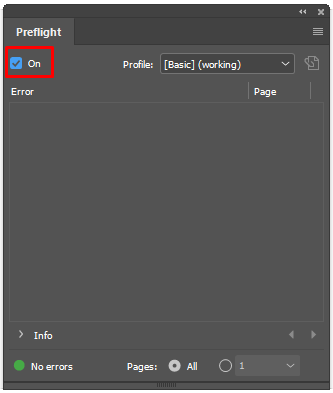
- Turn Off Preflight
InDesign Preflight constantly monitors your document to see if there are any “preflight errors,” such as overset text. It should not affect much, but if you’re running into slowdowns, it’s worth try turning it off (Window > Output > Preflight > Deselect the checkbox). - Disconnect from the Internet and work as you all usually do. (for just testing purposes)
If this helps, you can exclude these network endpoints (https://helpx.adobe.com/enterprise/kb/network-endpoints.html), which Adobe product used from your firewall with the help of your IT team or anyone with some technical knowledge. - Disable TimeMachine. (for just testing purposes)
Let us know how it goes.
I will be looking forward to hearing from you all.
Thanks & Regards,
Anshul Saini

Copy link to clipboard
Copied
Same here. Top of the line Intell 2020 Macbook pro and beachballs. Trying to get Apple to send me a new computer. I can't do my work. I could with my 2013 iMac and CS4 but the OS is obsolete yet WAY faster. It seems as we move forward with technology which is supposed to be faster, things either stay the same speed or even get slower. This is not acceptible.
Copy link to clipboard
Copied
Hi there,
Sorry to hear about the trouble you are facing. You perform the following steps and let us know how it goes:
- Keep all the files and links on the system HDD.
- Please check if turning off the internet help resolve the issue?
- Are you using TimeMachine? If yes, please check if turning it off/ disabling it help resolve the issue?
- Please check if turning off preflight (Window > Output > Preflight > Deselect the checkbox) help resolve the issue?
- Please try different Display options (View > Display Performance) in InDesign. I recommended working on Typical Display.
- Please try turning off GPU performance from InDesign preferences (cmd + k > GPU Performance > uncheck GPU Performance and see if that helps?
We will be looking forward to your response.
Thanks & Regards,
Anshul Saini
Copy link to clipboard
Copied
If i could remove my comment above I would. Montery has absolutely fixed my problem. All good now. Thanks Apple.

Copy link to clipboard
Copied
Same Problem here...
First on my MacBook pro 15" Mid 2014.
After that I ordered a new Mac Mini 2020 M1, 16GB 1TB, but the same problems... Slow and spinning balls
Big Sur 11.6 Indesign 16.4
regards Michael
Copy link to clipboard
Copied
Hi @goldmichel,
Sorry to hear about the trouble you are facing. I would like to know if you have tried the steps suggested above by me. If not, please try them and let us know if they help.
Regards,
Anshul Saini

Copy link to clipboard
Copied
Copy link to clipboard
Copied
Hello everyone. I found through months of troubleshooting that time machine was the culprit all along. I have reinstalled plug-ins and I am running everything as I have before, with the exception of Time Machine automatic backups. Now I run it back up at the end of every day, but I have stopped trying to do automatic backups as Time Machine greatly reduces Adobe in design's ability to do anything.
Copy link to clipboard
Copied
After almost 3 months of trouble and different tests the only thing that actually works is turning off automatic
Time Machine backups. I hope that in future updates Adobe will resolve this. Doing a manual back up at the end of the day cannot be a permanent solution.
Copy link to clipboard
Copied
@PRO64
Have a quick question. Is your Time Machine set on a external disk directly connected to your computer? Mine is on a server disk. Not sure if this affects the situation.

Copy link to clipboard
Copied
This is my experience...
After doing everything that people say. the spinning ball appearance again and again...
I turned off my internet, it seems it helps.
This is what I do to have fewer spinning balls.
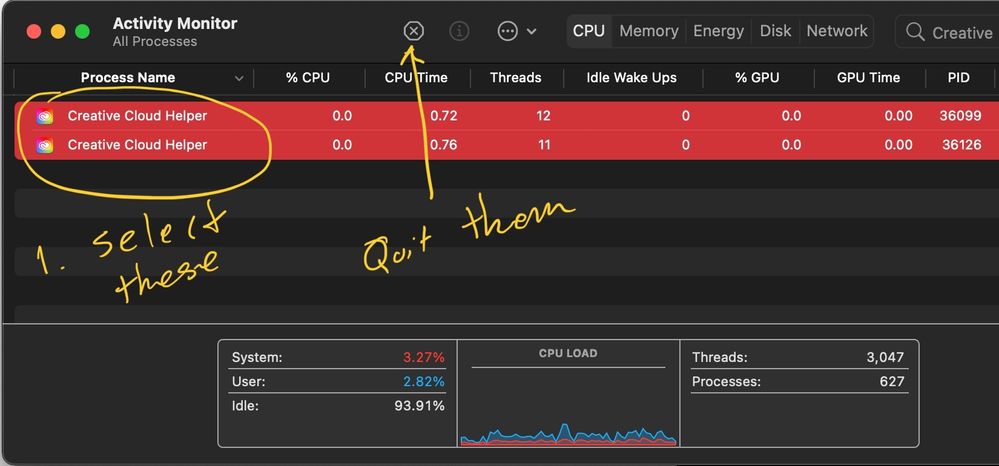
1. Open your Activity Monitor
2. Search "Creative"
3. Quit everything that is Creative as soon as you see it.
This works for me so far. You cant try it to see if it works for you too.
Copy link to clipboard
Copied
I tried everything with Big Sur and I mean everything. I was going to return my Macbook. Then I upgraded to Monterey and poof. Faster than ever. No more beachballs. I also am now using InDesign 17.01. Monterey 12.0.1
All good. Hope it stays that way.

-
- 1
- 2

Find more inspiration, events, and resources on the new Adobe Community
Explore Now
 AdChoices