

Copy link to clipboard
Copied
Hi all,
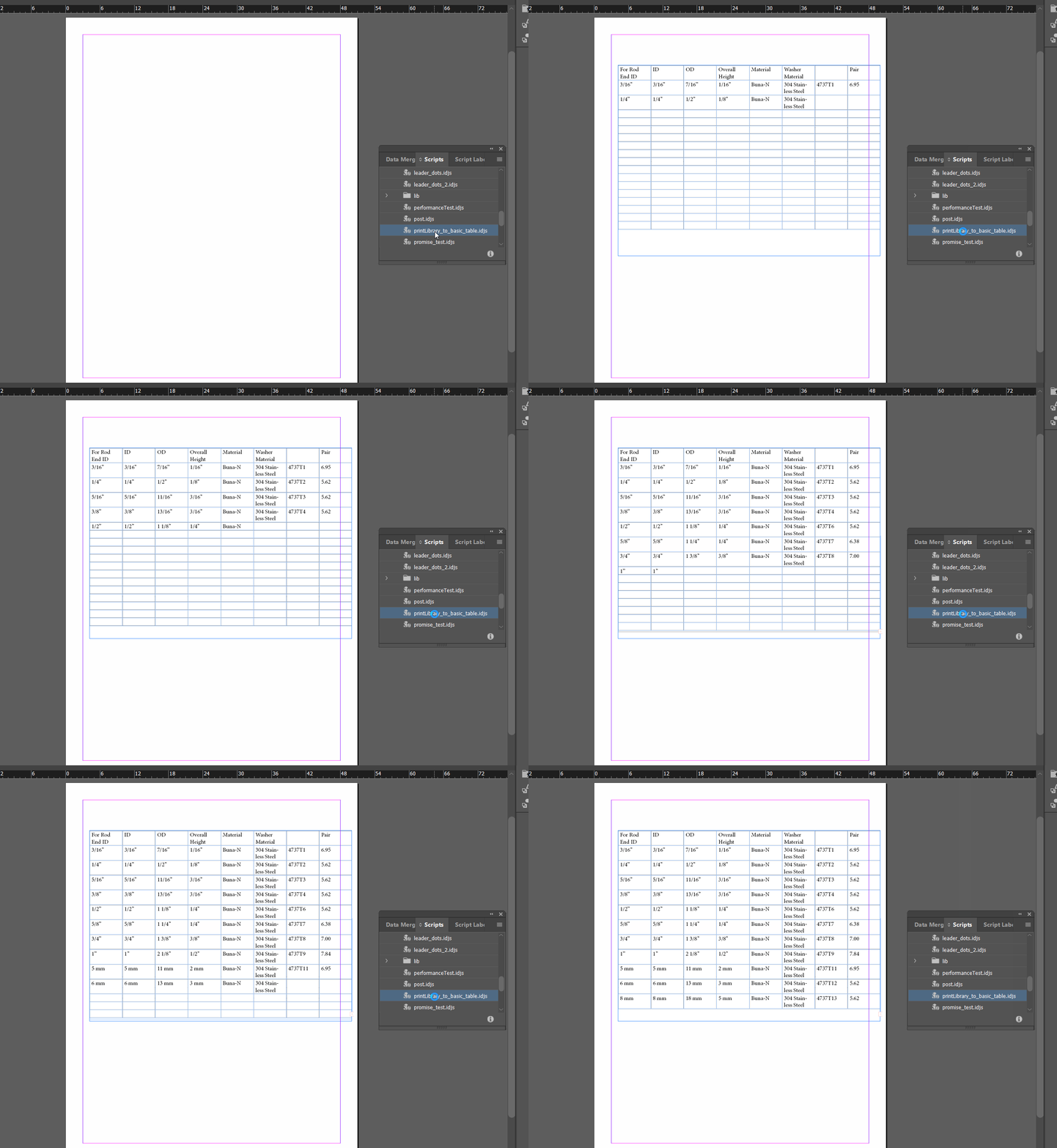
I'm noticing some odd behavior when creating a table and populating the cells' contents with a json response from an API. I've attached the video here showing how it goes cell by cell. I've tried preferences like enableRedraw in an attempt to have the table display with all the contents at once but that doesn't seem to work.
Further, I'd like to speed up this process as this isn't even a large table. Is there a more efficient way to populate a table?
async function fetchJson(url) {
return fetch(url)
.then((response) => {
return response.json();
});
}
const createTable = (textFrame, tableData) =>
{
//Get bounds of textframe to lay table on
const bounds = textFrame.geometricBounds;
columnLength = tableData.tableColumns.length;
rowLength = tableData.tableRows.length;
const table = textFrame.tables.add(
{
bodyRowCount: rowLength,
columnCount: columnLength,
width: bounds[3] - bounds[1],
});
cells = table.cells.everyItem().getElements();
tableData.tableCells.forEach(cellData => {
//calculate index in cell list based on row and column
cellIndex = cellData.rowIndex * columnLength + cellData.columnIndex;
cell = cells[cellIndex];
let texts = cell.texts.everyItem().getElements();
texts[0].contents = cellData.text;
//add labels to cell objects. These are used for formatting decisions.
cell.insertLabel("rowType" , cellData.rowType.toString());
cell.insertLabel("columnType" , cellData.columnType);
cell.insertLabel("rowIndex" , cellData.rowIndex.toString());
cell.insertLabel("columnIndex" , cellData.columnIndex.toString());
cell.insertLabel("columnAttributeId" , cellData.columnAttributeId);
cell.insertLabel("partNumbers" , cellData.partNumbers.toString());
cell.insertLabel("attributeValueIds" , cellData.attributeValueIds.toString());
cell.insertLabel("applyLeaderDots" , cellData.cellStyles.applyLeaderDots);
cell.insertLabel("bottomEdgeStrokeWeight" , cellData.cellStyles.bottomEdgeStrokeWeight);
cell.insertLabel("topEdgeStrokeWeight" , cellData.cellStyles.topEdgeStrokeWeight);
cell.insertLabel("leftEdgeStrokeWeight" , cellData.cellStyles.leftEdgeStrokeWeight);
cell.insertLabel("rightEdgeStrokeWeight" , cellData.cellStyles.rightEdgeStrokeWeight);
cell.insertLabel("verticalJustification" , cellData.cellStyles.verticalJustification);
cell.insertLabel("justification", cellData.cellStyles.justification)
cell.insertLabel("rightInset" , cellData.cellStyles.rightInset);
cell.insertLabel("leftInset" , cellData.cellStyles.leftInset);
cell.insertLabel("boldText" , cellData.cellStyles.boldText);
cell.insertLabel("font", cellData.cellStyles.font);
});
return table;
}
var resp = await fetchJson(<urlOfRespObj>);
let table = createTable(textFrame, resp[0]);
Copy link to clipboard
Copied
Phil,
Scripts which involve async APIs are executed on a cpu time sharing basis with other tasks that execute within InDesign application and hence are slower. This is because these scripts could be long running scripts, waiting for an external event etc, and under these cicrucmstances it is not possible to keep the cpu cycles dedicated for the script alone, which would result in InDesign UI being unresponsive.
In cases where you need performance, the script either shouldn't use async APIs or you could split them into multiple script files and invoke via doScript method. For example, the table update operation could be implemented in a separate independent script file, which doesn't include any async methods. You could call this script using doScript (with arguments) from your main script file (which can have async APIs calls). In this case your caller script will be time sharing cpu, while the called script will be run on priority till completion.
Do keep in mind that the current GA releases don't support passing arguments to script and hence wouldn't support above approach. But you could try this on the InDesign 18.4 prerelease. There are also other feature improvements to scripting DOM including better performance from 18.4.
Hope this helps, looking forward to hear back after you try this.
Copy link to clipboard
Copied
Hi @Phil 815 ,
to speed up performance one should be able to assign an array of strings to the table itself using the contents property of the table. Below an example written in ExtendScript:
/*
Code below is in ExtendScript and not UXP.
But assigning an array of strings should also be possible with UXP.
*/
var a =
[
"cell 1" ,
"cell 2" ,
"cell 3" ,
"cell 4" ,
"cell 5" ,
"cell 6" ,
"cell 7" ,
"cell 8"
];
/*
Adds a new document with a table of two rows and two columns ( 4 cells )
The array of strings will be assigned through property contents.
The first 4 items of the array will populate the 4 cells in the table.
There is no error if the length of cells does not equal the length of items in the assigned array.
*/
var doc = app.documents.add();
var tf = doc.textFrames.add
(
{
geometricBounds :
[
"0mm",
"0mm",
"200mm",
"200mm"
]
}
);
var tbl = tf.parentStory.insertionPoints[0].tables.add
(
{
headerRowCount : 0 ,
footerRowCount : 0 ,
bodyRowCount : 2 ,
columnCount : 2
}
);
// Assign the array of strings to the table:
tbl.contents = a ;
Regards,
Uwe Laubender
( Adobe Community Expert )
Copy link to clipboard
Copied
@Laubender this is great! I never knew about this way. Thanks very much! 🙂
- Mark
Copy link to clipboard
Copied
Build the table outside of InDesign - as InDesign Tagged Text.
There is somewhere some rather outdated specification - but the easiest way for you to know how it works would be to prepare sample table - and then export parent story.
It's similar to HTML / XML.
Then you can create the table's contents as a text file - which should be extremely fast - then just import it. I've used this way in the tool I've created few years ago for the Polish Patent Office.
Get ready! An upgraded Adobe Community experience is coming in January.
Learn more