Exit
  • Global community
    • Language:
      • Deutsch
      • English
      • Español
      • Français
      • Português
  • 日本語コミュニティ
  • 한국 커뮤니티
0

Very small kerning script....

Explorer ,
Aug 09, 2012 Aug 09, 2012

Hi, guys. I confess that I am not a scripter: I have tried and failed (twice). So please can anyone help me writing a small script? This is what I need:
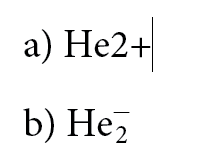
image.gif

Step 1:

Starting with the cursor type inserted to imediatly to the right of signal +, apply Subscript to the number 2 (that is, to the character immediatly before the last char in the word.

Step 2:

Apply a Character Style to the last char in the word.

Step 3:

Insert the cursor imediatly to the left of the last char and apply -550 kerning unities.

Step 4:

Move the cursor imediatly to the left of and apply 50 kerning unities.

We start with a) and end in b).

My best regards and I thank everybody in advance.

Maria

TOPICS
Scripting
1.1K
Translate
Report
Community guidelines
Be kind and respectful, give credit to the original source of content, and search for duplicates before posting. Learn more
community guidelines

correct answers 1 Correct answer

Mentor , Aug 09, 2012 Aug 09, 2012

app.selection[0].words[0].insertionPoints[-2].kerningValue = -550;

app.selection[0].words[0].insertionPoints[-3].kerningValue = 50;

app.selection[0].words[0].characters[-1].appliedCharacterStyle = "My Style"; // Change to style name

app.selection[0].words[0].characters[-2].position = Position.SUBSCRIPT;

This link http://forums.adobe.com/message/4567293#4567293 might be of interest.

Trevor

Translate
Mentor ,
Aug 09, 2012 Aug 09, 2012

Why does a) have a + sign and b) have some form of - sign?

Translate
Report
Community guidelines
Be kind and respectful, give credit to the original source of content, and search for duplicates before posting. Learn more
community guidelines
Explorer ,
Aug 09, 2012 Aug 09, 2012

Hi, Trevor.

Thank you for your help. It was my mistake: the text in a and in b is equal. The script will apply only formating and kerning.

(The book I am working is a Chemical book and the script is going to help me format a lot of chemical formulas).

Maria

Translate
Report
Community guidelines
Be kind and respectful, give credit to the original source of content, and search for duplicates before posting. Learn more
community guidelines
Mentor ,
Aug 09, 2012 Aug 09, 2012

app.selection[0].words[0].insertionPoints[-2].kerningValue = -550;

app.selection[0].words[0].insertionPoints[-3].kerningValue = 50;

app.selection[0].words[0].characters[-1].appliedCharacterStyle = "My Style"; // Change to style name

app.selection[0].words[0].characters[-2].position = Position.SUBSCRIPT;

This link http://forums.adobe.com/message/4567293#4567293 might be of interest.

Trevor

Translate
Report
Community guidelines
Be kind and respectful, give credit to the original source of content, and search for duplicates before posting. Learn more
community guidelines
Explorer ,
Aug 09, 2012 Aug 09, 2012
LATEST

Hi, Trevor.

Thank you very much for your script. It works very well and is going to be a great time saver.

Best regards,

Maria

Translate
Report
Community guidelines
Be kind and respectful, give credit to the original source of content, and search for duplicates before posting. Learn more
community guidelines

