Exit
  • Global community
    • Language:
      • Deutsch
      • English
      • Español
      • Français
      • Português
  • 日本語コミュニティ
  • 한국 커뮤니티
0

Viewing the underline options panel

New Here ,
May 06, 2021 May 06, 2021

Hi I would like to view the underline options panel. 


Thank you so much for your answers.


Ignacio

TOPICS
How to
1.0K
Translate
Report
Community guidelines
Be kind and respectful, give credit to the original source of content, and search for duplicates before posting. Learn more
community guidelines

correct answers 1 Correct answer

Guide , May 06, 2021 May 06, 2021

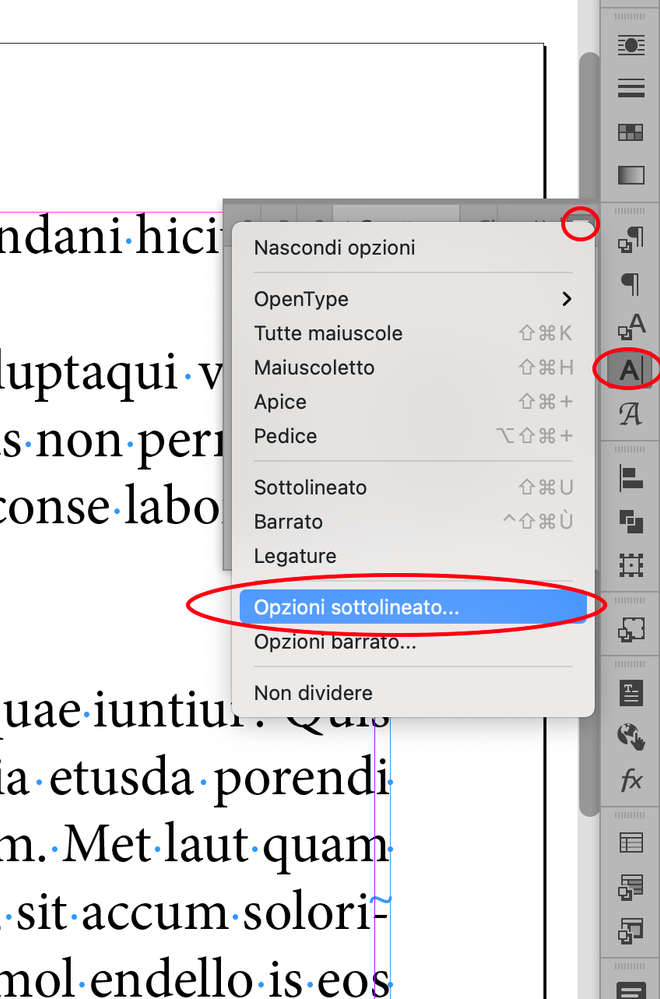
go to Character panel > Underline options

Translate
Guide ,
May 06, 2021 May 06, 2021

go to Character panel > Underline options

Translate
Report
Community guidelines
Be kind and respectful, give credit to the original source of content, and search for duplicates before posting. Learn more
community guidelines
New Here ,
May 06, 2021 May 06, 2021

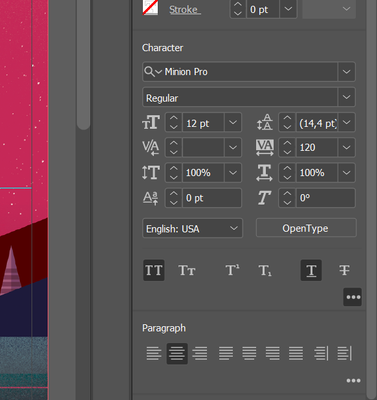
This is what I have on my screen:

Ignacio5FF3_0-1620287339947.png


Translate
Report
Community guidelines
Be kind and respectful, give credit to the original source of content, and search for duplicates before posting. Learn more
community guidelines
Guide ,
May 06, 2021 May 06, 2021

Schermata 2021-05-06 alle 09.44.17.png

Translate
Report
Community guidelines
Be kind and respectful, give credit to the original source of content, and search for duplicates before posting. Learn more
community guidelines
Guide ,
May 06, 2021 May 06, 2021

Is your screenshoot from Illustrator?

This is InDesign forum.

Translate
Report
Community guidelines
Be kind and respectful, give credit to the original source of content, and search for duplicates before posting. Learn more
community guidelines
Community Expert ,
May 06, 2021 May 06, 2021

Ignacio is looking at the Properties panel. In it, you can only enable and disable underlining, you can't see or modify its properties (even though the panel is called Properties!).

As Vladan mentioned, Ignacio, you need the Character panel. Apart from Vladan's way of getting there, you can also use the Type menu from the top menu bar, then select Character.

Translate
Report
Community guidelines
Be kind and respectful, give credit to the original source of content, and search for duplicates before posting. Learn more
community guidelines
Guide ,
May 06, 2021 May 06, 2021

right.

it is indesign Properties panel (not Illustrator properties panel as I asked before)

Translate
Report
Community guidelines
Be kind and respectful, give credit to the original source of content, and search for duplicates before posting. Learn more
community guidelines
New Here ,
May 06, 2021 May 06, 2021

It´s from indesign

Translate
Report
Community guidelines
Be kind and respectful, give credit to the original source of content, and search for duplicates before posting. Learn more
community guidelines
New Here ,
May 06, 2021 May 06, 2021
LATEST

Thank you for your great answers

Translate
Report
Community guidelines
Be kind and respectful, give credit to the original source of content, and search for duplicates before posting. Learn more
community guidelines