Participant
December 21, 2020
Answered

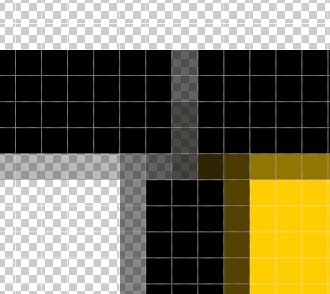
White pixel lines appearing on png's at intersecting line points on tables created in indesign

  • December 21, 2020
  • 1 reply
  • 374 views

I'm getting these white pixel lines as shown in graphic - when exporting tables from inDesign.

They don't show when I turn anti-alias off - but this gives the png a hard edge to the graphic which I dont want.

How do I fix this please?

This topic has been closed for replies.
Correct answer rob day

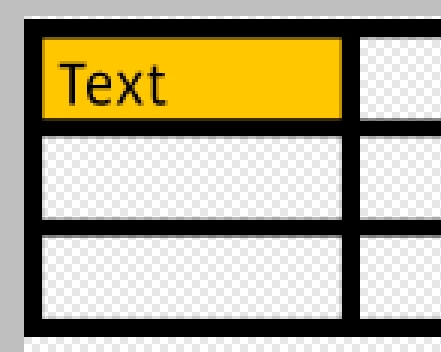
Also, the interpolation method matters, try Bilinear. Here’s Auto vs. Bilinear 576ppi to 144ppi:


1 reply

rob day
Community Expert
Community Expert
December 21, 2020

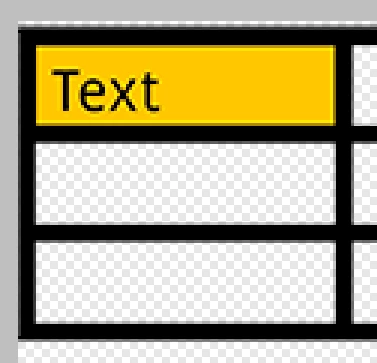
The anti-aliasing pixels are showing where the cell borders meet. You could try turning off anti-aliasing and exporting at a higher resolution than needed followed by a downsample—the downsample will create an ati-aliasing effect. Here I exported at 4x the desired resolution followed by a downsample to the target res:


Participant
December 21, 2020

Thanks Rob - a good solution that's going to save a lot of hours work. I was selecting and filling the areas before. Upwards of  20-30 steps before depending how many insecting points there were on the table. Now just 1 exrta step. Regards

rob day
Community Expert
rob dayCommunity ExpertCorrect answer
Community Expert
December 21, 2020

Also, the interpolation method matters, try Bilinear. Here’s Auto vs. Bilinear 576ppi to 144ppi: