


- Home
- InDesign
- Discussions
- Re: ADA Report - Form XObject - Other elements alt...
- Re: ADA Report - Form XObject - Other elements alt...


Copy link to clipboard
Copied
I have a document that was given to me that errors upon accessibility check. The normal solution would be to check the alt tags and make sure they are set but, they are. Even when I look in the tags panel I can see that they are set.
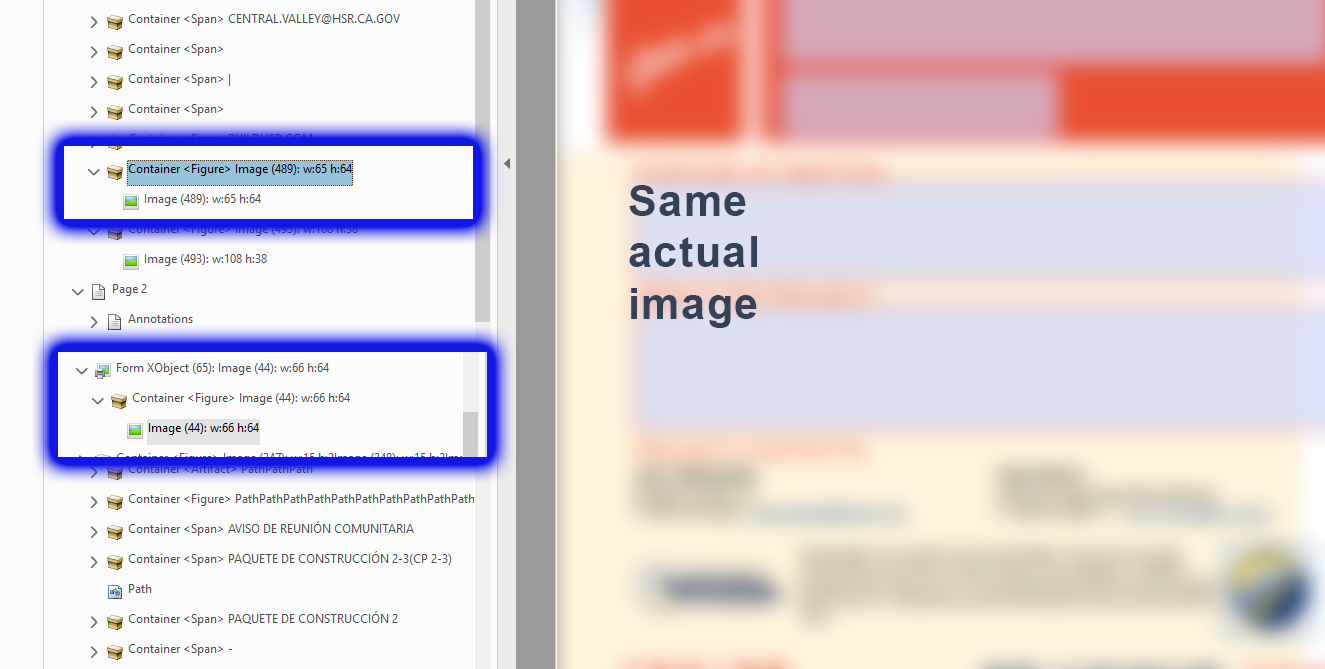
So, I tried replacing the images on the first page footer with new ones and they seem fine and give no errors. So fixed.. but I need to find out why. The only difference between the first page footer images and the second is that somehow the originals were created with the Form XObject meta data vs. Container <Figure>.
So... I know how to fix this, but WHY is it happening in the first place. I would like to find out so I can tell the creators what they are doing wrong so we can avoid this in the future.


 1 Correct answer

Hi Dax!
Form XObject is a relatively new feature in PDF and it's not working well with accessibility. Essentially it buries the Alt-text deep within the compound tag and prevents it from being fully accessible to all assistive technologies (AT).
IIRC, it was intended to streamline PDFs by wrapping a repeated object (any kind of object, like your logo that's used twice) into a Form XObject so that it can be stored and processed once but referenced/used many times in the document. FYI, the "Form" pa
...
 6
Replies
6
6
Replies
6

Copy link to clipboard
Copied
Hi Dax!
Form XObject is a relatively new feature in PDF and it's not working well with accessibility. Essentially it buries the Alt-text deep within the compound tag and prevents it from being fully accessible to all assistive technologies (AT).
IIRC, it was intended to streamline PDFs by wrapping a repeated object (any kind of object, like your logo that's used twice) into a Form XObject so that it can be stored and processed once but referenced/used many times in the document. FYI, the "Form" part of its name has nothing to do with fillable forms, so don't let that confuse you.
This problem began creeping into PDFs exported from InDesign layouts about 2 versions ago. And repeated graphics on Master Pages tend to cause this. However, in most cases, stuff on MP's should be Artifacted
At this time, you don't want the <Figure>'s Container embedded into the Form XObject. The first version in your screen capture is correct, the second fails accessibility tests. You'll have to correct this in the PDF.
1) In the Content Panel, move the group of Container, <Figure>, and Image out of the Form XObject. Then delete the now-empty Form XObject.
2) Another method: in the Order Panel, delete the graphics from the Order tree. Then, using the TURO/Reading Order tool, select the graphic and tag it <Figure>. You'll have to put the Alt-text back on it.
3) File this as a bug with Adobe. It's not that Form XObjects are bad, it's that they aren't programmed correctly by the Adobe export utility and they end up failing PDF accessibility checkers. And they fail in screen readers, too. See Kenny Moore's accessibility blog on this at https://taggedpdf.com/508-pdf-help-center/dealing-with-form-xobjects/
Question: if these logos are on master pages, don't you want them Artifacted anyway? If so, they don't need Alt-text.
| PubCom | Classes & Books for Accessible InDesign, PDFs & MS Office |
Copy link to clipboard
Copied
Thanks a ton for the info. That makes perfect sense. To answer your question, page one is English and page two is Spanish. The single pdf requires we have it in both languages. I am sure it would be just fine to artifact it, but wanted to know what was going on and you explained it perfect! Thanks!
-Dax
Copy link to clipboard
Copied
You're welcome, Dax! 
Glad to have you working on accessibility.
| PubCom | Classes & Books for Accessible InDesign, PDFs & MS Office |

Copy link to clipboard
Copied
A late and tangental reply: form XObject has been in PDF since 1.0 in 1993 (though it didn't work properly until Acrobat 2.0). So if accessibility checkers aren't working with them, it's not because the authors didn't know about them.

Copy link to clipboard
Copied
Hey Same Problem with me but when I do what you say to do some of my artwork disappears

Copy link to clipboard
Copied
@harrym, I had the same issue and found the following works:
- Open the Content pane
- Find the page and Form XObject
- Select the Form XObject
- Right click and selecct "Create Artifact"
From the options available I choose "Layout" for the "Artifact Type" and leave the "Attach…" options unchecked. The elements I am dealing with are decorative and, from what I've read, these options are OK for them.


Get ready! An upgraded Adobe Community experience is coming in January.
Learn more
 AdChoices