


- Home
- InDesign
- Discussions
- Cannot re-install InDesign CS4 after reinstalling ...
- Cannot re-install InDesign CS4 after reinstalling ...
Cannot re-install InDesign CS4 after reinstalling Windows 10

Copy link to clipboard
Copied
I have InDesign CS4. I had to reinstall my Windows 10 operating system, and I now want to reinstall InDesign, but the installer no longer accepts my serial number as valid:
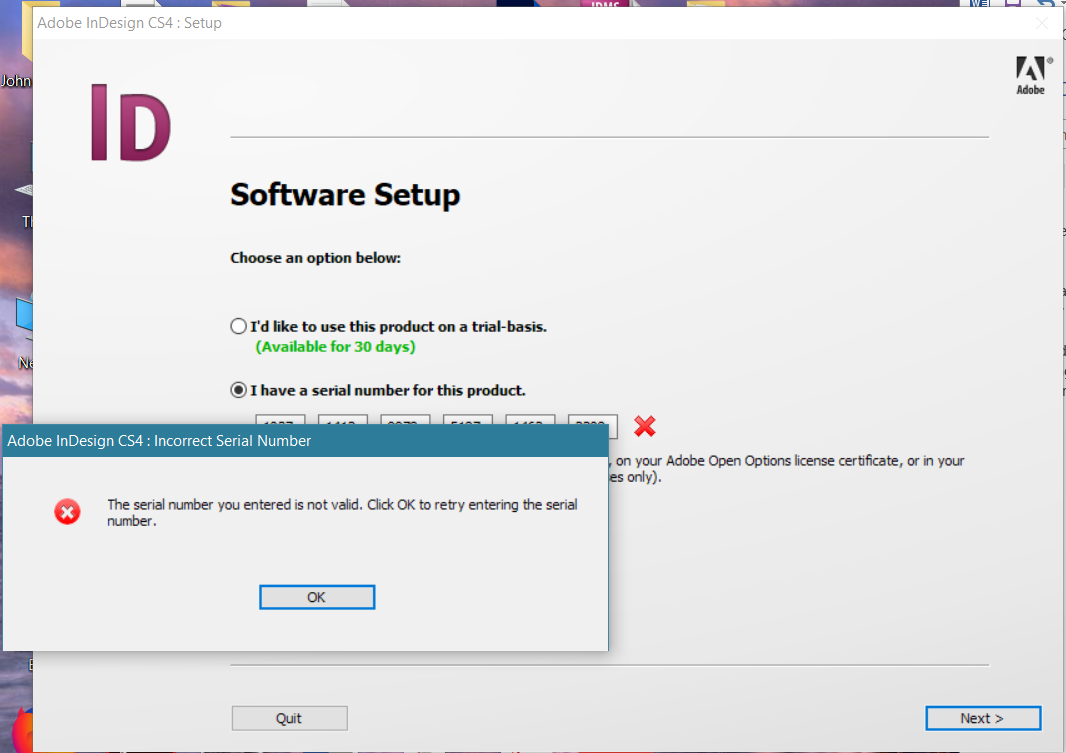
I have confirmed that my serial number is correct with Adobe, but they claimed that the problem is an incompatibility between the old CS4 software and Windows 10. This can't be true since I had CS4 running perfectly fine on Windows 10 before I had to reinstall.
Given that I do have a valid serial number, how can I get around this installation issue and install CS4 on my machine?


 12
Replies
12
12
Replies
12


Copy link to clipboard
Copied
Did you have CS4 already installed when you upgraded to Win10, or was your previous install one that you did after Win10?
Two ideas that MAY work to install and/or run old programs in Windows 10
-RIGHT click the program icon or EXE and select a compatibility mode in the pop up option window
-or Run as Administrator http://forums.adobe.com/thread/969395 to assign FULL Windows permissions may help... this says Encore, but is sometimes required for ALL Adobe programs (this is NOT the same as using an Administrator account) so follow the instructions, substituting the name and location of your specific program for Encore
Copy link to clipboard
Copied
Hi, and thanks for the reply. Yes, I had InDesign installed when I upgraded from Windows 7 to 10. The Windows 10 installation then died and had to be reinstalled, after which I have not been able to reinstall InDesign.
I tried both running as Administrator and running in compatibility mode, but neither made any difference. I don't really see how either could be relevant. The program launches perfectly well, the issue is with the screen shown in the OP where it doesn't accept my (valid) serial number.
However, I just realized that I can close the dialog that asks for the serial number and continue using InDesign! I fear this might just be the 30-day trial period, but perhaps not.

Copy link to clipboard
Copied
Not relevant? How so?
10 year old software that's about 8 versions out of date running on a brand new operating system is about as relevant as it gets.
Copy link to clipboard
Copied
It's not relevant (I am assuming) because the program installs and can be launched successfully. So the software itself works fine. The issue is the tool that asks and verifies the serial number, tyhat's where the problem is. If it were an issue of compatibility, I would expect InDesign not to launch at all, let alone work fine. The only problem is that it won't accept my serial number.

Copy link to clipboard
Copied
johnc38074757 wrote
The only problem is that it won't accept my serial number.
That, however, may be relevant and may be an OS problem...or not.

Copy link to clipboard
Copied
The real problem here is that even if you ultimately get CS4 installed it will sooner or later become inoperable as Windows 10 continues to automatically update. I’ve seen many reports on this forum of pre CC versions of InDesign and Illustrator no longer working correctly after one of Windows 10’s frequent updates. Microsoft has announced that going forward their OS will always be called Windows 10. It will, however, at some point have changed so much that it will become a different OS in fact if not in name. All this happens with no regard for whether older software will continue to run on it. Bob’s advice about compatibility mode will probably be your best bet if you want to continue with CS4 (if you successfully get it installed) on your current PC. Alternatively, you might want to consider getting an older used PC from ebay to run CS4 on.
Copy link to clipboard
Copied
As soon as the Windows 7 support is dropped, you need either go to Windows 8 or you need to pull the system of the internet.
Copy link to clipboard
Copied
And a reminder that Windows 10 1809 is right around the corner.
Copy link to clipboard
Copied
CS4 is not supported under Windows 10. The way to get around this, if compatibility mode doesn't work is to find an old Windows 7 machine to run it on.

Copy link to clipboard
Copied
CS4 can be installed on Win 10 (unofficially). As you can see your image - you are using not right distributive (if you serial is correct and legal).
Did you buy a box? - try to install directly from native box-CD/DVD
Did you buy a license? - try to find your distributive in your account on licensing.adobe.com
Did you buy some CS4 Design Standard suite? - Install from this native suite distributive, you can't install from "only InDesign" distributive using suite serial number.
Copy link to clipboard
Copied
Hmm, that makes sense. I will have to check and see if I can figure that out. It was, as you can imagine, bought a long time ago. Thanks.
Copy link to clipboard
Copied
That was one of the problems I encountered with different CS5 flavours (Master, Design Premium, Design Standard). I wanted to take only one installation set so I used Master (the most complete) and installed only the Premium or Standard programs and failed with the correct serial number. Either I took the wrong serial (here Master) or I needed to install using the correct DVD set.


Get ready! An upgraded Adobe Community experience is coming in January.
Learn more
 AdChoices