


- Home
- InDesign
- Discussions
- Re: Cant access Indesign with Excel VBA
- Re: Cant access Indesign with Excel VBA

Copy link to clipboard
Copied
I cant set indesign as an object. here is my code:
Sub newbook()
Dim InDapp As New InDesign.Application
Set InDapp = CreateObject("InDesign.Application")
End Sub
I have tried adding a version number to the create object(.CC.2015, CC2015) and i have tried renaming the reference resource as recommended by Trevor. I have look all over the internet and look in the guide.
If anyone can help me getting start here i would really apprieciate it.
Thanks.
Dane


 1 Correct answer

Make sure to add the InDesign's reference like so:


Without this the 2nd line throws an error both as VBA and VBS script.
— Kas

 11
Replies
11
11
Replies
11

Copy link to clipboard
Copied
Make sure to add the InDesign's reference like so:
Without this the 2nd line throws an error both as VBA and VBS script.
— Kas
Copy link to clipboard
Copied
Hello Kas
Thank you for your reply.
I did add the indesign reference and it still gives the error.
for ("InDesign.Application") it say simple not supported
and for ("InDesign.Application.CC or .CC.2015 or .CC.2014") I get 'error 429 activex can not create this object'.
Dane
Copy link to clipboard
Copied
Hi Dane,
Before posting my answer I tested your snippet with InDesign CC 2015.4 and Excel 2016 on Windows 10 and it worked for me without any errors.
— Kas
Copy link to clipboard
Copied
Hey Kas,
It appears i was in contact with InDesign and didnt know it. this is because the local winow at the bottom of the screen show me nothing at all. i have attached a picture.
I am somewhat used to scripting for illustrator and this local windows is full of all the classes, object, and elements that each variable/object contains. For InDesign there is nothing; the value is <no Variable>. If this is not normal then perhaps you know why?
Thank you very much for your help.
Best regards
Dane


Copy link to clipboard
Copied
Please mark Kas's answer as correct
Copy link to clipboard
Copied
I used Visual Basic 6 when I was making my baby steps in scripting back in 2004. Now I'm a devotee of JavaScript and use VB or AS only when I can't do without them. For example, when a client wants the script to export a pdf-file from InDesign and send it by e-mail. I write the main part in JS and the "send e-mail" part, say, in AS (if the client is on Mac). Then combine them with "do script" method. BTW, different scripting languages work very well together if you do everything correctly, of course. So I am not an expert in VB.
I have a similar problem on my side: both in VBA and VB6. Though some properties are available:

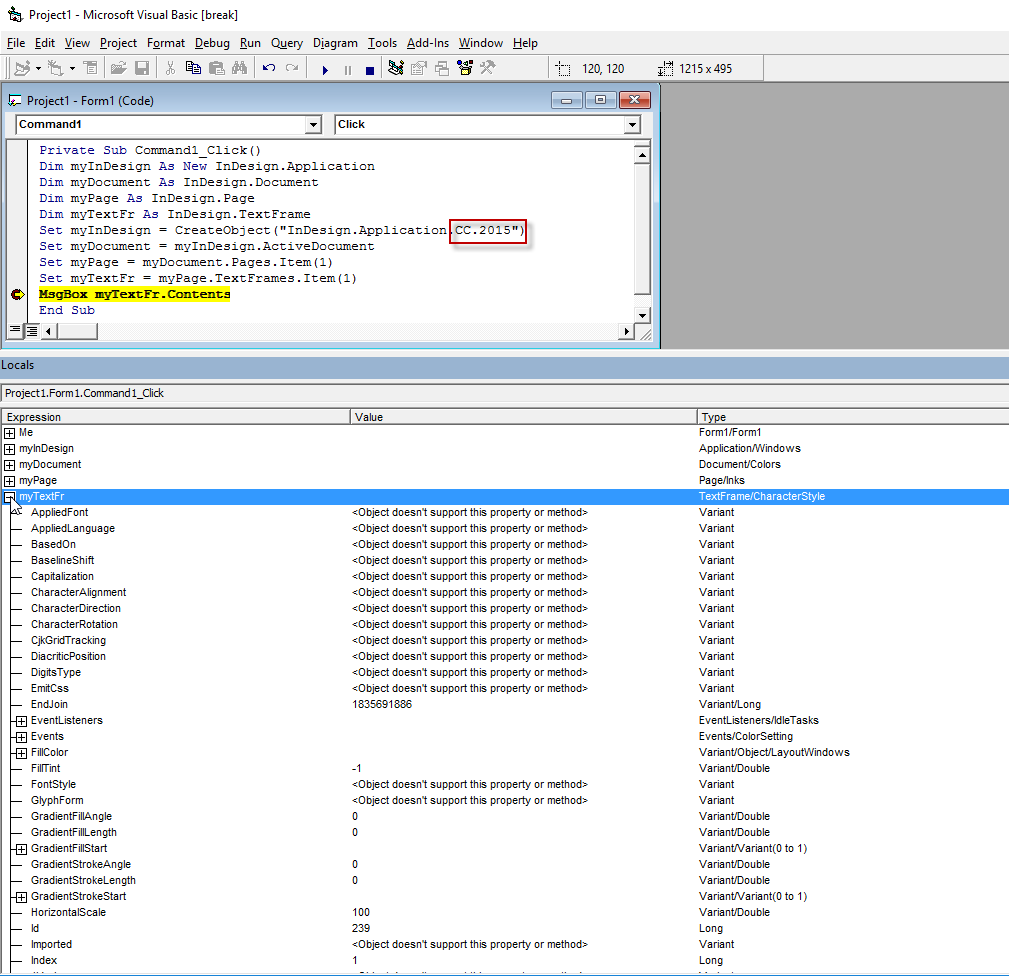
Now look at this screenshot

Note that something went totally wrong here: variables show something strange in the "Type" column -- e.g. Document/Colors.
My guess is that Adobe simply stopped supporting VB because it's not popular among scripters and with newer versions of InDesign it doesn't work properly.
In 2006 I wrote the VB version of my "Resize Images" script. I just wondered how I could write such a complex script without the "Locals" window so I opened it and run it step-by-step. Variables are available here:

— Kas
Copy link to clipboard
Copied
And here's a confirmation to my guess: I tested the same script both in the latest InDesign 2015.4 and InDesign CS3.
In CS3 -- everything is OK.

But in CC 2015 -- everything is broken
— Kas
Copy link to clipboard
Copied
Hey Kas
Thanks a lot for your in depth reply. I only started scripting about 2 months ago and everything is still very new. But i see its tremendous potential. despite that i have already started noticing limitations with VBA. Commands that don't exist for VBA, speed issues etc.. Of course these issues might be more the result of my beginner status, however I will start learning Javascript as you recommended as it is clearly the language of choice for Adobe scripts but also to a large extent outside of Adobe.
I am hoping to spend a lot less time "working" and a lot more time scripting. Just with what i have managed in the last 2 months i have save my company(Fashion Design) hundreds of hours of work.
Looking forward to the next project.
Thanks again.
Best Regards,
Dane
Copy link to clipboard
Copied
Hi Dane
Just backing up what Kas said (not that he needs it!) and your conclusion.
Regarding InDesign DOM execution (i.e. tell InDesign to do something) both applescript and more so vbs or vb are a complete waist of time (the scripting doctor would disagree with the applescript part but ...).
They serve 3 "Useful" functions in InDesign.
1) They can do OS stuff that js can't
2) They can communicate with other programs. (i.e. send data from Outlook to InDesign or the reverse)
3) They can me made into binary executable files.
Regarding the second point this does not mean that the InDesign part would not done is js it means you would just wrap it in vb or applescript and call a doJavaScript
Javascript is a much more convenient language to program in and works on both Windows and Macs so if you ever switch to Macs to won't be messed up.
Perhaps the most important advantage of js it community. There are millions of js programmers and hundreds of thousands of js libraries, so when you need to do something and search for it or ask about it your much more likely to get your answer.
Here on the forum there is really a limited amount of participants who can answer even the most basic questions on vbs or applescript.
The documentation and scripting references are sorely lacking in them.
FWIW
Trevor
Copy link to clipboard
Copied
Hello Trevor
I am now quite convinced that js is the right direction. thank you for your additional information.
I have also been listening to an online tutorial and it seam the shift into js from VBA will be very light. time will tell.
Do you use Adobe's Extendedscript Toolkit when righting scripts? or do you have another recommendation?
Thanks.
Best,
Dane
Copy link to clipboard
Copied
Hi Dane
I have written many times and will write many more times.
The ESTK is pathetic.
I use sublime text with autocompletes and builds for InDesign, Illustrator, vbs, applescript, node.js etc.
The build meaning that I can execute the script strait from the sublime text.
The are thousands of plugins for ST of which I use quite a lot including git.
One can slowly get the hang of what's going to be useful to add on.
I do not use $.writeln for logging rather I use my on log system that is a completely different world.
Hundreds if not thousands of times quicker and better than the pathetic console provided by the ESTK.
ST has a fully functional trial for as long as one wants and cost $70 for the license version if one decides to keep it.
Brackets is a good alternative so it Atom they are both free. I have not used either of them.
The are also some pricey options.
That said there is some room for the ESTK to execute the scripts sometimes. I.e. write them in ST or whatever and if needed execute them with the ESTK.
Just my opinionated opinion, regards,
Trevor


Get ready! An upgraded Adobe Community experience is coming in January.
Learn more
 AdChoices