


- Home
- InDesign
- Discussions
- Change Text in a Text Box with Script
- Change Text in a Text Box with Script

Copy link to clipboard
Copied
Hi,
I have a text box that lists the word "English" which identifies the English Manual on the title page. I copy and translate this manual. On the translated manuals, I want to change this "English" into the word "Spanish" or "Japanese" using a script. What would be the right way to do this? I could do a find change that targeted only the first page or is there some way to give a text box a unique identifier to call out in the code? Is this what "script labels" do?


 1 Correct answer

Hi
The label property depends if you use CS5 or up.
CS4 and previous versions it was sufficient to use the script label.
Select the frame with the selection tool and write the name on the Script Label palette.
CS5 and up you need to select the text frame, open the Layers palette, find the text frame you wish to name, you will see the color indication, then you should click the <text frame> label on that palette and give it the label you want.
anyway, the code to use it is, if you call your frame as "
...
 9
Replies
9
9
Replies
9

Copy link to clipboard
Copied
Hi
The label property depends if you use CS5 or up.
CS4 and previous versions it was sufficient to use the script label.
Select the frame with the selection tool and write the name on the Script Label palette.
CS5 and up you need to select the text frame, open the Layers palette, find the text frame you wish to name, you will see the color indication, then you should click the <text frame> label on that palette and give it the label you want.
anyway, the code to use it is, if you call your frame as "a":
myFrame = app.activeDocument.textFrames.itemByName("a");
hope this help
Cheers,
Eli
Copy link to clipboard
Copied
Worked like a charm. I filled it using the myFrame.contents = "Spanish" and it works great.
You wouldn't happen to know how to reference the layers group would you? The layers group that is named "Rev line". I tried and was unsuccessful:
myFrame = app.activeDocument.textFramesGroup.itemByName("Rev Line").textFrames.itemByName("a");
I tried looking it up in the Scripting Object Library and there was a Group.textFrame but not sure how to use it here.
Copy link to clipboard
Copied
Did you mean the whole layer? or a group of objects?
I will answer both:
Reference the whole layer:
app.activeDocument.layers.itemByName("Rev Line")
Reference a group of objects in a specified layer:
app.activeDocument.layers.itemByName("Rev Line").groups.itemByName("myGroup").name
or reference the group from the page items collection:
app.activeDocument.pageItems.itemByName("myGroup").name
or reference the group from the document's groups collection:
app.activeDocument.groups.itemByName("myGroup").name
I hope this helps
Regards,
Eli
Copy link to clipboard
Copied
Thank you Eli, this is very helpful and educational as well. I really appreciate your help.
Here is a screenshot of the layer:

As you can see, "Rev Line" is a group and holds my Language text box. Its basicly a text box inside a text box. So would this be correct?
var myFrame = app.activeDocument.layers.itemByName("Rev Line").groups.itemByName("Language").name;
myFrame.contents = "Spanish"
Copy link to clipboard
Copied
I cannot figutre exactly from your screenshot for each object what type it is.
"Its basicly a text box inside a text box" - Inside means that the frame text is anchored inside the parent text frame? if so the 'child' text frame will be considered as a character inside the 'parent' text frame, so you should reference it from the characters collection.
Anyway, in order to reference an object, simply go through the collection->object->collection->object, figure out which type it is and try to debug it on the javaScript console.
good luck
Eli

Copy link to clipboard
Copied
No.
You probably need something like this:
var myFrame = app.activeDocument.groups.itemByName("Rev Line").textFrames.itemByName("Language").name;Alternatively, you can do something like this to find your frame:
var myFrame = getObjectByName(app.documents[0],"Language");

function getObjectByName(container,name){
  var objects = container.allPageItems.slice();
  for(var i=0;i<objects.length;i++){
    if(objects.name == name){
      return objects;
    }
  }
  return null;
}
You can feed into the function any item which has an allPageItems property. That includes Document or Layer among others...
Harbs
Copy link to clipboard
Copied
Eli and Harbs,
Thank you so much for your help. I was unable to call it using the:
var myFrame = app.activeDocument.groups.itemByName("Rev Line").textFrames.itemByName("Language").name;But your other code worked like a charm!!!
var myFrame = getObjectByName(app.documents[0],"Language");
function getObjectByName(container,name){
var objects = container.allPageItems.slice();
for(var i=0;i<objects.length;i++){
if(objects.name == name){
return objects;
}
}
return null;
}I will add an if statement to this so if the text box is not in the document, the user will get an message box.
Thanks again for your help.

Copy link to clipboard
Copied
Hi,
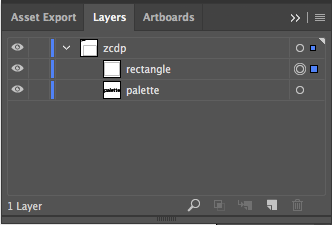
I'm also struggling with getting and changing the text of layers, I tried all the solution provided over here but didn't got success.
I've this type of layer structure in AI


Copy link to clipboard
Copied
You're in the InDesign forum, and Illustrator are different from InDesign scripts. You should ask in the/a Illustrator forum.


Get ready! An upgraded Adobe Community experience is coming in January.
Learn more
 AdChoices