


Copy link to clipboard
Copied
Hi There,
I have a question regarding these two pdfs
18.6MB
http://www.ultimatearanui.com/48721%20UT%20ARANUI%205%20AUSTRALIAN%20BROCHURE%202016_web.pdf
3MB
http://www.ultimatearanui.com/ARA5AustralianBrochure2018.pdf
The 3MB one is a PDF thats been sitting on the website for a couple of years. the boss asked me to make some changes to the .pdf and put it back on the site.
Easy. The problem is that I can't get the file size down to 3MB. So the above two links are the exact same pdf except that the larger one I did yesterday and exported as (smallest file size) and it's over 6x larger than the one from a couple of years ago.
Any ideas why?


 1 Correct answer


As Jongware pointed out, Content Streams are the culprit for most of the file size bloat. I wasn't sure how important it was for you to maintain the quality of the photos, so I didn't use the Reduce File Size command which would have degraded the photos.
What worked was this.
Open your file, and choose File > Export To > Postscript. You should get a file with a .ps file extension.
Then in Acrobat, File > Open the .ps file. Acrobat will process the file and create a new PDF.
That brought the file si
...
 9
Replies
9
9
Replies
9



Copy link to clipboard
Copied
What was the creator application for the original pdf file? Did you try reducing the size of the new pdf in Acrobat via Reduced Size PDF option?
Copy link to clipboard
Copied
Thanks for the suggestion Ravi, it dropped the size by a couple of hundred Kbs nothing too dramatic. So I guess I still have no idea how they got it down to 3Mb. When you choose HIgh Print Quality it's 122Mb doc.

Copy link to clipboard
Copied
Use Acrobat Pro to audit the PDF. See Optimizing PDFs in Adobe Acrobat Pro
Small document:
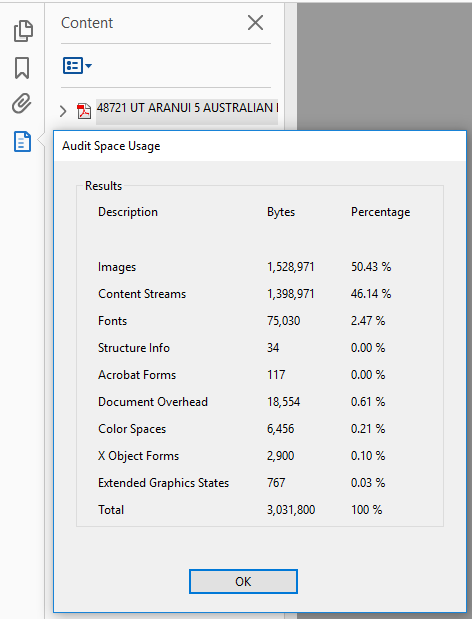
Large document:

The images in the larger document take up more space, so presumably you still have different downsample settings. The biggest difference, however, is in the Content Stream: 1.3MB vs. 15MB. That's where most of your bytes went.
What are those Content Streams? Inspecting the PDF at a deeper level shows it's probably vector images - there are some quite large ones in there. (Running out of time so have to wrap this up a bit faster) Despite popular demand, there is no way to 'downsample' vector images, so I'd suggest inspecting the links in the original and new file and see whether these changed. It may also be worth 'flattening' the vectors into raster images, because these may start out large but, other than the vectors, they can be downsampled until you end up with a reasonable total size.
Copy link to clipboard
Copied
Ah wait -- use Document Preflight > Browse Internal PDF Structure.
Checking the size of the Contents stream for each page
Copy link to clipboard
Copied
Thanks for your thoughts Jongware, as I said above Barbara's was a great answer but yours helped me along too.
Copy link to clipboard
Copied
As Jongware pointed out, Content Streams are the culprit for most of the file size bloat. I wasn't sure how important it was for you to maintain the quality of the photos, so I didn't use the Reduce File Size command which would have degraded the photos.
What worked was this.
Open your file, and choose File > Export To > Postscript. You should get a file with a .ps file extension.
Then in Acrobat, File > Open the .ps file. Acrobat will process the file and create a new PDF.
That brought the file size down to 3.47 MB on my computer.

Copy link to clipboard
Copied
Not sure if the OP has access to Enfocus Pitstop, but I ran the "scrubber 2.0" action that ships with Enfocus Pitstop (removing the part of the action that removes fonts <4pt) then resaved the file, and was able to achieve a filesize of 6MB. Not the 3.47 that Barbara achieved, but still another way of achieving a lower file size.
Copy link to clipboard
Copied
Thanks for the suggestion, Barbara's answer yielded a great result so I went with that one.
Copy link to clipboard
Copied
You are an absolute legend. I never used adobe forum before and I figured I would get much help as similar questions to mine had already been asked and answered but not in the same way. Thanks for taking the time Barbara, as well as the other kind folk in this thread!


Get ready! An upgraded Adobe Community experience is coming in January.
Learn more
 AdChoices