Exit
  • Global community
    • Language:
      • Deutsch
      • English
      • Español
      • Français
      • Português
  • 日本語コミュニティ
  • 한국 커뮤니티
0

How can save a UTF-8 file?

Enthusiast ,
Jun 03, 2021 Jun 03, 2021

How can save a UTF-8 file?

This is my code:

var file = new File("C:\\tmp\\test.html");
file.open("w");
file.write('<?xml version="1.0" encoding="utf-8"?>\r\n');
file.write('<!DOCTYPE html PUBLIC "-//W3C//DTD XHTML 1.0 Transitional//EN" "http://www.w3.org/TR/xhtml1/DTD/xhtml1-transitional.dtd">\r\n');
file.write('<html xmlns="http://www.w3.org/1999/xhtml" xml:lang="ja" lang="ja">\r\n');
file.write('<meta http-equiv="Content-Language" content="ja" />\r\n');
file.write('<meta http-equiv="Content-Type" content="text/html; charset=utf-8" />\r\n');
file.write('<body>\r\n');
file.write('送信致しますので、宜しくご検討のほどお願い致します');
file.write('\r\n</body>\r\n');
file.write('</html xmlns="http://www.w3.org/1999/xhtml" xml:lang="ja" lang="ja">\r\n');
file.write('</?xml version="1.0" encoding="utf-8"?>\r\n');
file.close();
 result of file is  utf8, but text can"t output correct

<?xml version="1.0" encoding="utf-8"?>
<!DOCTYPE html PUBLIC "-//W3C//DTD XHTML 1.0 Transitional//EN" "http://www.w3.org/TR/xhtml1/DTD/xhtml1-transitional.dtd">
<html xmlns="http://www.w3.org/1999/xhtml" xml:lang="ja" lang="ja">
<meta http-equiv="Content-Language" content="ja" />
<meta http-equiv="Content-Type" content="text/html; charset=utf-8" />
<body>
‘—M’v‚µ‚܂·‚̂ŁA‹X‚µ‚­‚²ŒŸ“¢‚̂قǂ¨Š肢’v‚µ‚܂·
</body>
</html xmlns="http://www.w3.org/1999/xhtml" xml:lang="ja" lang="ja">
</?xml version="1.0" encoding="utf-8"?>

TOPICS
Scripting
1.4K
Translate
Report
Community guidelines
Be kind and respectful, give credit to the original source of content, and search for duplicates before posting. Learn more
community guidelines

correct answers 1 Correct answer

Community Expert , Jun 03, 2021 Jun 03, 2021

You can set the encoding of the file using the encoding property of the File object. Something like the following

file.encoding = "UTF-8";

See the following

https://www.indesignjs.de/extendscriptAPI/indesign-latest/#File.html

-Manan

Translate
Community Expert ,
Jun 03, 2021 Jun 03, 2021

You can set the encoding of the file using the encoding property of the File object. Something like the following

file.encoding = "UTF-8";

See the following

https://www.indesignjs.de/extendscriptAPI/indesign-latest/#File.html

-Manan

Translate
Report
Community guidelines
Be kind and respectful, give credit to the original source of content, and search for duplicates before posting. Learn more
community guidelines
Enthusiast ,
Jun 03, 2021 Jun 03, 2021

Thank you.

Translate
Report
Community guidelines
Be kind and respectful, give credit to the original source of content, and search for duplicates before posting. Learn more
community guidelines
Community Expert ,
Jun 03, 2021 Jun 03, 2021

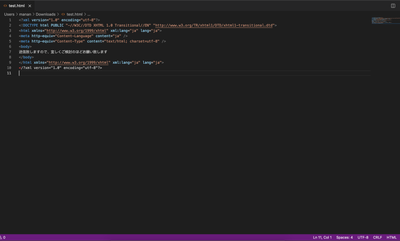
I used the following code and it seems to be fine, see the attached screenshot showing the encoiding of the file. The special characters also look fine to me.

var file = new File("/Users/manan/Downloads/test.html");
file.encoding="UTF-8";
file.open("w");
file.write('<?xml version="1.0" encoding="utf-8"?>\r\n');
file.write('<!DOCTYPE html PUBLIC "-//W3C//DTD XHTML 1.0 Transitional//EN" "http://www.w3.org/TR/xhtml1/DTD/xhtml1-transitional.dtd">\r\n');
file.write('<html xmlns="http://www.w3.org/1999/xhtml" xml:lang="ja" lang="ja">\r\n');
file.write('<meta http-equiv="Content-Language" content="ja" />\r\n');
file.write('<meta http-equiv="Content-Type" content="text/html; charset=utf-8" />\r\n');
file.write('<body>\r\n');
file.write('送信致しますので、宜しくご検討のほどお願い致します');
file.write('\r\n</body>\r\n');
file.write('</html xmlns="http://www.w3.org/1999/xhtml" xml:lang="ja" lang="ja">\r\n');
file.write('</?xml version="1.0" encoding="utf-8"?>\r\n');
file.close();

Screenshot 2021-06-03 at 4.34.21 PM.png

See at the bottom right to see the encoding deciphered by the editor and also the characters are shown properly.

-Manan

Translate
Report
Community guidelines
Be kind and respectful, give credit to the original source of content, and search for duplicates before posting. Learn more
community guidelines
Mentor ,
Jun 04, 2021 Jun 04, 2021
LATEST

Syntactically the XML declaration "<?xml"... from the first line is no element but a processing instruction, therefor it does not need a balancing end tag (your last file.write).

Better also omit the attributes on the html end tag.


For details, see https://www.w3.org/TR/xhtml1/ and https://validator.w3.org

Translate
Report
Community guidelines
Be kind and respectful, give credit to the original source of content, and search for duplicates before posting. Learn more
community guidelines
