


- Home
- InDesign
- Discussions
- How to make a MSO REFERENCE ANOTHER MSO
- How to make a MSO REFERENCE ANOTHER MSO

Copy link to clipboard
Copied
I have an MSO that I would like to have active buttons that allow me to access more information than what is being showed by activating that state. Currently I have the two buttons at the top left (Cleaning TIPS & BOM) controlling which state appears to the right. The "BOM" state (Displayed on right of photo) with all the parts labelled with buttons that I would like to then display more info below it. When attempting to set the buttons in the "BOM" slide, I cannot assign it to show a state in the MSO at the bottom of the page.



 1 Correct answer


Hi,
a button inside a MSO state can see the MSO where it sits in.
You cannot see MSOs outside of the MSO the button sits in. For example other MSOs on the page.
Maybe you can work with MSOs that are nested inside of MSOs?
Two ways of nesting MSOs to states of an MSO:
1. Anchor a MSO to a text frame inside of a state of another MSO.
2. Add a new, generic MSO to a graphic frame inside of a state of the MSO.
You can do that by scripting only.
With option 1 the button cannot see the anchored MSO.
With option
...
 9
Replies
9
9
Replies
9

Copy link to clipboard
Copied
Hi,
a button inside a MSO state can see the MSO where it sits in.
You cannot see MSOs outside of the MSO the button sits in. For example other MSOs on the page.
Maybe you can work with MSOs that are nested inside of MSOs?
Two ways of nesting MSOs to states of an MSO:
1. Anchor a MSO to a text frame inside of a state of another MSO.
2. Add a new, generic MSO to a graphic frame inside of a state of the MSO.
You can do that by scripting only.
With option 1 the button cannot see the anchored MSO.
With option 2 the button can see the added MSO.
How to add a new MSO to a graphic frame:
Re: Animation not work in NESTED MSO
Downside of option 2: You have to add all of your states to the new MSO.
You cannot use a prepared MSO and simply add it inside a graphic frame. Paste Inside is grayed out.
Here an example from my German InDesign:
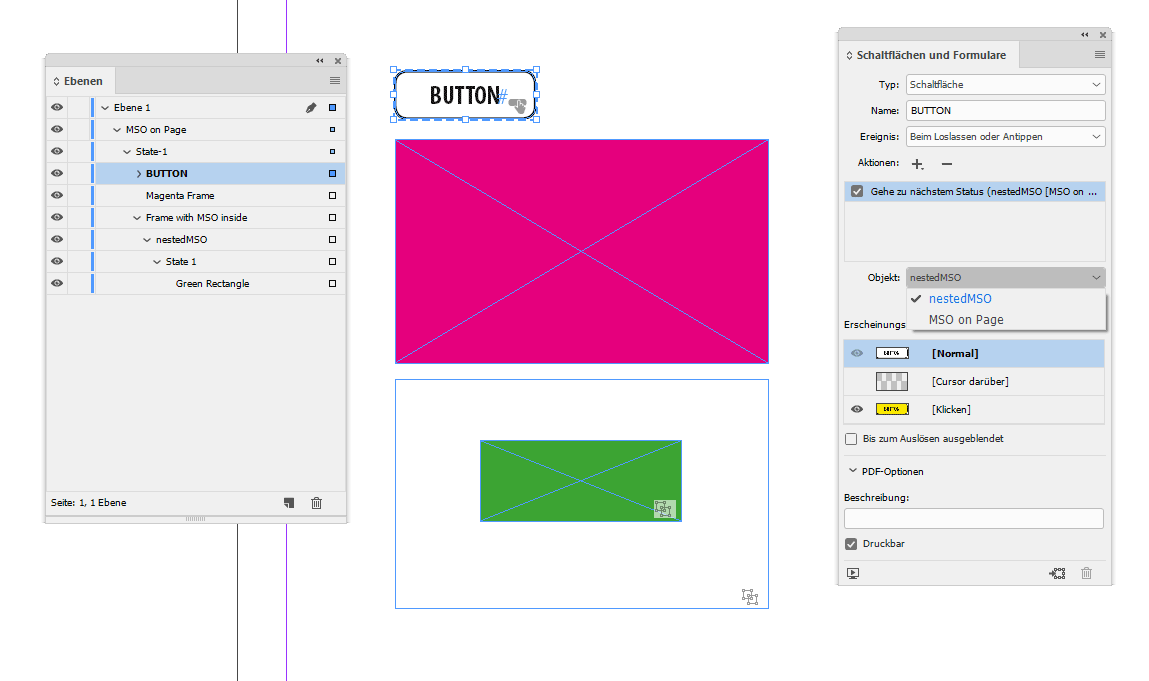
The green object is a MSO I added by scripting to the frame with the blue frame edges and no fill.
The BUTTON can see the MSO where it is positioned in, named "MSO on Page". Nothing unusual here.
But BUTTON can also see the nested MSO named "nestedMSO" inside the graphic frame named "Frame with MSO inside" of State-1 of MSO named "MSO on Page".
The magenta frame is just another frame in State-1 of "MSO on Page".
"Ebene 1" is just "Layer 1" of the document. "Schaltfläche" means "Button".
Regards,
Uwe

Copy link to clipboard
Copied
You can do the same anchoring trick with a button. Create the button; anchor it to a text frame; add the text frame to the state of an MSO.
Select the button (easiest way is from the layers panel) and add the action to the button. You’ll see all of the MSOs on the spread.
Copy link to clipboard
Copied
I'm not quite sure how to do that. This will allow for an MSO to be inside of another MSO?
Copy link to clipboard
Copied
Hi,
I'm not sure if the other MSO you want to control is directly on your page or should be positioned inside a state of your main MSO. Either way a button that is anchored to a text frame inside of a state of an MSO can see all MSOs on the whole spread.
Regards,
Uwe
Copy link to clipboard
Copied
This screenshot may help:

FWIW: "Textrahmen" means "text frame" in my German InDesign, "Schaltfläche" means "Button".
Regards,
Uwe
Copy link to clipboard
Copied
Unfortunately this does not help me understand.
Copy link to clipboard
Copied
Hi,
hm…
Let's see. In my screenshot we have 3 MSOs on the spread.
Two MSOs directly on the page and one nested inside a graphic frame.
BUTTON can see the MSO it is sitting in plus the one that is nested in the graphic frame.
But it cannot see the one outside on the page.
BUTTON 2 can see all three MSOs that are there. The one it sits in of course, the one that is nested in a graphic frame, but also the other one outside on the page. Why? Because BUTTON 2 is anchored to a text frame ( in State-1 of a MSO ).
BUTTON 2 opens the control to all MSOs you are seeing here.
If still in doubt download my document from InDesign CC 2018.1 from my Dropbox account:
Dropbox - Control-nested-MSO-with-Button-13.1.0.76.zip
Regards,
Uwe
Copy link to clipboard
Copied
That clears things up alot and I was able to get that done but the problem I am having now is layering the different MSO's to show at separate times
Copy link to clipboard
Copied
I’ll make the same suggestion I already did…one very large MSO.


Get ready! An upgraded Adobe Community experience is coming in January.
Learn more
 AdChoices