Participant
March 6, 2017
Answered

How to prevent hyphenated words?

  • March 6, 2017
  • 4 replies
  • 33243 views

I have a customer who doesn't want ANY hyphenated words at the end of a line. How do I set up a document to prevent hyphenated words?

This topic has been closed for replies.
Correct answer Barb Binder

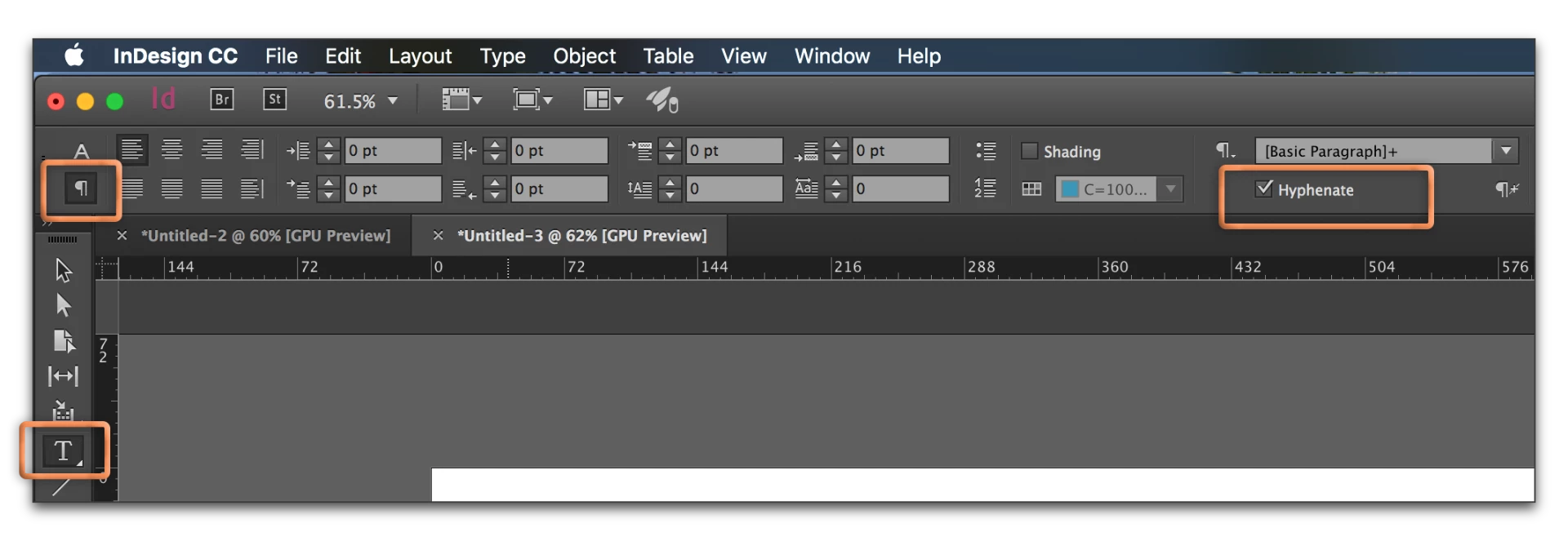
If you aren't using styles, select the text, change to paragraph view (click the ¶ at the left of the control panel) and uncheck hyphenation:
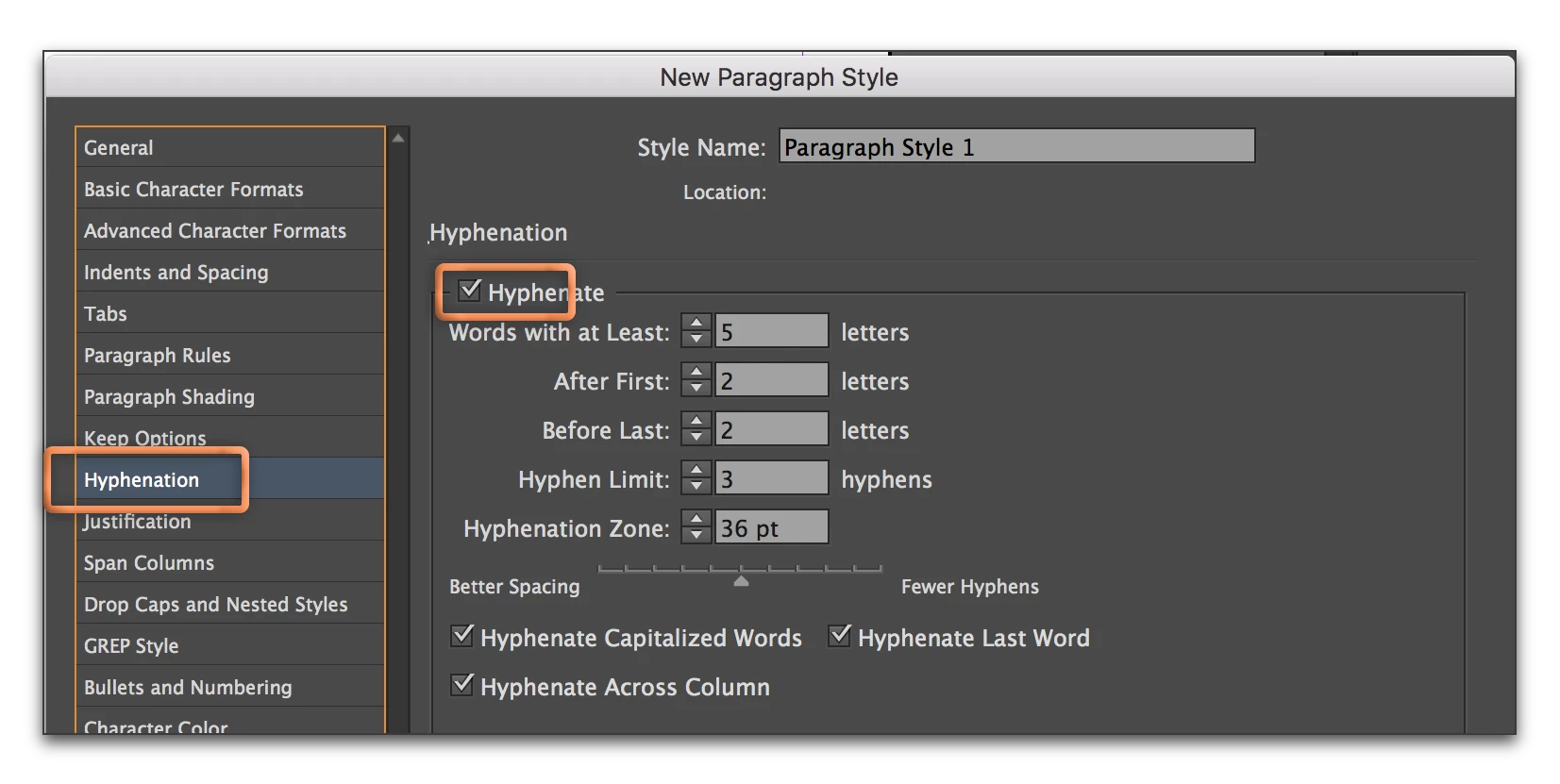
If you are using styles, turn it off for the various styles in the style definition:
4 replies

GraphicDesigner0001
Participant
August 1, 2018

Turning off Hyphenation by default. Can it be done?

For New Documents, Yes! For existing documents, No! That would have to be done manually by the user each existing document one at a time.

This is for Adobe CC 2018 but may work for older versions:

Make sure no documents are opened. Better close indesign and re-open it just to make sure.

1) In top menu click on TYPE>PARAGRAPH

2) Top right corner of Paragraph menu is a flyout menu. Click that!

3) Choose HYPHENATION

4) De-activate it by unchecking the "tick" box.

5) Press OK to make sure settings take effect.

Again NEW documents will now auto hyphenate by default. Older documents will have to be changed manually.

-Cheers!

BTW -CorelDraw Graphics Suite has this setup correctly by default!

Barb Binder
Community Expert
Community Expert
March 6, 2017

So you can't set up a document with no hyphenation like you set up margins, page size, etc?

You can change the defaults.

  1. To set the default for all new documents, close all open documents. With no documents open, choose:
    Type > Paragraph > Paragraph panel menu > Hyphenation and uncheck it. This will disable hyphenation on all new documents, it will not impact existing documents.
  2. To set the default for a single file:
    Choose the Selection tool; Edit > Deselect All. With nothing selected, choose Type > Paragraph > Paragraph panel menu > Hyphenation and uncheck it. This will disable hyphenation on any new text in this document. It will not impact existing text (see my first answer, above) and it will not impact other existing or future documents.

~Barb at Rocky Mountain Training
Lo73140Author
Participant
March 7, 2017

Thank you! The replies I've received  have been very helpful!

Janet Long

Barb Binder
Community Expert
Community Expert
March 7, 2017

Thanks for letting us know that we were able to help, Janet.

~Barb

~Barb at Rocky Mountain Training
Frans v.d. Geest
Community Expert
Community Expert
March 6, 2017

Turn off Hyphenate Last Word and Cross column in the [basic paragraph] style and build new styles from there.

Barb Binder
Community Expert
Barb BinderCommunity ExpertCorrect answer
Community Expert
March 6, 2017

If you aren't using styles, select the text, change to paragraph view (click the ¶ at the left of the control panel) and uncheck hyphenation:

If you are using styles, turn it off for the various styles in the style definition:

~Barb at Rocky Mountain Training
Lo73140Author
Participant
March 6, 2017

So you can't set up a document with no hyphenation like you set up margins, page size, etc? 

Steve Werner
Community Expert
Community Expert
March 6, 2017

Nope. Barb said it correctly!

Hyphenation is totally different. It is tied to the language dictionary you've chosen for the text (by choosing Language from the character attributes).