Exit
  • Global community
    • Language:
      • Deutsch
      • English
      • Español
      • Français
      • Português
  • 日本語コミュニティ
  • 한국 커뮤니티
0

Image Catalog Script not wokring

New Here ,
Nov 19, 2020 Nov 19, 2020

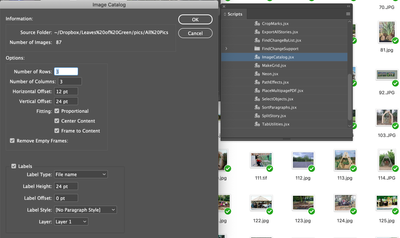
I have an issue with Image Catalog. I've been using this feature sucessfully for years and recently it's not been reliable. I'm using Javascript on CC19 on Mojave (see pic).


There are 226 files in the folder, but only 87 are being recognised by the script. All my files are JPG, PNG or PDF. Of these 210 are jpgs (10 x png/ 6 x pdfs). All batch resized to 300dpi in Photoshop. 


This is such a useful tool, all help appreciated to get this feature back on, thanks!


Screenshot 2020-11-19 at 19.49.20.png


[ attachment inserted as inline image by moderator ]

TOPICS
Bug , How to , Scripting
924
Translate
Report
Community guidelines
Be kind and respectful, give credit to the original source of content, and search for duplicates before posting. Learn more
community guidelines

correct answers 1 Correct answer

Community Expert , Nov 20, 2020 Nov 20, 2020

Hi DB-VIKA,

seems that you have no write access in the folder where the script file is currently installed.


No problem! There is another folder in your Scripts panel named User.

Go to that folder in your file system, copy that script file to this folder and edit it from that position.


If you cannot save it as *.jsx file, but only as *.txt file just rename the file later in your file system.

Note: Enable the Finder so that you can see file suffixes and invisible files and folders.


Regards,
U

...
Translate
Community Expert ,
Nov 19, 2020 Nov 19, 2020

Hi DB-VIKA,

open the script code in your text editor as unformatted text and check if an upper case suffix "JPG" is supported.

Ok. Did that for you on my Windows 10 machine and can see that a suffix like "JPG" is not supported by default.

Line 23 of the script says:


	myExtensions = [".jpg", ".jpeg", ".eps", ".ps", ".pdf", ".tif", ".tiff", ".gif", ".psd", ".ai"] 


You can change that and add a string like ".JPG" in this way:


	myExtensions = [".JPG", ".jpg", ".jpeg", ".eps", ".ps", ".pdf", ".tif", ".tiff", ".gif", ".psd", ".ai"] 


FWIW: At the top of the script code there is a little description how to do this:


//The myExtensions array contains the extensions of the graphic file types you want 
//to include in the catalog. You can remove extensions from or add extensions to this list. 


Regards,
Uwe Laubender

( ACP )

Translate
Report
Community guidelines
Be kind and respectful, give credit to the original source of content, and search for duplicates before posting. Learn more
community guidelines
Community Expert ,
Nov 19, 2020 Nov 19, 2020

May be, that a change in line #77
could work with all uppercase suffixes.


Try to change from:

if(myFile.name.indexOf(myExtension)>-1){

to:

if(myFile.name.toLowerCase().indexOf(myExtension)>-1){


Translate
Report
Community guidelines
Be kind and respectful, give credit to the original source of content, and search for duplicates before posting. Learn more
community guidelines
New Here ,
Nov 20, 2020 Nov 20, 2020

Firstly, many thanks for identifying the problem so quickly! 

I'm new to editing script and have been unable to update it. I followed the InDesign link to 'Reveal in Finder' from the Script window. And I opened this file in TextEdit. But my Finder will not let me edit the script file and save over the old one. I've tried unlocking the folder and the file thorugh Finder, and I've treid Duplicating and saving to Desktop (with the intention of replacing the original .jsx doc) but the TextEdit it saving the file as a .txt. 

In the meatime, I changed the filenames to .jpg using Automator. So I've solved the problem in this instance and have created the document I needed today (great!). And I also understand what to look out for in the future. But I have not been able to update the script itself, which is the best long term solution.

Are you able to advise further on how to update the script?

Many thanks!

Translate
Report
Community guidelines
Be kind and respectful, give credit to the original source of content, and search for duplicates before posting. Learn more
community guidelines
Community Expert ,
Nov 20, 2020 Nov 20, 2020
LATEST

Hi DB-VIKA,

seems that you have no write access in the folder where the script file is currently installed.


No problem! There is another folder in your Scripts panel named User.

Go to that folder in your file system, copy that script file to this folder and edit it from that position.


If you cannot save it as *.jsx file, but only as *.txt file just rename the file later in your file system.

Note: Enable the Finder so that you can see file suffixes and invisible files and folders.


Regards,
Uwe Laubender

( ACP )

Translate
Report
Community guidelines
Be kind and respectful, give credit to the original source of content, and search for duplicates before posting. Learn more
community guidelines