


- Home
- InDesign
- Discussions
- Re: Is it possible to get unique links paths with ...
- Re: Is it possible to get unique links paths with ...

Copy link to clipboard
Copied
Hi people,
I'm trying to write a simple script to quickly generate a list of the links paths of an InDesign document.
Here's my piece of code :
var myLinksPath = app.activeDocument.links.everyItem().filePath;

var myNewDoc = app.documents.add();

var myTextFrame = myNewDoc.textFrames.add({
	geometricBounds: myNewDoc.pages[0].bounds
});

myTextFrame.contents = myLinksPath.join("\r");
While this works perfectly fine, it gets all the occurences of any link, which is not really necessary. Is there a way to only deal with unique links (not sure if they are called this way in english, see the attached image below in french — 41 unique links for 78 total links)? I see that links have an "assetURL" property but I'm not sure I can do something with that. Thank you for any advice.
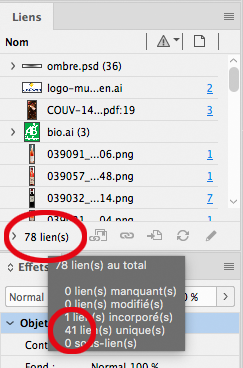


 1 Correct answer

Hello,
you can remove the duplicate occurences like this.......
var myLinksPath = app.activeDocument.links.everyItem().filePath;

var RemoveDuplicates = myLinksPath;
var myCleanList = [];
var count = 0;
var start = false;

for (j = 0; j < RemoveDuplicates.length; j++) {
 for (k = 0; k < myCleanList.length; k++) {
   if (RemoveDuplicates[j] == myCleanList[k] ) {
       start = true;
       }
   }
   count++;
   if (count == 1 && start == false) {
    myCleanList.push(RemoveDuplicates
 7
Replies
7
7
Replies
7

Copy link to clipboard
Copied
Hello,
you can remove the duplicate occurences like this.......
var myLinksPath = app.activeDocument.links.everyItem().filePath;

var RemoveDuplicates = myLinksPath;
var myCleanList = [];
var count = 0;
var start = false;

for (j = 0; j < RemoveDuplicates.length; j++) {
 for (k = 0; k < myCleanList.length; k++) {
   if (RemoveDuplicates[j] == myCleanList[k] ) {
       start = true;
       }
   }
   count++;
   if (count == 1 && start == false) {
    myCleanList.push(RemoveDuplicates[j]);
   }
   start = false;
   count = 0;
}

var myUniqueLinks = myCleanList;

var myNewDoc = app.documents.add();

var myTextFrame = myNewDoc.textFrames.add({
	geometricBounds: myNewDoc.pages[0].bounds
});

myTextFrame.contents = myUniqueLinks.join("\r");
Regards,
Mike
Copy link to clipboard
Copied
Hi Mike, sure I thought about removing the duplicates, my point was about knowing if I was missing something more straightforward instead of having to loop through every single link.
Still, thank you a lot for your answer, your sample does a great job. I'll try to understand how it works, this is gonna be instructive for me.
Copy link to clipboard
Copied
Hello Simon,
re: I thought about removing the duplicates, my point was about knowing if I was missing something more straightforward instead of having to loop through every single link.
I would imagine that's exactly what's happening in the background of the application in order to display the total number of links and the number of unique links.
Regards,
Mike


Copy link to clipboard
Copied
You can also make a duplicate removal function—this is just a variation of mike’s code:
var myLinksPath = removeDuplicates(app.activeDocument.links.everyItem().filePath);
$.writeln(myLinksPath.length)


/**
* Removes duplicates from the array
* @Param an array to edit
* @Return an array with no duplicates
* https://community.adobe.com/t5/indesign/js-how-to-remove-duplicate-items-from-an-array/td-p/3044978
*/
function removeDuplicates(a){
    var ra = new Array();
    var o = new Object()
    for( i=0 ; i<a.length ; ++i ){
        o[a[i]] = null;
    }
    for( a[i] in o ){
        ra.push(a[i]);
    }
    return ra;
}Copy link to clipboard
Copied
Hi Rob, that's some interesting stuff, thank you.

Copy link to clipboard
Copied
And yet another approach: a variant of Rob's script adds items to an array only if they're not already in the array:
myLinksPath = app.activeDocument.links.everyItem().filePath;
list = [];
known = {};

for (i = 0; i < myLinksPath.length; i++) {
  if (!known[myLinksPath[i]]) {
    list.push (myLinksPath[i]);
    known[myLinksPath[i]] = true;
  }
}
P.
Copy link to clipboard
Copied
Hi Peter, thank you for this addition too!


Get ready! An upgraded Adobe Community experience is coming in January.
Learn more
 AdChoices