


- Home
- InDesign
- Discussions
- is there an easy script to apply detect edges
- is there an easy script to apply detect edges
is there an easy script to apply detect edges

Copy link to clipboard
Copied
hello
I need to apply a clipping path using detect edges with the same option on all the images in my doc
is there any script I can apply to do in bulk?
Thanks
Maritna


 6
Replies
6
6
Replies
6


Copy link to clipboard
Copied
Moved to InDesign Scripting...

Copy link to clipboard
Copied
Hi Maritna,
Use the below codings. THis will apply detecting edges. Is it what you want?
if (app.activeDocument.allGraphics.length>0)
{
  for (img=0; img<app.activeDocument.allGraphics.length; img++) {
    app.activeDocument.allGraphics[img].clippingPath.clippingType = ClippingPathType.DETECT_EDGES
}
}
Thanks,
Karthi
Copy link to clipboard
Copied
Hi Karthi
Thank you, I've tried with script editor but it gives me syntax error.
I'm afraid my skills are too poor to try to make new actions but thanks anyway for have tried to help me
best,
Martina

Copy link to clipboard
Copied
The Script tpk1982 works. Just try this:
#target indesign


var myDocument = app.activeDocument;


if (myDocument.allGraphics.length>0)
{
  for (img=0; img<myDocument.allGraphics.length; img++) {
    var detect = myDocument.allGraphics[img].clippingPath.clippingType = ClippingPathType.DETECT_EDGES
}
}
if (detect = true){
    alert("Exist Edges")}
Copy link to clipboard
Copied
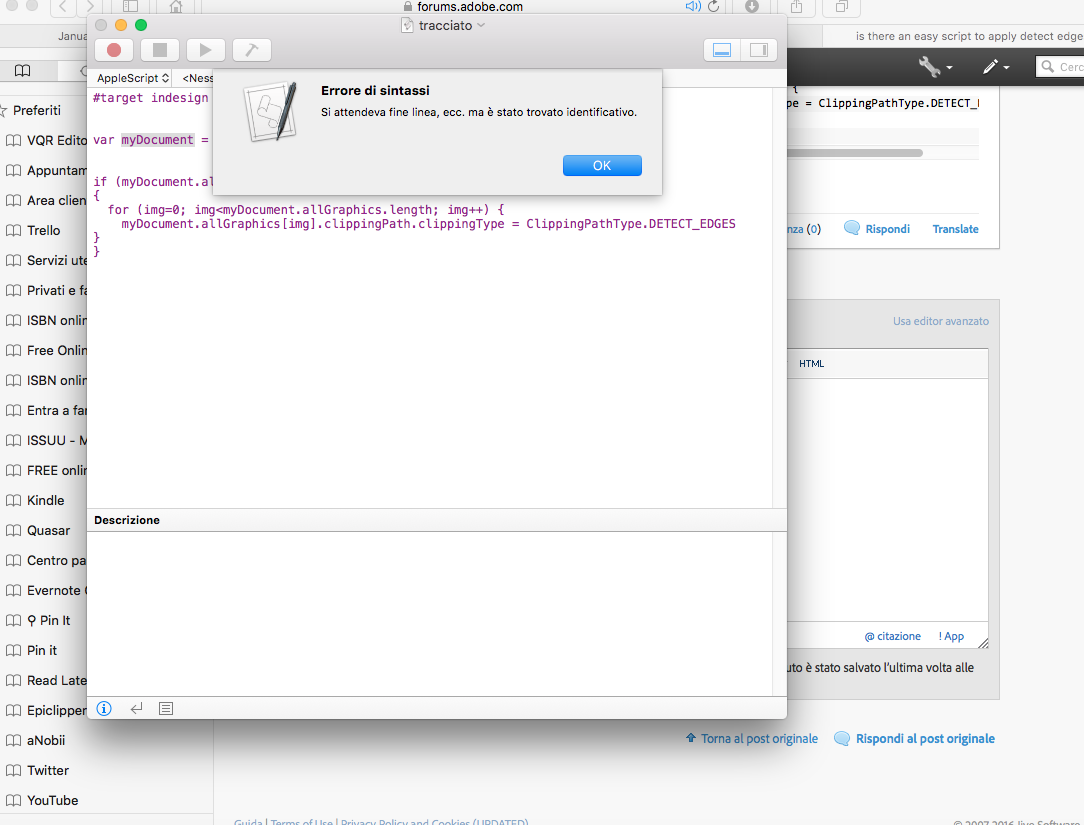
Thank, it gives me a different error now:
Syntax Error: Expected end of line, etc. but found identifier
Copy link to clipboard
Copied
You are using Apple Script ..
Copy and paste the ExtendScript Toolkit. Save as .jsx


Get ready! An upgraded Adobe Community experience is coming in January.
Learn more
 AdChoices