Exit
  • Global community
    • Language:
      • Deutsch
      • English
      • Español
      • Français
      • Português
  • 日本語コミュニティ
  • 한국 커뮤니티
0

Numbered list not appearing. HELP

New Here ,
Jun 19, 2018 Jun 19, 2018

Hi,

I am experiencing a rather unusual problem with InDesign, one that I have never come across before.

I have a text box containing a number of paragraphs that are marked with bullet points, when I try to change the bullets to numbers the bullets disappear and there is no sign of the numbers though the justification of the text changes slightly.

I have tried editing the alignment and indent depth for the numbers to no avail. Any insight into why this is happening and how it can be fixed would be much appreciated.

1.5K
Translate
Report
Community guidelines
Be kind and respectful, give credit to the original source of content, and search for duplicates before posting. Learn more
community guidelines

correct answers 1 Correct answer

Engaged , Jun 19, 2018 Jun 19, 2018

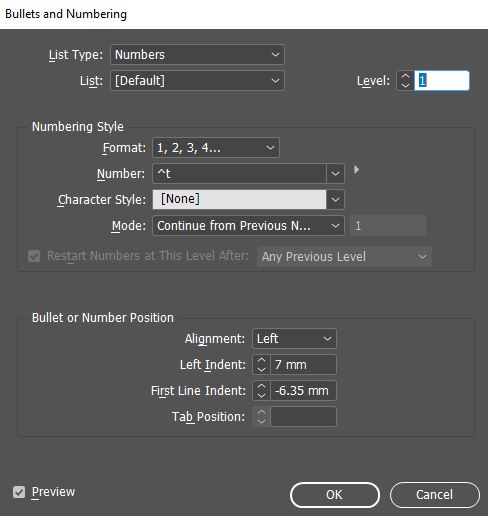
You're missing the number character in the Number: field. Screen Shot 2018-06-19 at 10.03.42 AM.png

Translate
Community Expert ,
Jun 19, 2018 Jun 19, 2018

Screen shots with before, after and the Bullets and Numbering dialog box would help here.

~Barb

Translate
Report
Community guidelines
Be kind and respectful, give credit to the original source of content, and search for duplicates before posting. Learn more
community guidelines
New Here ,
Jun 19, 2018 Jun 19, 2018

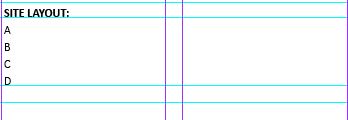
Text with bullets:

Capture.JPG

Text after apply numbers:

Capture1.JPG

Settings dialog box:

Capture2.JPG

Translate
Report
Community guidelines
Be kind and respectful, give credit to the original source of content, and search for duplicates before posting. Learn more
community guidelines
Engaged ,
Jun 19, 2018 Jun 19, 2018

Did your bullets use a character style that called for a different font?

Translate
Report
Community guidelines
Be kind and respectful, give credit to the original source of content, and search for duplicates before posting. Learn more
community guidelines
New Here ,
Jun 19, 2018 Jun 19, 2018

I hadn't edited the character style from default. Is not happening with other files, however when the text is copied to a new document, same problem.

Translate
Report
Community guidelines
Be kind and respectful, give credit to the original source of content, and search for duplicates before posting. Learn more
community guidelines
Engaged ,
Jun 19, 2018 Jun 19, 2018
LATEST

You're missing the number character in the Number: field. Screen Shot 2018-06-19 at 10.03.42 AM.png

Translate
Report
Community guidelines
Be kind and respectful, give credit to the original source of content, and search for duplicates before posting. Learn more
community guidelines