


Copy link to clipboard
Copied
I have seen many post about setting tabs... however its the default tab I need to adjust.


 1 Correct answer


Hi,
Please change the value of X field with NOTHING selected. Even the cursor should not be any frame. If you do this, the newly set values will apply to all new tab presses in any frame of that document.
In case you set this value with no document open, the newly set values will apply to all new tab presses in any frame of a any new document.
If the cursor is in any text frame, the newly set values will apply to all new tab presses in that frame.
-Aman

 9
Replies
9
9
Replies
9

Copy link to clipboard
Copied
Copy link to clipboard
Copied
Yes I seen that.. that is for paragraphs correct?
I want to change the space when I hit the TAB KEY...
Copy link to clipboard
Copied
Hi,
Please set the X value in the tabs panel.
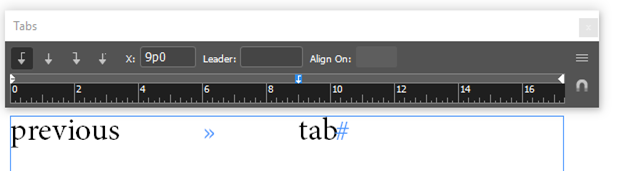
As and when you click the tab in the text frame, the new space will be set.

If you change the X value, all new tabs will have the space as defined in the X value.
-Aman
Copy link to clipboard
Copied
I did that, but when I hit the tab key on a separate page it goes back to what I don't want it to be. So I have to do this to every new text field?
Copy link to clipboard
Copied
Hi,
Please change the value of X field with NOTHING selected. Even the cursor should not be any frame. If you do this, the newly set values will apply to all new tab presses in any frame of that document.
In case you set this value with no document open, the newly set values will apply to all new tab presses in any frame of a any new document.
If the cursor is in any text frame, the newly set values will apply to all new tab presses in that frame.
-Aman
Copy link to clipboard
Copied
I am sorry.. I am just not getting this...
Thanks anyway.
Copy link to clipboard
Copied
Hi,
Does this help..

-Aman


Copy link to clipboard
Copied
The default tab value in InDesign is every .5 in. There's no way to adjust this per se. As others have pointed out though, with nothing selected, you can specify a tab value that will become the default tab stop when you type the tab key one time. If you need more than one, then you'll have to set multiple tab stops as described above. I should say that my number one rule for working with tabs is never type more than one tab character in a row. 😉

Copy link to clipboard
Copied
Adding to what Chad said about the default tab, which you can set for the document or for all new documents, the best practice is to create and use Styles. Create a paragraph styles, set the tab, and appply the style to appropriate text. When you edit the style, everything will update.
For tabs to work, confirm that you have pressed the tab key once between "columns". No multiple tabs and no spaces. Turn on hidden characters to check.


Get ready! An upgraded Adobe Community experience is coming in January.
Learn more
 AdChoices