Hi,
I have problems with moving my pages to another spread by using javaScript.
What I have:
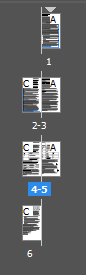
What I want:

At this moment im coding it page after page for debugging. Later i'll put that into loop of course. My code is something like that:
app.documents.pages[0].move(LocationOptions.AT_BEGINNING, app.documents.pages[0], BindingOptions.LEFT_ALIGN);
app.documents.pages[1].move(LocationOptions.AFTER, app.documents.pages[0], BindingOptions.RIGHT_ALIGN);
app.documents.pages[2].move(LocationOptions.AFTER, app.documents.pages[1], BindingOptions.LEFT_ALIGN);
app.documents.pages[3].move(LocationOptions.AFTER, app.documents.pages[2], BindingOptions.RIGHT_ALIGN);
but it puts all the pages in one spread.
Please, any hints how to solve this?
Thanks
[Question moved to the InDesign Scripting forum. -Mod.]




 2
Replies
2
Replies


 AdChoices