Exit
  • Global community
    • Language:
      • Deutsch
      • English
      • Español
      • Français
      • Português
  • 日本語コミュニティ
  • 한국 커뮤니티
0

Text Frame Rotation

New Here ,
Aug 20, 2018 Aug 20, 2018

Hello,

I am trying to script a textframe location to move based on the size of the art file. Currently I move the textframe by its Geometric Bounds using the following script :

                case '10':

            myPage=app.activeDocument.pages.item(i).select();    

            myPageItems=app.documents.item(0).pages.item(i);

             //Adjust Text Location

            myTextFrame=myPageItems.textFrames.item("txtSUB_Slogan_Right");

            myTextFrame.geometricBoundseBounds = ["142.5", "588", "225", "596"];

               Break;

However when this occurs it moves the Text Frame box to the correct location but the angle of the text does not follow the Frame. So you can see the text "JAMES LANCIOTTI" moves to two lines as the text is vertical 90 Degree while the Text Frame is at 86.25 Degrees.
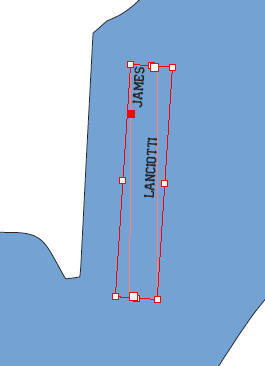
I would like to be able to control the text angle and placement. I think the solution might be to use a text Path but I am having trouble calling a text path by name like I did above. Any help on this would be much appreciated.

Thanks.

WPL

TOPICS
Scripting
1.5K
Translate
Report
Community guidelines
Be kind and respectful, give credit to the original source of content, and search for duplicates before posting. Learn more
community guidelines
Community Expert ,
Aug 20, 2018 Aug 20, 2018

Hi WPL,

see into the properties for text frame:

https://www.indesignjs.de/extendscriptAPI/indesign-latest/#TextFrame.html

You'll find e.g. rotationAngle.

For moving text frames around use method move().

Argument one is for moving to a point, array of x,y values.

Example:

textFrame.move( [ 5,10 ] );

Argument two is moving by values, also array of x/y values.

Example:

textFrame.move( undefined , [ 5,10 ] );

Regards,
Uwe

Translate
Report
Community guidelines
Be kind and respectful, give credit to the original source of content, and search for duplicates before posting. Learn more
community guidelines
New Here ,
Aug 22, 2018 Aug 22, 2018

Uwe,

Thanks the move function worked and did not distort the text angle so I do not need to further change the angle. However this leads me to another followup question.

  • I originally tried the textFrame.rotationAngle ( 93.75);   but I had an error. Is the errror the value I put in? Is it Deg or Radians? Or was it my format?
  • When using the textFrame.move( [ 5,10 ] ); where is the reference point on the frame that it is moving. Can I change it?

Thanks again for all the help!

WPL

Translate
Report
Community guidelines
Be kind and respectful, give credit to the original source of content, and search for duplicates before posting. Learn more
community guidelines
Community Expert ,
Aug 22, 2018 Aug 22, 2018
LATEST

Hi WPL,

rotationAngle is no method.
Just assign the value in degree.

Adobe InDesign CS6 (8.0) Object Model JS: TextFrame

Regards,
Uwe

Translate
Report
Community guidelines
Be kind and respectful, give credit to the original source of content, and search for duplicates before posting. Learn more
community guidelines
